Two years ago, an acquaintance proudly showed me his new NAS: 4 NVMe drives in a RAID-Z1, 4 terabytes, everything on the fastest drives the market has to offer. I asked what was on it. Answer: "Photos, movies, the family backups, and occasionally a VM." I didn't laugh — I did the math. Four NVMes for data that is 95 percent written once and never read again. That's like buying a Formula 1 car for the weekly grocery run.
Storage tiering means: store data where it belongs. Hot data — databases, VMs, active projects — on NVMe. Warm data — media library, Docker volumes — on SSD. Cold data — backups, archives, unused files — on HDD or in the cloud. This article shows the tier pyramid with real numbers, how to classify your workloads, and the ZFS pool architecture I've been running since the migration.
Why tiering? The bare numbers
The decision comes down to two metrics: IOPS and cost per gigabyte. If you don't have a feel for the difference, read the IOPS article first — there I explained why spec-sheet IOPS and real-world IOPS are far apart. Here's the short version in numbers, as I measured them on my server:
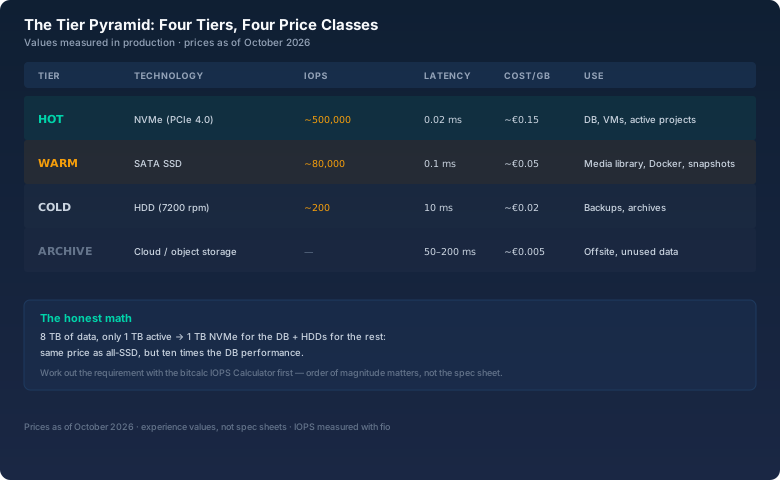
The orders of magnitude are what matters: an NVMe delivers 2,500 times the IOPS of an HDD but costs seven to eight times as much per gigabyte. A database needing 5,000 IOPS is hopelessly overwhelmed on an HDD (which manages 200) and trivial on an NVMe. A media library read sequentially is perfectly fine on an HDD — 200 MB/s covers Full-HD movies several times over. If you put everything on NVMe, you pay for performance that 99 percent of your data never calls upon.
The three temperature zones
The simplest way to think about it is the temperature metaphor:
- HOT (NVMe): Everything that must be there instantly on every access. Databases, VM disks, container volumes with active services, running projects. Access pattern: random, many small IOs. This data is typically small — 5 to 20 percent of your total.
- WARM (SATA SSD): Everything needed regularly but not every second. Media library, Docker registry, snapshots, home directories. Access pattern: mixed, medium block sizes. Usually 20 to 40 percent.
- COLD (HDD): Everything written and rarely read. Backups, archives, old projects, original photo archives. Access pattern: sequential, large blocks. Often half your data or more.
The boundaries are fluid, and that's a good thing: tiering isn't a science, it's a conscious decision about how much money you want to spend for how much performance.
The honest math: all-SSD vs. tiering
Take a typical home server: 8 terabytes of data, 1 terabyte active (database, two VMs, running containers) and 7 terabytes cold (backups, photos, archives). Two scenarios:
Scenario A — everything on SATA SSD:
2 × 4 TB SATA SSD  ≈ €440
IOPS for the DB:   ~80,000 (more than enough)
Result:            convenient, but expensive per TB

Scenario B — tiering:
1 × 1 TB NVMe      ≈ €110   (DB + VMs, hot)
2 × 4 TB HDD       ≈ €240   (archive, cold)
IOPS for the DB:   ~500,000 (ten times more than A)
Result:            cheaper AND faster for the hot data
That's not a sleight of hand, it's the logic of the tier pyramid: the NVMe costs less than a 4-TB SSD because it's smaller. The HDDs cost less per terabyte. Together they cover both worlds — and the database, the only part that truly needs performance, gets more than in the all-SSD scenario. That's exactly the math I did before rebuilding my NAS. Before, the database ran on two HDDs and every query felt like an eternity. After, it sat on a 1-TB NVMe — and the migration showed me the difference between 5,000 and 500,000 IOPS directly.
If you want to know how many IOPS a workload really needs, use the bitcalc IOPS Calculator: enter the load profile (IOPS, block size, read/write ratio), and you'll see whether an HDD, SSD, or NVMe is enough. That has saved me from the "buy an SSD" vs. "keep everything as is" decision more than once.
The ZFS architecture: three pools instead of one
My server runs ZFS — the basics are in the ZFS article. For tiering I use three separate pools, because ZFS pools shouldn't mix different drives (the pool is only as fast as its slowest vdev):
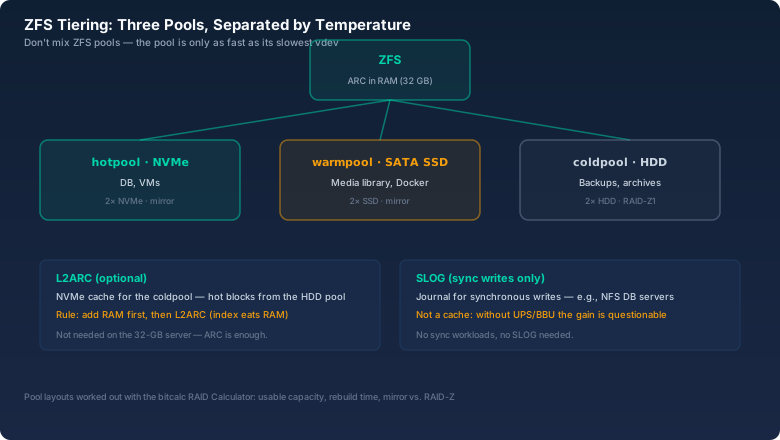
The distribution on my machine looks like this:
- hotpool (NVMe): Database, VM disks, container volumes. Two NVMes in a mirror — the data is small enough that mirroring stays affordable. ZFS's ARC (the RAM cache) additionally catches the hot blocks.
- warmpool (SATA SSD): Media library, Docker, snapshots. Two SSDs in a mirror, more than enough for 5 to 10 percent of accesses.
- coldpool (HDD): Backups, photos, archives. Two HDDs in RAID-Z1 — capacity matters, redundancy against a single failure is enough.
I worked out the pool layouts with the bitcalc RAID Calculator: usable capacity, rebuild time, and whether mirror or RAID-Z is the right choice for the drive count. Especially with large HDDs, the math is worth doing before you build a pool that can't grow later.
L2ARC and SLOG: the two amplifiers with a warning
Two ZFS features are often overrated — here's the honest assessment:
L2ARC is a cache on fast storage (e.g., an NVMe) that pretends the cold pool has hot blocks. Sounds tempting, but there's a hard rule: add RAM first, then L2ARC. L2ARC needs RAM for its index structures — roughly 1/8 to 1/10 of the cache size — and eats into the ARC if you don't have enough RAM. On my server with 32 GB of RAM, the ARC is sufficient for the cold pool; I skipped L2ARC. If you have an old server with 8 GB of RAM and are thinking about L2ARC: upgrade to 16 or 32 GB first, that brings more.
SLOG accelerates synchronous writes (e.g., NFS databases, VM sync writes) through a small, very fast drive with power-loss protection. Important: SLOG is not a cache, it's a journal — it only helps with sync writes, and without a UPS or BBU the gain is questionable, because the drive could lie during a power outage. If you don't have NFS sync workloads, you don't need a SLOG. I don't have one.
The migration: moving hot, warm, and cold
The move itself is unspectacular if you do it in stages. My procedure:
- Inventory: Which data is really active? I evaluated the access times of the last 90 days — the surprise: 70 percent of files weren't touched once in three months.
- Stage 1 — hot: Database stop, dump, onto the hotpool, start. The DB was back after 20 minutes of downtime — and went from one second to the next ten times faster.
- Stage 2 — warm: Docker volumes and media library onto the warmpool, via rsync with
--remove-source-files. No downtime needed, the services kept running. - Stage 3 — cold: Old projects and backups onto the coldpool. That's the biggest pile, but also the least critical one.
- Verification: After every rsync I compared the data with SHA-256 — the bitcalc Hash Generator provides the hash, and comparing source and destination exposed two transfer errors that rsync itself had swallowed.
Verification is the step almost everyone skips — and exactly the one that turns a migration from "seems to work" into "proven correct". At 8 terabytes the hashing takes its time, but the certainty is worth it.
What the change achieved
The numbers after three months of operation: database queries that used to take 200 to 800 milliseconds now take 5 to 40. VM starts went from 90 seconds down to 15. The media library runs as smoothly as before — the HDDs were never the problem. And the best part: total costs were lower than the all-SSD scenario I had planned. I even have an NVMe I could have sold as a SLOG — but didn't need.
The acquaintance with the 4-NVMe NAS has rebuilt by now, by the way. Two NVMes are out, two HDDs are in, and the remaining NVMes host the VMs. He didn't tell me I was right. The numbers did.
Bottom line
Storage tiering isn't enterprise complexity, it's plain economics: hot data on fast, expensive drives, cold data on slow, cheap drives. The tier pyramid with NVMe, SSD, and HDD covers 95 percent of home servers, ZFS makes the separation clean with three pools, and the math with the bitcalc IOPS Calculator prevents you from buying performance for 99 percent of your data that you never call upon. Next time you're about to put "more SSD" in the cart: ask yourself first how hot your data really is.