
Six months ago I moved two of my servers to ZFS. Not a lab setup, everyday use: a media server with six 8 TB drives in RAIDZ2 and a backup server with four 4 TB drives as two mirrors. There is also a third server, a small web host with a single NVMe, where ext4 stays on purpose. What happened in those six months changed how I think about file systems. Not in the direction I expected.
The moment that sold me was a simple mistake. A colleague was cleaning up a shared folder and deleted the wrong subfolder. Two years of project work, gone. On the old ext4 server this would have meant a two hour restore from a backup image, plus questions about which version was even still around. On the ZFS server it took four minutes. Four minutes between the phone call and the folder being back, including every intermediate state from that same morning.
The Story: Four Minutes Instead of Two Hours
The magic word is snapshot. ZFS takes point-in-time copies of a file system while it keeps running, with no noticeable performance hit. Since day one, a cron job on my servers creates a snapshot every morning at six. When the call came in, the diagnosis was one line long:
zfs list -t snapshot tank/dataThe output lists every snapshot with a timestamp. The one from this morning was still there, the folder was only deleted around noon. I had two options. The careful one: mount the snapshot through the hidden .zfs directory and copy just the deleted folder back.
ls /tank/data/.zfs/snapshot/2026-09-17-0600/The fast one: since nothing had changed in that file system since the snapshot, a rollback.
sudo zfs rollback tank/data@2026-09-17-0600Four minutes later the folder was back, as of this morning. No image restore, no downtime, no debate about which backup version is the right one. That difference is why I would not run a machine with important data without snapshots anymore.
Checksums: The Silent Death of Data
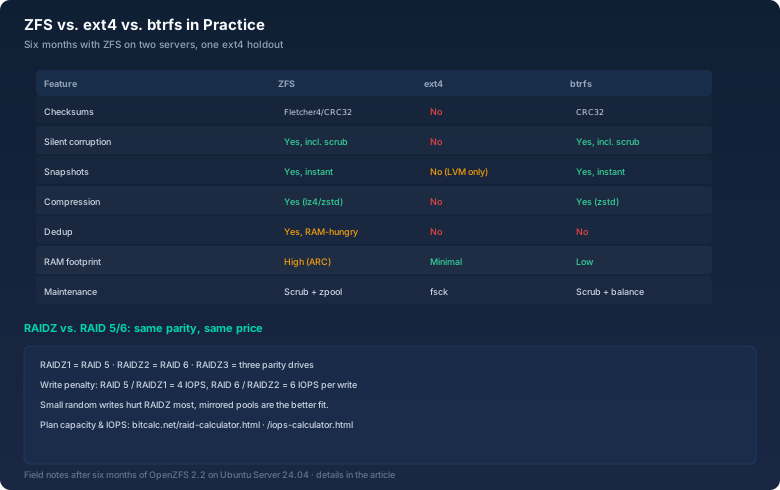
ext4 trusts the drive. What was written once is not checked when it is read again. That sounds harmless until a drive starts quietly corrupting data. We call it bit rot: single blocks flip without anyone noticing. SMART reports nothing, the controller reports nothing, and the file system just hands out the broken data.
ZFS stores a checksum for every block and verifies it on read. If it does not match, the block gets rebuilt from another copy if one exists, or it is reported as an error. I realized how much that matters during my first full scrub of the 24 TB pool:
sudo zpool scrub tankThe scrub ran for nine hours across six drives. Result: zero errors. A month later, the next scrub reported exactly one checksum error on a drive that SMART called healthy. Without ZFS I would never have seen it. Eventually the one file whose only copy lived on that sector would have become unreadable, and nobody would have known why.
Snapshots: Time Travel for Admins
Snapshots are the biggest practical win of ZFS for me. They are nearly free: a snapshot only takes space for the blocks that change afterwards. Creating one takes fractions of a second, no matter how big the pool is. That makes a snapshot culture possible that classic backups cannot afford.
To keep an eye on datasets and space usage, zfs list is the tool:
zfs listIt shows size, used and referenced space for every dataset. Add -t snapshot and you get the list of all snapshots.
sudo zfs snapshot -r tank@auto-$(date +%F)The -r flag covers every dataset in the pool. Plus a weekly snapshot kept for four weeks. That is enough to rewind any night without touching a config file.
One rule belongs here: snapshots are not a backup. They protect against accidental deletion, broken updates, and ransomware that encrypts files. But they live on the same hardware as the data. If the server burns down, both are gone. That is exactly what send and receive are for.
Backup with send/receive
zfs send and zfs receive stream snapshots across the wire. The nice part: only the differences between two snapshots are transferred, not everything every time. My backup server pulls the newest snapshot of the media server every morning:
zfs send tank/data@2026-09-17-0600 | zfs receive backup/tankThe first transfer was a full 12 TB stream overnight. Since then it has been a few hundred megabytes a day. The backup is always exactly at the state of the last snapshot. And because the target also runs ZFS, I get the same checksums and snapshots there, including the option to pause the stream and resume it later.
ARC: The RAM Tax
The price for all of this is memory. ZFS keeps a large chunk of RAM as a cache, the ARC (Adaptive Replacement Cache). By default it grows until it uses half of the physical memory. On my media server with 32 GB of RAM, that is up to 16 GB. This is not a bug, it is by design: free RAM is wasted RAM.
On the small web host with 8 GB of RAM and a single NVMe, exactly this would be a problem. ZFS would permanently reserve several gigabytes for a cache a fast NVMe barely needs, while PHP and the database fight for the same memory. You can cap the ARC with the zfs_arc_max kernel parameter. But then you are manually managing what ZFS is supposed to do on its own.
Then there is dedup. Deduplication sounds tempting, but every block costs an entry in RAM. On a pool with a few terabytes you quickly talk about ten or more gigabytes of memory just for the dedup table. I run dedup on none of my servers. Compression is the better deal: lz4 or zstd costs almost nothing and regularly saves 30 to 50 percent on logs and text files.
Where ext4 Still Wins
Now for the counterpoint. My third server stays on ext4 on purpose. A small VPS with a 1 TB NVMe, 8 GB of RAM, and a single job: web hosting with a few Docker containers. No RAID, no huge files, no data that does not exist somewhere else.
ext4 wins there for three reasons. First: zero maintenance. In ten years I have never had to touch an ext4 server because of the file system. No scrub, no pool import after a kernel update, no thinking about ashift or record size. Second: RAM. ZFS would permanently claim several gigabytes that I would rather give to the containers. Third: predictability. When the single drive dies, the difference between ext4 and ZFS without redundancy is small. Both lose the data. ZFS without a mirror or RAIDZ is basically ext4 with checksums that eats more RAM.
That is the honest math: ZFS pays off past a certain amount of data, with redundancy, with many small files, with a fear of silent data loss. For a single drive with manageable data, ext4 is simply the more pragmatic tool. File systems are tools, not religions.
RAIDZ vs. RAID 5/6: The Price of Parity
If you build a RAID with ZFS, you should know how it compares to classic RAID. RAIDZ1 equals RAID 5 in terms of parity, RAIDZ2 equals RAID 6, RAIDZ3 has no classic equivalent. Usable capacity is the same: with RAIDZ2 on six drives, two drives go to parity, exactly like RAID 6.
What many people underestimate is the write penalty. One write costs four IOs on RAID 5 (two reads, two writes), six on RAID 6. RAIDZ is not better, quite the opposite: ZFS prefers to write full stripe sets, and small random writes, the kind databases produce, are the most expensive case on RAIDZ pools. If you have lots of random writes, a mirrored pool or RAID 10 serves you better.
That is exactly what the calculators on bitcalc.net are for. The IOPS calculator shows what a RAID level costs in write operations. The RAID calculator computes usable capacity for RAID 5, RAID 6, RAIDZ and mirrors before you order drives.
Bottom Line
After six months of ZFS, my conclusion is clear. For servers with multiple drives, with data nobody wants to lose, and with an appetite for snapshots, there is currently no good reason to stick with ext4. The four minutes for the deleted folder convinced me more than any benchmark. But the small VPS stays on ext4, and that is no shame. The right file system is the one that fits the job. Not the one with the longer feature list.