
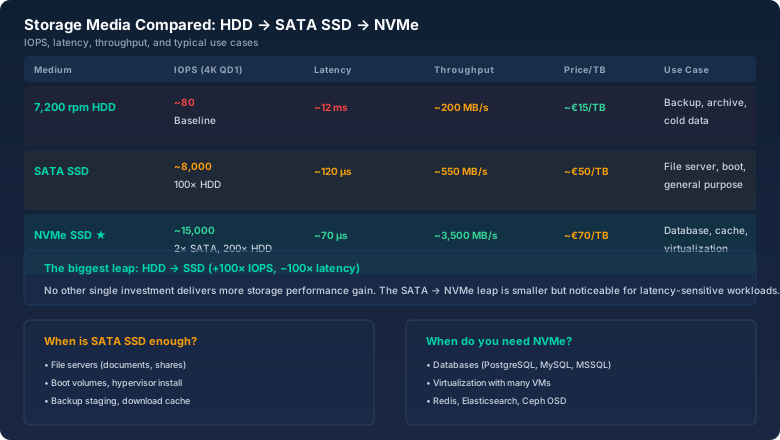
"This SSD does 100,000 IOPS." That's what the spec sheet says. What it doesn't say: those 100,000 IOPS are at 4K random read, Queue Depth 32, on an empty drive. Your database runs at 70% writes, Queue Depth 4, on a drive that's 80% full. Congratulations, your 100,000 just became 15,000.
Storage performance is a topic where spec sheets lie more than election posters. This article explains what IOPS, throughput, and latency actually mean — and how to get realistic numbers with the bitcalc IOPS Calculator.
Throughput: How many MB/s move. Matters for video, backups, large file transfers.
Latency: How long a single I/O takes (ms or µs). Matters for anything where wait time hurts.
Throughput = IOPS × Block Size. 10,000 IOPS at 4K = 40 MB/s. 10,000 IOPS at 64K = 640 MB/s. Same IOPS, completely different throughput. IOPS_max ≈ 1 / Latency. A drive with 10 ms latency tops out around 100 IOPS.

Queue Depth: the invisible factor
QD is how many simultaneous I/O requests the storage system handles. Desktop: QD 1-2. Busy database: QD 8-32. Benchmark marketing: QD 128. SSDs deliver peak IOPS only at high QD. Your database never sees QD32 in practice. For DB performance, care about QD1-4. Everything above QD64 is benchmark porn.
4K vs. 64K: block size changes everything
Databases use ~8K blocks. Virtualization: 4K-64K. Video: 1M+. With the IOPS Calculator: six SATA SSDs in RAID 10 at 90K IOPS each → ~540K read IOPS = 2.1 GB/s at 4K, theoretically 34 GB/s at 64K (controller-limited). Block size determines whether you're IOPS-bound or throughput-bound.
The RAID write penalty
RAID 5: 4× penalty (read-modify-write cycle). RAID 6: 6×. RAID 10: 2×. The IOPS Calculator shows this live: 900 read IOPS in RAID 5 → 225 write IOPS. In RAID 10 → 450 write IOPS. That's why RAID 10 is standard for write-heavy workloads.
Practical tips
- Find your real QD.
iostat -x 1on Linux. That's the number you design for — not QD32 from marketing. - Think in IOPS, not MB/s, for small-block workloads.
- Plan headroom. If your workload needs 5,000 IOPS, size for 8,000. SSDs slow down as they fill up.