
The first erasure request arrived on a Thursday lunchtime as an email with the subject "Please delete all my data". I was sitting in front of a system I didn't fully understand — a web database, logs with IP addresses, an analytics system, an email archive, and somewhere in a backup folder from three years ago there were still old exports. Three hours later I had a rough idea of where the requester's data lived. Manually, the erasure would have taken days. Today, with a five-step pipeline of scripts, I handle such a request in under 30 minutes — without panic.
This article shows the technical side of GDPR data subject rights (Articles 15 to 21) as it looks in day-to-day admin life: which data you have to find, what the machine-readable export looks like, how erasure and anonymization work concretely, and how to keep track of the deadline. This isn't legal advice — it's the mechanics underneath.
The rights at a glance: Articles 15 to 21
Before you automate, you need to know what you're automating. The seven data subject rights of the GDPR in the order they appear in practice:
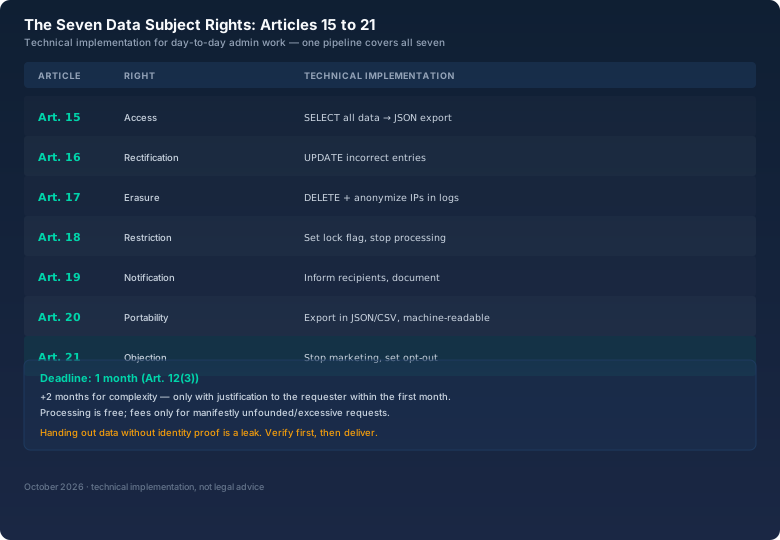
Two rights dominate practice: Article 15 (access) and Article 17 (erasure). Both come down to the same question: where does this person's data live at all? If you can't answer that question quickly, you have a problem — because the deadline starts running from the moment the request arrives, not from the moment you finally understand your data inventory.
The deadlines: one month, no excuses
The GDPR sets a deadline of one month from receipt of the request (Article 12(3)). In case of complexity or a high volume of requests, you may extend by two more months — but only with a justification given to the requester within the first month. And: processing is free of charge. Fees are only permitted for manifestly unfounded or excessive requests (Article 12(5)) — and even then you must justify the decision.
Practically that means: the clock starts with the email, not with your first coffee. Simple deadline tracking in a spreadsheet — received on, deadline on, status — prevents the most expensive error of all: letting the deadline silently pass. For a mid-sized website that's a few lines per month; for a larger operation it belongs in a ticket system with automatic reminders.
The data you have to find: the inventory
The hardest part isn't erasing, it's finding. Personal data typically lives in these places:
- Database: user table, orders, comments, tickets. Everything linked via an email address or user ID.
- Logs: every request to your web server contains the visitor's IP address — that's personal data. Access logs, error logs, auth logs.
- Analytics: Matomo or similar tools store visits, devices, origins — often without a clear user ID, but still attributable to a person.
- Email and tickets: the classic everyone forgets. A support conversation from two years ago contains names, addresses, sometimes passwords (which must then be rotated immediately).
- Backups: the dreaded corner. Data in backups isn't "gone" just because you deleted it in the live DB.
- Third-party services: newsletter services, payment providers, CRM — anything you run externally must be handled separately.
Once you've built the inventory — essentially a list of all systems and their data sources — you can process every request in the same order. Without an inventory, every request starts from zero. That's why the inventory is the real return on investment of automation.
The pipeline: five steps, under 30 minutes
My processing follows five steps that I built once as scripts and templates and now simply execute:
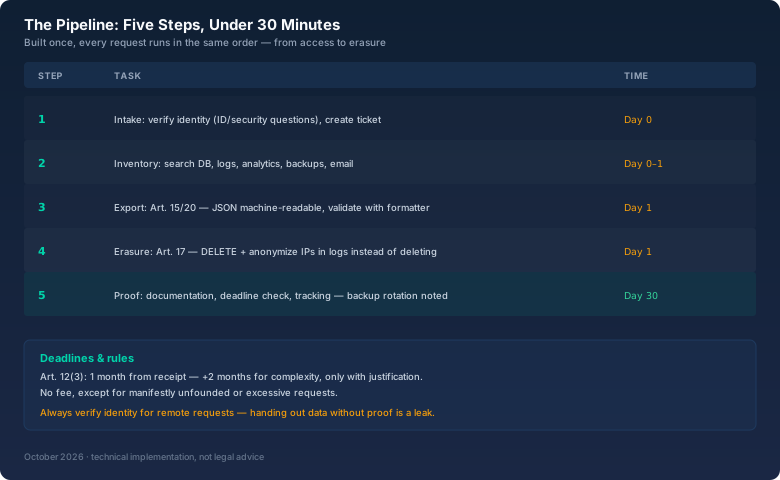
Step 1 — intake and identity. Before anything happens: who is making the request? With remote communication (email), you can't see the requester — and you must not hand data to just anyone who names an email address. In case of justified doubt, you ask back, even though the deadline is running. We have a standard response for that: "Please confirm with a copy of your ID (redacted) or answer the security questions." That's not bureaucracy, it's protection against data theft via social engineering.
Step 2 — search the inventory. A script collects all locations: DB queries by email address, grep over the logs, analytics search. The output is a list of "where something was found" — the basis for export and erasure.
# Inventory: all hits for an email address
mysql -e "SELECT id, email, created_at FROM users WHERE email='x@example.com'"
grep -l "x@example.com" /var/log/nginx/*.log
grep -l "x@example.com" /srv/backups/*.sql.gz 2>/dev/null
Step 3 — export (Articles 15/20). For the access request, you compile all data as a structured file. I export as JSON — machine-readable, as Article 20 requires for data portability — and validate the file with the bitcalc JSON Formatter: format, validate, tree view. That way I see at a glance whether the export is complete and syntactically clean before it makes its way to the requester. The export isn't sent by email, but provided via a password-protected portal with an expiry date.
Step 4 — erasure and anonymization (Article 17). Now comes deletion — but not blindly:
# Delete user data
mysql -e "DELETE FROM orders WHERE user_id=(SELECT id FROM users WHERE email='x@example.com')"
mysql -e "DELETE FROM users WHERE email='x@example.com'"

# Logs: anonymize IPs instead of deleting (retention obligations!)
mysql -e "UPDATE access_log SET ip='0.0.0.0' WHERE email='x@example.com'"
The important difference: in logs you don't delete, you anonymize — the IP is replaced with a neutral address so log statistics don't break and statutory retention periods aren't violated. I described that principle for web server IP anonymization in the privacy article; here it applies to existing logs too. For pseudonymization instead of anonymization (when you still need mappings later), a hash with salt works — the bitcalc Hash Generator shows the principle.
Step 5 — proof and deadline. At the end you document what you deleted when, and enter the request into tracking. That sounds bureaucratic, but it's your protection: if a supervisory authority asks, you prove the processing — and if the requester later claims they never got anything, you have the evidence. For handing over the export via the portal, you generate a one-time strong password with the bitcalc Password Generator — 20 characters is enough for an expiring portal, all classes, and after the expiry the access is dead.
Backups: the honest answer
The question everyone asks: "What about the backups?" The honest answer: data in backups is part of your processing inventory, but immediate erasure in all historical backups is hardly feasible cleanly — you'd have to rebuild every snapshot. Common practice: you document that the data remains in old backups until the next regular backup rotation and disappears automatically afterwards, and that restores from old backups respect the erasure (the deletion list is applied on restore). That documentation is the difference between "forgotten" and "deliberate and justified". If you run versioned backups (as described in the Restic article), you can control retention per snapshot — one more reason to treat backups as more than an opaque blob.
What the automation achieved
The first request cost me three hours plus two days of brooding. The last one I processed took 26 minutes: verify intake, run the inventory script (11 seconds), build and validate the export (4 minutes), DELETE + anonymization (30 seconds), proof and tracking (5 minutes). The one-month deadline was never in danger — and the most reassuring part: the pipeline is now the same for access, erasure, and objection, only with different script lines in the middle.
The client with the opaque system from back then now has a data inventory, by the way — a single Markdown file with all systems, data sources, and their erasure scripts. It lives in the project's Git repo, and every new data source is added there before going live. That's the real cultural shift: GDPR not as an event, but as an operational state.
Bottom line
Data subject rights aren't paperwork, they're a database problem. Once you've built the data inventory, you answer access and erasure requests with scripts in under 30 minutes instead of days. The five steps — verify identity, search inventory, build JSON export, delete and anonymize, prove — cover all seven rights. And if you validate the JSON export with the bitcalc JSON Formatter and secure the handover with a fresh Password Generator password, you've eliminated the two most common failure points (broken exports and open handovers) at the same time. The one-month deadline then stops being a race against the clock — it's a day on the calendar by which everything is long done.