
Saturday, 6:42 AM, monitoring email: "Backup failed." I open the dashboard, see the red line, restart the job, and forget about it until the next email arrives. That is how it worked for years. The backup ran, the counter said OK, and somewhere in an S3 bucket sat a copy of my server. Whether I could ever get it back onto a machine was something I did not know. Until the Sunday I actually tried.
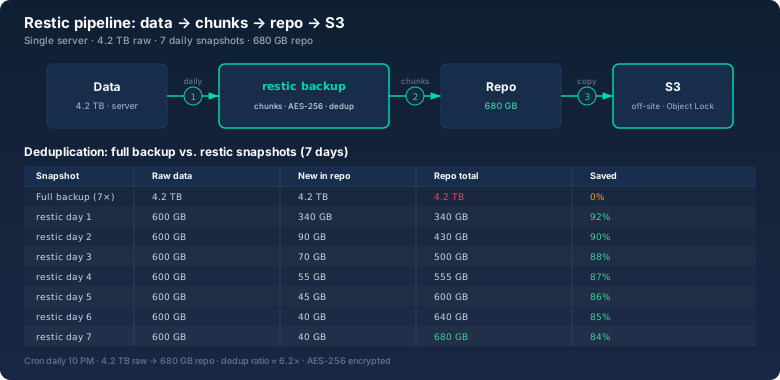
The result was sobering and reassuring at the same time: the whole restore test took 38 minutes. 4.2 TB of raw data as seven daily snapshots, deduplicated into a 680 GB repo, encrypted in S3, back on a fresh server. No drama. This article covers the setup, the commands I actually use, and why every integrity check at my place runs through the Hash Generator.
The moment "the backup is somewhere" stopped being enough
A few years ago the system disk on one of my servers died. The kind of failure that announces itself with a click and then ends with a quiet clunk. I had an rsync script that ran at night and an external disk in the cupboard. Sounds like a plan. Until I stood in front of the first rsync after replacing the disk and realized: I did not know whether the copy was complete, whether it was current, or whether the script had ever run through without errors. No logs, no checksums, no repeatability. Just a copy, somewhere.
The data came back intact that time, which was luck, not a system. After that I set three rules that still hold: backups must be encrypted before they leave the building. Backups must be verifiable automatically. And at least once a quarter, a restore is rehearsed on a fresh machine with a stopwatch running. Restic covered all three without needing a second server or a backup product with its own management console.
The setup: one server, 4.2 TB, one S3 bucket
It is a single server, not a cluster. Two data directories, 4.2 TB of raw data combined: web server files, database dumps, user uploads. Plus an S3 bucket at a European provider with server-side encryption and Object Lock, so even a compromised admin account cannot silently delete snapshots.
The repo is created once, everything after that runs on its own:
export RESTIC_REPOSITORY=s3:s3.eu-central-1.amazonaws.com/my-bucket/restic
export RESTIC_PASSWORD_FILE=/etc/restic/passphrase
restic init
restic init creates the repo structure, generates the keys, and writes the config. Without the passphrase, the repo content is just noise. The password lives in a root-only file with 600 permissions and in a vault as a second copy, so I cannot lose it. A lost passphrase is a lost backup with restic, and nobody prints that warning on the box.
The daily run
A cron job at 10 PM, nothing more:
0 22 * * * restic backup /srv/data --exclude /srv/data/cache --tag dailyThe run reads the directories, splits everything into chunks, compares them with what is already in the repo, and uploads only what is new. After the run, housekeeping keeps the repo from growing forever:
restic forget --keep-daily 7 --keep-weekly 4 --pruneSeven daily snapshots stay, plus four weekly ones. Exactly the seven days I calculated in the infographic above. --prune removes chunks no snapshot references anymore, and I run it weekly, not every evening.
What restic actually does during a backup
The core is content-defined chunking followed by deduplication. Restic splits files into variable-sized blocks of about 8 MB, based on their content. The same content in another place or in another file produces the same chunk hash, and the same chunk is stored only once. A snapshot is essentially a tree of chunk references, not a copy of the data.
Every chunk is encrypted with AES-256 before upload. There are no filenames or directory names in the S3 bucket, only opaque packs. Anyone reading the bucket sees nothing usable, and anyone mounting the repo sees nothing without the passphrase.
The numbers from my setup after one week of operation:
- 4.2 TB of raw data across seven snapshots
- 680 GB repo size after deduplication and compression, a factor of about 6.2
- An average evening run takes a few minutes, depending on how much changed
I check what happened with one look:
restic snapshotsSeven lines, each with timestamp, hostname, paths, and tag. If a line is missing because a job was aborted, I see it immediately, and the monitoring email warned me before that anyway.
The restore test: 38 minutes to the first line
Sunday, 9 AM. Fresh machine, same hardware class, same partitioning. Goal: pull back the latest snapshot the way a real incident demands. No comfortable experimenting, just the question: how long until this server is productive again?
restic restore latest --target /srv/restore-testThen the stopwatch ran. 31 minutes alone for the restore: download from S3, decryption, unpacking chunks into the target directories. Then seven minutes of verification. I compared the file counts, checked the sizes, and sampled checksums:
find /srv/restore-test -type f | wc -l
sha256sum /srv/restore-test/dumps/mysql-2026-09-13.sql
38 minutes total until the first line came out of the restored database. For a single-server setup, that is the answer to the question every boss eventually asks: how long are we down? Answer: shorter than an average Monday morning.
I care about the difference between what this test proved and what it did not. The test proves the latest snapshot is fully readable and restorable. It does not prove the data is correct inside. That is what the checksums are for.
Why every check runs through the Hash Generator
This is where the tool that lives on this site anyway comes in: the Hash Generator. restic check verifies repo integrity, meaning chunks are intact and referenced. What it does not verify is whether a chunk's content matches what was exported from the database two weeks ago. A logical error in the export, a silent data problem in the source: the repo stays unaffected and still looks healthy.
That is why every backup of critical files passes two stations: before the backup, a SHA-256 sum is computed and stored in a manifest. After the restore test, the same file is hashed again and compared against the manifest. That is exactly what I use the Hash Generator on this site for: upload the file, read the hash, compare it with the manifest value. Two independent implementations must produce the same result before I call a recovery complete.
In daily practice this means: the database dumps that appear every morning follow a naming convention with the date. The manifest stores hash, filename, and size. During the restore test I compare a handful of these entries. If the hash matches, the snapshot is not just readable, it is also correct in content. That is the difference between "restored" and "restored and verified".
restic check: the weekly inventory
A backup that is never checked is an opinion, not a backup. My check runs weekly with a twist: --read-data-subset does not read everything at once, only a percentage of the data. Over ten weeks, every chunk has been fully read from the S3 bucket and verified at least once, without a single run blocking the line for hours.
restic check --read-data-subset 10%That covers integrity inside the repo. Once a quarter, together with the restore test, the full run happens: restic check --read-data. That really reads everything, 680 GB from S3, and takes accordingly long. After that I know the repo can be read from front to back. Combined with the hash comparison from the previous section, those are two independent checks: one at repo level, one at file level.
What an off-site restore really costs
The restore test above ran straight out of S3, and 31 minutes felt almost comfortable. The real case looks different: pulling 680 GB from an S3 bucket over a normal connection. At 100 Mbit/s that is more than 15 hours by the math, at 1 Gbit/s still more than an hour and a half. That is exactly what the Download Time Calculator on this site is for: enter size and connection, and you immediately see whether the Monday recovery takes one hour or two days.
That number changed how I plan retention. When a restore from S3 takes that long over the wire, an extra local snapshot pool is worth more than another month in the bucket. The local snapshot is the fast way back, the off-site copy is the clean way. Both must work, but only one has to be fast.
Bottom line
Since the first restore test I no longer call my backup "the backup is somewhere". It is a repo with a known size, a known password, a known check plan, and a known recovery time. 38 minutes. That is the difference between a backup you have and a backup you believe in.
The three rules that remain: encrypt before it leaves the building, check weekly, restore quarterly. Restic handles the first part, the calendar handles the rest.
0 3 * * 0 restic check --read-data-subset 10%