
In 2019, I sat in an open-plan office in Frankfurt configuring an OpenVPN connection for the same client for the third time in six months. The trick was TCP port 443, because the client's firewall only allowed HTTPS through. The config file went onto a USB stick I handed to their admin. Six months later he called: the connection was gone, and nobody knew why. Of course, the USB stick had long since found its way into a desk drawer. Today I'd solve that differently — and this article shows how.
The question I get most often isn't "which VPN is secure?" — all three are, when configured properly. The question is: "How much time does it cost me, and how much does it slow me down?" I run all three approaches in production: WireGuard on a Hetzner VPS and on the Raspberry Pi in my living room, OpenVPN only as legacy at two clients, Tailscale on twelve devices across family and homelab. The numbers in this article come from those setups, not from spec sheets.
Why a VPN at all? The three jobs that actually exist
Before we talk tools: a VPN solves three different problems, and your choice depends on which one you're solving.
Job 1 — Road warrior: You're in a hotel, on a train, or at a client site and need access to your server or homelab. A single client connecting to a fixed endpoint. This is the classic — what 80 percent of admins mean when they say "VPN".
Job 2 — Site-to-site: Two fixed locations should behave like one network. Office A (192.168.10.0/24) and office B (192.168.20.0/24) talk to each other over encrypted tunnels without anyone on the path reading along. What matters here is throughput and stability — and hardly anyone dials in from the road.
Job 3 — Device mesh: You have twelve devices — laptops, servers, NAS, Raspberry Pis — and you want every one of them to talk to every other, no matter where they happen to sit on the internet. That's the problem Tailscale solves most elegantly, because it negotiates the connections automatically.
Everything I write here refers to these three jobs. If you want a VPN as "disguise for browsing", you're in the wrong article — there are other solutions for that, and a self-hosted tunnel is the wrong tool anyway.
WireGuard: 4,000 lines that conquered the kernel
WireGuard has been part of the Linux kernel since 5.6 (March 2020). That's the most important sentence in this article, because it explains almost everything about WireGuard: there's no userspace daemon copying packets around, but a kernel module doing the crypto directly in the network stack. That's why throughput is so high and overhead so low.
The protocol is built on the Noise protocol framework and uses modern crypto throughout: Curve25519 for key exchange, ChaCha20-Poly1305 for encryption, BLAKE2s for hashing. The whole codebase is manageable — around 4,000 lines, audited repeatedly by security researchers. A typical OpenVPN setup drags in ten times that much code and dependencies.
The core idea is cryptokey routing: every peer gets a public key (Base64-encoded, 44 characters) and a list of allowed IP addresses (AllowedIPs). Anything destined for those IPs goes through the tunnel, encrypted — everything else doesn't. It's routing and firewall in one. The configuration is so small it fits entirely in one wg0.conf:
[Interface]
PrivateKey = /etc/wireguard/private.key
Address = 100.64.0.2/32
ListenPort = 51820

[Peer]
# Admin's laptop (PublicKey Base64)
PublicKey = HIe2zN8...P2k=
AllowedIPs = 100.64.0.3/32
The handshake takes exactly one round trip — three messages, done. I've measured connection setup in under 50 milliseconds. On my Hetzner VPS (2 vCPU, 1 Gbit/s uplink) I push 940 Mbit/s through the WireGuard tunnel. That's essentially the raw capacity of the line.
The flip side: WireGuard is minimalistic to the point of pain. There's no built-in NAT traversal — if your server sits behind a router that doesn't forward inbound UDP on port 51820, nobody connects. There's no automatic key management, no user management, no dynamic address assignment. If you manage 40 clients, you either write your own tooling or use a management layer like wg-easy or an Ansible playbook. And because the keys are Base64-encoded, you'll mistype them constantly — the bitcalc Base64 Encoder has saved me more than once when a copied key picked up stray line breaks from an editor.
My verdict on WireGuard: for Job 1 (road warrior) and Job 2 (site-to-site) with a manageable number of devices, it's the best choice that exists today. Manual, honest, fast. If you want more, take Tailscale — it's WireGuard at its core, just with a management layer around it.
OpenVPN: the workhorse nobody sets up fresh anymore
OpenVPN has been around since 2001, and it has two undisputed strengths: it's by far the most widely deployed — every firewall vendor, every VPN client, every enterprise doc speaks OpenVPN — and it can squeeze through almost any firewall because it runs over UDP 1194 or TCP 443. When a client says "our VPN is broken", nine times out of ten they mean OpenVPN. The USB stick from my intro story was one of those.
Architecturally, it's a userspace process doing TLS handshakes and encrypting packets through OpenSSL. That costs twice: TLS adds protocol overhead (certificate chains, handshake round trips), and the userspace daemon has to take every packet from the kernel, process it, and hand it back. On my VPS I measured a real 85 Mbit/s with OpenVPN — at full CPU load on one core. That's more than an order of magnitude less than WireGuard on the same box. Anyone claiming OpenVPN is "just as fast" either has a beefy CPU or very little traffic.
Then there's the config sprawl. An OpenVPN setup with certificates needs its own CA (easy-rsa), server and client certificates, a server.conf, and per client a separate .ovpn file with embedded certificates — and when the server changes, every client needs new files. In my time as a consultant I inherited OpenVPN setups where the CA lived on the laptop of a former employee. Guess what happened when that laptop died.
Where OpenVPN still earns its keep: when you must support many client types that haven't been updated in a decade, when you need TCP 443 as a last resort (some hotel firewalls block everything but HTTPS), or when a client runs an enterprise firewall with built-in OpenVPN interoperability. I wouldn't set it up fresh for any use case today. You can verify certificate fingerprints with the bitcalc Hash Generator — compare the SHA-256 of CA and server certificates before blindly accepting a new connection.
Tailscale: WireGuard with a front office
Tailscale is WireGuard with a management service on top. The client on your device is a WireGuard tunnel, but the coordination — who may talk to whom, which addresses get assigned, how peers find each other behind NAT — is handled by the Tailscale coordination server. You install the client, log in, and five minutes later your laptop talks to your NAS, your Pi, and your brother's server without you touching a single firewall rule.
The magic word is NAT traversal: Tailscale tries to establish direct connections between devices (via UDP hole punching). When that fails — aggressive corporate firewalls, carrier-grade NAT — its DERP relays kick in automatically: encrypted relay servers Tailscale runs worldwide. Traffic stays end-to-end encrypted; Tailscale can't read it, because the WireGuard session is negotiated directly between your devices. That's an important difference from classic "cloud VPNs": control (coordination) lives in the cloud, data doesn't.
With a direct connection I measured 920 Mbit/s — the same WireGuard box, the same VPS, just managed by Tailscale. Through a DERP relay, throughput drops to whatever that relay provides (100–200 Mbit/s for me, depending on location). For SSH, administration, and file access that's plenty.
Then come the things that drive you crazy when they're missing: MagicDNS (every device has a name like nas.tailnet.ts.net you don't have to memorize), ACLs (a policy file defining who can reach what), and SSO integration (Google, Microsoft, OIDC). The free tier covers 3 users and 100 devices — almost always enough for a homelab and a small company. And because devices find each other through the coordination server, access works from anywhere without opening a single port. No port on my router is open for VPN — a security win you shouldn't underestimate.
The price is a trust point that pure WireGuard doesn't have: your device list, your addresses, and your connection metadata run through Tailscale's coordination server. For most use cases that's a good deal. If you don't want that, run Headscale — an open-source reimplementation of the coordination server that you host yourself. You get Tailscale's convenience layer and keep all data under your control. Effort: one Docker container, a reverse proxy, 30 minutes.
The comparison table: numbers from my setup
All throughput values were measured with iperf3 through the same Hetzner VPS (2 vCPU, 1 Gbit/s); the client was a Lenovo laptop running Ubuntu. Handshake times come from wg show and OpenVPN logs. Your numbers will differ — but the order of magnitude holds.
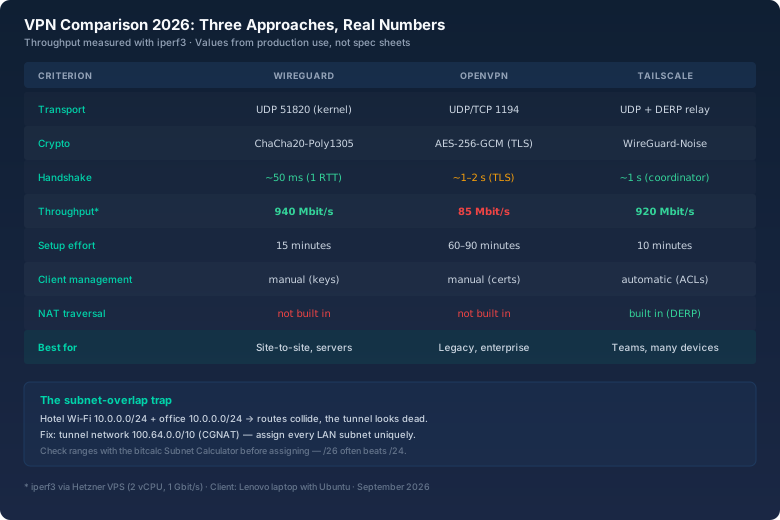
What the table doesn't show: OpenVPN is the only one of the three I haven't set up fresh in the last two years — I only migrated it. I've reinstalled WireGuard and Tailscale multiple times, and both times that was more pleasant than any OpenVPN intervention.
The subnet-overlap trap: why your tunnel suddenly reaches nothing
Now the story that should save you from one of the dumbest nights of your admin life. Two years ago I set up a WireGuard tunnel for a friend, from his laptop to his office NAS. Works great — at home. In the hotel: nothing. No ping, no SSH, nothing at all. The laptop showed a connection, but every attempt into the office network vanished into thin air.
The cause was as simple as it was nasty: the hotel Wi-Fi used 10.0.0.0/24 — exactly the same subnet as the office. The laptop now had two routes for the same IPs: the local Wi-Fi route (the hotel's default gateway) and the tunnel route. And since the local route won, every packet "to the office" went into the hotel's Wi-Fi. The classic subnet-overlap trap.
The fix has three parts:
- Pick your tunnel network from the CGNAT range:
100.64.0.0/10is reserved for exactly this purpose (RFC 6598) — no normal LAN uses it, so it practically never collides. The server gets100.64.0.1/32, the laptop100.64.0.2/32. - Assign LAN subnets deliberately: Instead of
10.0.0.0/24or192.168.0.0/24everywhere, give each site its own subnet from172.16.0.0/12or the 10-block: office A10.10.0.0/24, office B10.20.0.0/24, homelab10.30.0.0/24. Then no two sites can ever clash. - Do the math first: Before assigning a subnet, check with the bitcalc Subnet Calculator whether the range is really free and how large it needs to be. A /24 for 30 devices is wasted space — a /26 is enough, and you keep the rest of the /24 for later growth.
I've since moved my friend's office to 192.168.10.0/24 and the tunnel to 100.64.0.0/10. Access now works from every hotel, café, and train — regardless of the network behind them. The overlap trap is, by the way, the most common reason people think "the VPN is broken" when in truth only the routing table confuses two networks. ip route get 10.30.0.5 shows you in one second where a packet actually goes.
The topology: what a clean road-warrior setup looks like
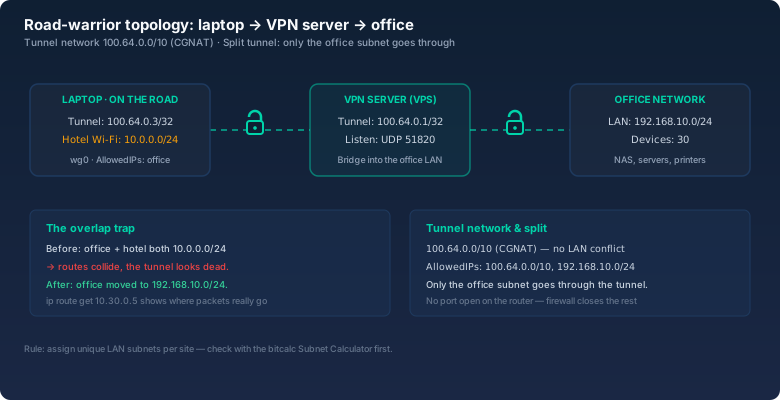
Three rules keep this setup maintainable:
- One tunnel network for everyone: Every device gets an address from
100.64.0.0/10. The server is the bridge; clients may only reach the LAN through the server — no direct peer connections you don't know about. - Keep AllowedIPs small: The laptop only gets the subnets it actually needs (
100.64.0.0/10, 192.168.10.0/24), not0.0.0.0/0. That's split tunneling — the internet goes direct, only the office goes through the tunnel. No Netflix-slows-down-when-office-is-down effect, and the office network is less exposed. - Firewall on the server: On the VPS, only UDP 51820 may arrive from outside. Everything else stays closed. If you need access to the office, you come through the tunnel — and only that way.
Which one when? My decision rules
After five years of running these three worlds, my rules have become pretty stable:
- One server, a few clients, you're the only admin: WireGuard. 15 minutes of effort, maximum control, no external dependency. The keys live in a file that's in your backup — the Base64 Encoder helps with clean copying, the Hash Generator with verifying fingerprints.
- Two sites that should behave like one network: Also WireGuard, site-to-site with one peer per site. Throughput matters, and WireGuard wins clearly there.
- Twelve devices, family, friends, changing networks: Tailscale. The 10 minutes of setup saved per device pay off from the third device on, and an ACL file is easier to maintain than 15 wg0.conf files. If you don't want cloud coordination, use Headscale.
- Enterprise requirements, old clients, "must talk to everything": OpenVPN — but only if you don't have to set it up fresh. Migrate what exists, build new things with WireGuard or Tailscale.
100.64.0.0/10 (CGNAT), LAN subnets unique per site from the 10-block or 172.16-block. The bitcalc Subnet Calculator shows network address, host range, and size in seconds — that rules out the overlap trap from the start.Bottom line
If I had to set up a VPN from scratch today, there would be exactly two candidates: WireGuard for everything I control myself, and Tailscale for everything with many devices and little maintenance. OpenVPN shaped my history, but not my future. The measurements speak for themselves: 940 Mbit/s versus 85 Mbit/s on the same box, handshake in milliseconds instead of seconds, config files in a handful of lines instead of certificate orgies. And the overlap trap from the hotel Wi-Fi hasn't come back since I moved to CGNAT.
The nicest side effect: since Tailscale runs on my devices, not a single port on my router is open for VPN. The USB stick with the OpenVPN config is still lying in some drawer. It's served its purpose — just like the era in which that was state of the art.