
The classic from my support days: a client calls, their website is "gone". I open my browser — the page loads. He opens his — error. I ask for details: "What exactly does it say?" Answer: "It can't find the page." Ten minutes later we have it: his router had a dead resolver configured as DNS server that hadn't answered a single query in two months. The website was never gone. His DNS was.
DNS is the invisible foundation every network service sits on. When it works, nobody notices. When it breaks, everything looks broken — website gone, mail gone, VPN gone. This article explains resolution step by step with real latencies I measured on my setup, a cheat sheet of the most important record types, the TTL traps that sink migrations, and why DNSSEC is more than a buzzword.
The path of a DNS query: three questions, three servers
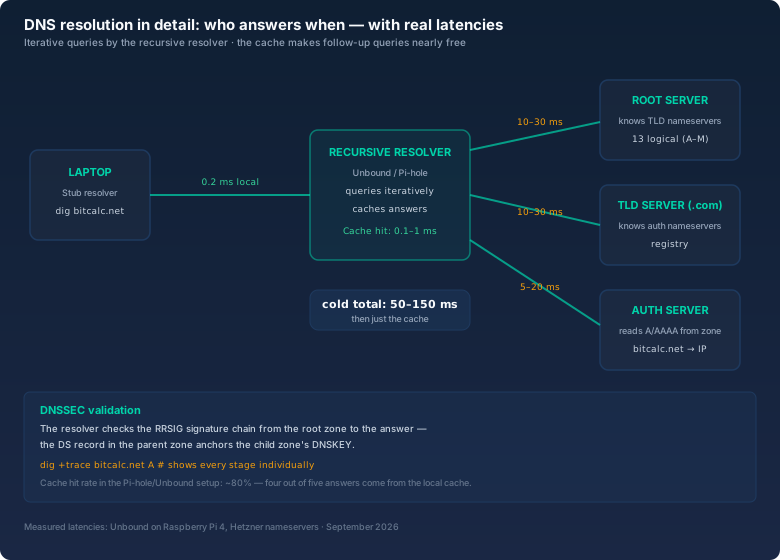
When your browser loads bitcalc.net, it doesn't know which IP sits behind it. It first asks the stub resolver — the tiny client in your operating system configured in /etc/resolv.conf or systemd-resolved. The stub resolver does exactly one thing: it forwards the query to a recursive resolver, configured by your ISP or your router. And that resolver does the actual work.
The recursive resolver doesn't know the answer by heart. It has to work it out — with three iterative questions to three different servers:
- Question to a root server: "Who is responsible for .com?" The 13 logical root servers (letters A through M) only know the top-level domains. Answer: the nameservers of the registry for .com. For me this takes 10 to 30 milliseconds.
- Question to a TLD server: "Who is responsible for bitcalc.net?" The registry's TLD server knows the authoritative nameservers of every domain under it. Answer:
ns1.kasserver.comandns2.kasserver.com. Another 10 to 30 milliseconds. - Question to the authoritative server: "What is the IP of bitcalc.net?" The auth server reads the A record from its zone and returns the IP. Depending on server location, 5 to 20 milliseconds.
All told, a completely cold resolution is 50 to 150 milliseconds — on a good connection often less than the TLS handshake that follows. The key point: the resolver stores every answer in its cache and answers the next query for the same domain in 0.1 to 1 millisecond. That's why the second request feels so much faster than the first.
A detail that surprises many people: the resolver doesn't ask the servers on your behalf with your IP — it asks with its own. To the authoritative servers, you're just one resolver among many. That's why your domain hoster's logs show millions of queries even though only a handful of people use the domain.
The record types: the cheat sheet
Every zone is a table of entries, and every entry has a type. Most admins know A and AAAA — but in day-to-day work you'll meet at least ten. Here's the cheat sheet I always wished I'd had:
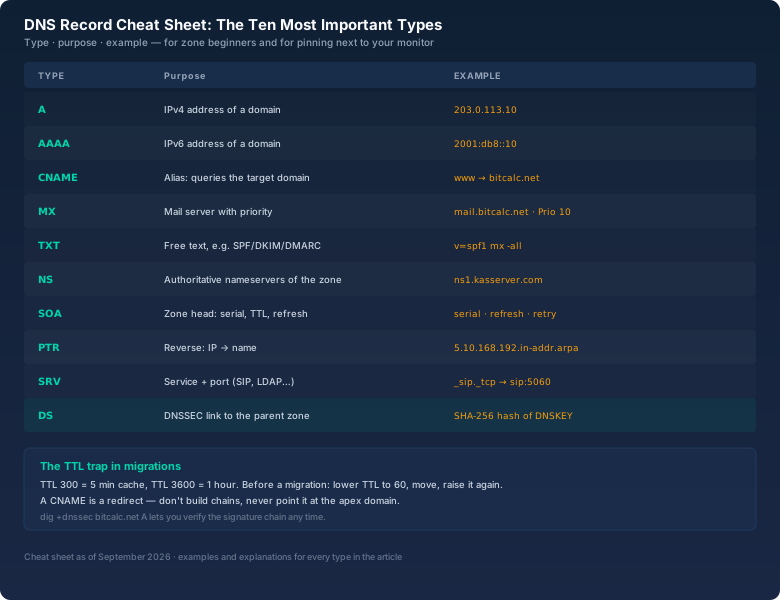
Three of them deserve special attention:
A CNAME is a redirect, not an alias in the strict sense. www → bitcalc.net means: "Go ask again what bitcalc.net is." The browser makes a second query. If you point a CNAME at a domain that is itself a CNAME, you build a chain — and every chain costs time and can break. CNAME on the apex domain doesn't work either (an A record must live there), which confuses many newcomers.
TXT records are the backbone of email security today. SPF (v=spf1 mx -all) states which servers are allowed to send for the domain. DKIM puts a public key into the zone. DMARC (a TXT with a policy) tells receivers what to do with mail that fails SPF and DKIM. Without all three, legitimate mail lands in spam quickly — more on that in the reverse-DNS section below.
The DS record is the chain to DNSSEC. It contains a hash of the child zone's public key (DNSKEY). That's how the parent zone (.com) links the child zone (your domain) into the chain of trust. More in the DNSSEC section.
TTL: the invisible trap in migrations
Every DNS answer carries a TTL (Time To Live) in seconds — how long resolvers may cache the answer. TTL 300 means: five minutes. TTL 3600: one hour. Sounds harmless, until you move a website.
Three years ago I moved a client's website to a new server. New IP, new A record, all set. And then? Part of the visitors saw the old site for hours, another part already the new one. The client called asking if "the migration was still running". The migration was done — but the old record's TTL was 3600, and resolvers worldwide kept the old IP cached for up to an hour. On top of that came resolvers that ignore or extend TTLs. Realistically it took 24 to 48 hours until truly everyone saw the new IP.
The lesson I apply to every migration since:
- Two to three days before: Lower the A record's TTL to 60 seconds. Resolvers can then keep the old answer for at most one minute.
- On migration day: Change the A record to the new IP, start the web server, verify.
- Two to three days after: Raise the TTL back to 3600 or more — shorter TTLs mean more queries to your nameservers and slightly more latency for everyone.
And the other way around: when you're preparing a migration and want to know what's cached today, look at the TTL in your dig answer. That value tells you how long you'll wait for the next generation of clients.
Running your own resolver: systemd-resolved, Unbound, and the Pi-hole effect
By default, your system asks your ISP's resolver — which is usually fine, but you share its cache with half the city. If you want resolution under your own control, you have three options:
systemd-resolved is already active on most modern distributions and caches locally. For the vast majority of desktops, that's enough. The catch: the cache is small, and configuring it via resolvectl takes getting used to.
Unbound is the classic for your own recursive resolver on a server. It queries the root servers directly, caches aggressively, and can validate DNSSEC. On my Raspberry Pi, Unbound runs next to Pi-hole: Pi-hole blocks ads and tracking domains, Unbound resolves everything else itself. Since then, DNS answers in my household are consistently fast — and I know exactly which server resolved what when something "doesn't work" again.
The cache effect is measurable: in my setup, the hit rate is around 80 percent. That means four out of five queries are answered by Unbound from cache in under a millisecond, without a single packet leaving the house. The remaining 20 percent go out iteratively. The average user barely notices the difference — but the admin notices having a resolver they understand and whose logs they can read.
Reverse DNS: why mail without PTR lands in spam
So far we've asked "Which IP belongs to this name?" — forward DNS. With reverse DNS you flip the question: "Which name belongs to this IP?" There are dedicated zones for that: in-addr.arpa for IPv4, ip6.arpa for IPv6. The IP is written backwards: 192.168.10.5 becomes the lookup 5.10.168.192.in-addr.arpa. The fourth octet goes first — exactly the opposite of the notation you're used to. With the bitcalc Subnet Calculator you can work out the host range of a reverse zone directly, for example when you want to create PTR records for a whole /24 — network address and order are easy to mix up.
Why does this matter? Most mail servers check incoming mail to see whether the sender's IP has a matching PTR record. If it's missing or points to a foreign name, the mail is considered suspicious and lands in spam — even if SPF, DKIM, and DMARC are perfect. I once ran a mail server whose reverse was missing because the hoster only sets PTR records on request. Result: every other mail to major providers vanished into the spam folder. One ticket to the hoster, 24 hours later the problem was gone.
The same applies to IPv6, just with more nibbles: every hex digit of the address becomes a label in ip6.arpa. Anyone converting IPv6 addresses into reverse zones by hand will eventually make a mistake — the bitcalc Number Converter helps keep the hex groups straight, and the 4-bit boundaries suddenly become obvious.
DNSSEC: the signature chain nobody can forge
Plain DNS has a security problem: the answers are not authenticated. An attacker who intercepts a DNS answer or poisons a DNS cache can feed you a fake IP — and your browser doesn't notice, because it has no reason to distrust the answer. That's the mechanism behind many DNS-hijacking attacks.
DNSSEC fixes this by having every zone cryptographically sign its answers (RRSIG records), with the chain of trust running from the root zone through the TLD to your domain. The anchor: the root zone has been signed since 2010, .com since then as well. Your domain publishes a DS record in the parent zone, anchoring your zone's public key. A validating resolver checks the signature chain on every answer — and rejects answers that don't fit the chain.
What DNSSEC costs: compute time on the resolver (negligible on modern hardware), more zone maintenance (key rotation), and occasionally real headaches when a zone is badly signed. I had a client whose domain was left without a DS record after a hoster switch — the result wasn't "everything broken" but a subtle seesaw effect: some resolvers validated (and failed), others didn't. That's the insidious thing about DNSSEC errors: they don't hit everyone at once, and they rarely show up as a clear error message.
For checking, there are two commands I use constantly:
# Show the signature chain
dig +dnssec bitcalc.net A

# Complete resolution chain, step by step
dig +trace bitcalc.net A
dig +trace is, by the way, the best debugging tool there is: it shows every stage of resolution separately — root, TLD, auth — with the response times of each. When the website is "gone", you'll see in 10 seconds whether the resolver, the TLD, or the auth server is the problem. You can cross-check your zone's DS record with the bitcalc Hash Generator: the DS entry contains a SHA-256 hash of the DNSKEY — when your hoster hands you a key, you can recompute the hash yourself instead of trusting them.
The five most common DNS mistakes in admin life
To close, the mistakes I see most often — and have mostly made myself:
- Wrong resolver configured: a dead or overloaded DNS server in the router or
/etc/resolv.confmakes everything look slow or broken.dig +short example.comagainst different resolvers tests this in seconds. - CNAME chains: three CNAMEs in a row — each stage is an extra query, each stage an extra failure point.
- TTL not lowered before migrations: the classic from the migration section. Lower the TTL, migrate, raise it again.
- Forgotten PTR records: mail lands in spam, monitoring fails, and nobody knows why.
- DNSSEC after a hoster switch: new provider, new DNSKEY, but the DS record in the parent zone stays old — or disappears entirely. After every switch, test validation, not just the A record.
Bottom line
DNS is not magic. A resolution is a small, clearly structured conversation: resolver asks, root refers, TLD refers, auth answers — and the cache makes everything after that nearly free. If you know the record types, set TTLs deliberately, and have dig +trace up your sleeve, no "website is gone" report will make you lose your nerve again. And if you also keep reverse DNS and DNSSEC in view, you get mail that arrives and zones nobody can forge.
My client's website from back then was never gone, by the way. His router pointed at a resolver that had been dead for two months. One entry in the router config, one minute of work — and the foundation was back. That's DNS in everyday life: mostly invisible, but when it wobbles, everything wobbles.