
Four hours. That is what the monthly update evening used to cost me: three servers, three ssh sessions, three rounds of apt upgrade, three rounds of watching dpkg grind. One box wanted a reboot, another reported a full disk, and on a third a service did not survive the upgrade. I was done shortly before eleven, tired, with the feeling that I had spent an evening on something a computer could have done by itself.
Today it looks different. I type one command, put the coffee mug next to the keyboard, and twelve minutes later all three servers report: up to date, all green. In between are five small playbooks that I wrote in two evenings and have reused unchanged every month since. No cluster, no agents, no 200-page manual. Just SSH, one inventory file, and tasks I formulated once.
This article shows the five playbooks that actually run on my machines: setup, host keys, updates, users, backups. Including the mistakes I made along the way, so you do not have to repeat them.
Why Ansible when you work alone?
Ansible sounds like enterprise, like Tower and teams and ticketing. But for a single person it is the best tool I know, and it was built for exactly this: the target systems need nothing but SSH and Python. No agent to install, maintain, and update. You write a playbook on your laptop, and Ansible runs it on every server, with the same order, the same parameters, the same results.
The main reason for me is a different one, though: a playbook is documented memory. I used to forget which packages I had installed on which box and why. Now it is in a file. If I ask myself in six months why a server is set up the way it is, the playbook answers. And because playbooks are idempotent, I can run them again and again without risk: a task that has nothing to do does nothing.
The foundation: ansible.cfg and inventory
My setup consists of two small files. The first, ansible.cfg, tells Ansible where the inventory lives and that host keys should be checked:
[defaults]
inventory = inventory
host_key_checking = true
retry_files_enabled = false
The second file is the inventory. Three groups would be overkill, one is enough:
[servers]
vps1.example.net
nas01.local
mail01.example.net

[all:vars]
ansible_user = admin
That is all it takes. The variables under [all:vars] apply to every host, and since I log in as admin everywhere, I do not have to repeat that per server. The rest of the setup is handled by the first playbook.
setup.yml: a new server in 15 minutes
I used to set up a fresh server by hand: create users, configure sudo, copy SSH keys, fail2ban, ufw, a few packages. Two hours when everything went smoothly, and I made slightly different decisions on every server. Today setup.yml runs, and every server ends up looking the same. That is the point: standardization is not boring, it is insurance. When all boxes are alike, the other four playbooks work everywhere without special cases.
The playbook is deliberately simple: apt update up front, base packages, users with SSH keys, fail2ban, and ufw with the ports I need. Nothing exotic, but everything required to make a server productive. After that it goes into the inventory, and the update routine takes over.
update.yml: the morning coffee run
This is the playbook that gives me the most time back. Before: four hours on one evening, spread across three terminals, with interruptions. Today:
---
- name: Keep systems up to date
  hosts: servers
  become: true

  tasks:
    - name: Update package lists
      ansible.builtin.apt:
        update_cache: true
        cache_valid_time: 3600

    - name: Upgrade packages
      ansible.builtin.apt:
        upgrade: dist
        autoremove: true
      register: update_result
      notify: Reload services

    - name: Check reboot status
      ansible.builtin.stat:
        path: /var/run/reboot-required
      register: reboot_required

    - name: Restart server
      ansible.builtin.reboot:
        reboot_timeout: 300
      when: reboot_required.stat.exists

  handlers:
    - name: Reload services
      ansible.builtin.service:
        name: "{{ item }}"
        state: reloaded
      loop:
        - nginx
        - postfix
A few details you only appreciate after the third mistake. cache_valid_time stops Ansible from reloading the package lists on every run when they are younger than an hour. autoremove cleans up old kernels and orphaned dependencies that would otherwise pile up over months. And the reboot task only restarts a box when /var/run/reboot-required exists. That exact check saved my first weekend incident, when a kernel update on the mail server was waiting and I had missed it.
The handler with the loop is my standard recipe: services that should survive an update are only reloaded when a task notifies them. If a playbook runs through without changes, nothing happens. That is what makes the morning run so relaxed: I start update.yml, drink coffee, and when I get back the summary is on screen. Twelve minutes instead of four hours, every month.
hostkeys.yml: no more SSH nightmares
At some point I reinstalled a server, and the next ssh greeted me with an old friend: WARNING: REMOTE HOST IDENTIFICATION HAS CHANGED. First instinct: delete the key and move on. That is exactly the trap. If a host key really changed because someone took over the server, you would no longer notice the difference.
My compromise: host keys are collected centrally and written into known_hosts. After a reinstall I fetch the fresh keys with a playbook run instead of typing ssh-keyscan by hand:
---
- name: Collect and distribute host keys
  hosts: localhost
  connection: local

  tasks:
    - name: Collect ed25519 keys
      ansible.builtin.command: ssh-keyscan -t ed25519 {{ item }}
      loop: "{{ groups['servers'] }}"
      register: keys
      changed_when: false

    - name: Update known_hosts
      ansible.builtin.known_hosts:
        name: "{{ item.item }}"
        key: "{{ item.stdout }}"
      loop: "{{ keys.results }}"
host_key_checking stays on, so Ansible never accepts keys that are not in known_hosts. The playbook is the only way new keys get into the system. Since then I have seen that warning exactly once: during my own rebuild, and I knew why.
users.yml: users with password_hash
Creating users used to be copy and paste from a note: useradd, then mkpasswd -m sha-512, then paste the result into the password line. By the third server I decided to turn it into a playbook, because Ansible has something better: the password_hash filter. The password is never stored in plain text, the filter generates the hash directly on the control machine:
---
- name: Set up users
  hosts: servers
  become: true
  vars_prompt:
    - name: new_password
      prompt: "Password for the new user"
      private: true
      no_log: true

  tasks:
    - name: Create user
      ansible.builtin.user:
        name: "{{ new_user }}"
        password: "{{ new_password | password_hash('sha512') }}"
        groups: sudo
        append: true
        shell: /bin/bash
I ask for the password with vars_prompt, with no_log, so it never lands in output or logs. If you want it even cleaner, put the password encrypted into an ansible-vault file. The point is: the result is identical on all three servers, and the hash is re-checked against the file on every run. No server drifts from the others anymore.
When I want to verify that the hash in /etc/shadow really belongs to the password I assigned, I use the Hash Generator on bitcalc.net: a comparison hash from the same password has to be identical. I use the same generator for checksums of downloaded files, before setup.yml installs anything that does not come from the repos.
backup.yml: the configuration is the asset
The fifth playbook is the most unspectacular and the one I would miss the most: it backs up the configuration. /etc on all three servers, the cron tabs, the list of installed packages. Not the data, that lives elsewhere, but the state that makes a server what it is.
That used to be a good two hours of manual work per month: packing directories, pulling them over with scp, stashing them somewhere. Today it is a playbook run with ten minutes of runtime, and the backups sit on a box outside the main setup. Anyone who has rebuilt a server from memory after a disk failure knows what that is worth.
Facts and checksums with the bitcalc tools
Two bitcalc.net tools accompany me in the Ansible work. The first moment is always the same: ansible -m setup returns a server's facts as one huge JSON document. Unformatted, it is a single line with a thousand nested brackets. The JSON Formatter turns it into a readable tree where I can look up which kernel version is running or which interface has which IP.
The second moment is verification: before setup.yml installs something that does not come from the package repos, I compare the checksum of the downloaded file against the official one. The Hash Generator computes SHA-256 right in the browser, the file never leaves your machine.
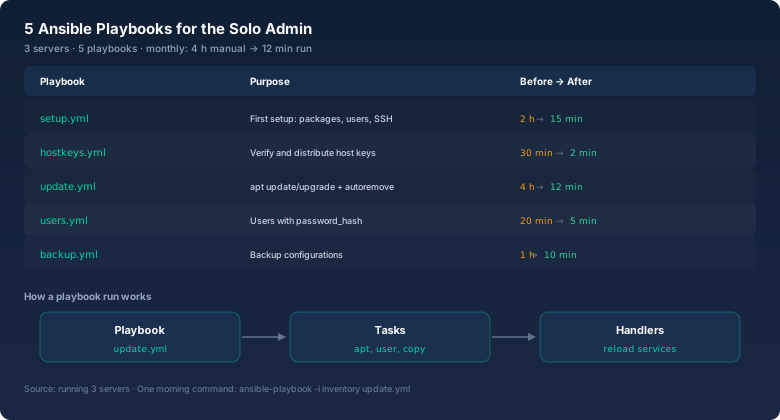
setup.yml · First setup: users, SSH keys, fail2ban, ufw (2 h → 15 min)
hostkeys.yml · Collect and distribute host keys (30 min → 2 min)
update.yml · apt update incl. reboot detection (4 h → 12 min)
users.yml · Users with password_hash (20 min → 5 min)
backup.yml · Backup configurations (1 h → 10 min)
The morning coffee command:
ansible-playbook -i inventory update.ymlBottom line
Five playbooks, three servers, twelve minutes in the morning. The biggest win is not the time saved, nice as that is. It is the peace of mind: the state of the servers lives in files, is reproducible, and is checked by a tool that never gets tired and never forgets.
Start small. Take update.yml, write it in an hour, and run it next month. The rest will follow once you have felt how good a Tuesday evening without apt upgrade feels.