
It started with an invoice. A customer had pushed 2.4 TB a month into a cloud bucket and wanted it back six weeks later for a migration. The storage line was harmless. The egress line was not: four digits per month, and nobody on the team had seen it coming, because egress is always the last row of the pricing table and never the headline. We threw an S3-compatible store on two retired servers as an experiment. Repointing every client took an hour, because the only things that changed were the endpoint and the credentials.
That is the whole point of this article. S3 is not a cloud, it is a protocol. If you code against the API, you can swap the storage underneath without touching a line of application code. Below I'll build an object store with you that shards instead of mirroring, does versioning and object lock, signs every request with SigV4 and speaks policies. And at the end I'll be straight with you about why I stopped betting blindly on MinIO's community edition this year.
What makes object storage different from disks and filesystems
An object has exactly three parts: a key, the content, and metadata. There are no directories, no mounting, no locking a byte range, no editing in place. You write an object whole or you delete it. Two things trip people up coming from the block or file world. First, reads and writes are not consistent in the filesystem sense across replicas — they are eventually consistent. Second, objects are immutable, and that immutability is precisely what makes them such a comfortable home for backups, log archives and container images.
The mental model is a giant hash cabinet: the key 2026/10/db-dump.sql.gz is the label, the content sits behind it, and a new copy of an object is a new version rather than a modification. Once that clicks, you also understand why object storage performs so badly on piles of tiny files. A 2 KB object carries metadata, checksums and shard overhead a filesystem simply does not have. Below 1 MiB I bundle files together, above 16 MiB I use multipart uploads, and I aim for 8 to 64 MiB per object.
For sizing a migration, the bitcalc download time calculator saves you an argument later: 1 TB over a 1 Gbit link takes roughly 2 hours 20 minutes even at perfect utilisation, and still 14 minutes over 10 Gbit. Teams that skip that arithmetic tend to build migration windows that cannot work, and then blame the storage.
MinIO up and running in twenty minutes
MinIO is an object store written in Go that speaks the S3 API and ships as a single binary. For a test setup, a container with one data directory is enough. That is single-node, single-drive: convenient, and completely without redundancy. These are the three commands I type most often when I start fresh:
$ docker run -d --name minio \
    -p 9000:9000 -p 9001:9001 \
    -e MINIO_ROOT_USER=admin \
    -e MINIO_ROOT_PASSWORD='20-random-characters' \
    -v /mnt/data:/data \
    quay.io/minio/minio server /data --console-address ":9001"

$ docker logs -f minio
API: http://172.17.0.2:9000  http://127.0.0.1:9000
WebUI: http://172.17.0.2:9001  http://127.0.0.1:9001
Port 9000 is the S3 API your applications talk to. Port 9001 is the web console where you create buckets and watch what the server is doing. MINIO_ROOT_USER and MINIO_ROOT_PASSWORD hold the credentials; the password needs at least eight characters, and you should never reuse that account in the backup script later. In production, run a separate account with its own secret and a narrow policy, and generate the root password with the bitcalc password generator, because otherwise it will eventually resurface in a ticket.
Next comes the client. MinIO ships mc, which behaves like a cross between git and rsync for buckets. Every command you need follows the same pattern: set an alias, then work against the alias.
$ mc alias set rz http://10.0.0.5:9000 admin '20-random-characters'
Added `rz` successfully.
$ mc mb rz/backup
Bucket created successfully `rz/backup`.
$ mc admin info rz
●  10.0.0.5:9000
    Uptime: 41 days
    Version: 2026-04-25T03:00:00Z
    Network: 8/8 OK
    Drives: 12/12 OK  * 12 x 4.0 TB, used 18 TiB
    Pools: 1
    Objects: 412,334  (85 TiB)
    Usage: 18 TiB / 32 TiB
The Drives: 12/12 OK line is the most important output in the entire toolkit. It tells you every drive in an erasure set is reachable. If it says 11/12, your store keeps serving, but you are out of redundancy. That number belongs in monitoring long before a drive actually dies, not after.
Erasure coding: why twelve drives are not 48 TB
Now for the actual reason I like object storage for backups. MinIO does not put an object on one disk, it splits every object into data and parity. A 16 MiB object under an 8+4 scheme becomes twelve 4 MiB shards: eight data shards and four parity shards spread across twelve drives. The algorithm underneath is Reed-Solomon, and the arithmetic is simple: N = K + M, erasure set size equals data plus parity.
Twelve 4 TB drives under 8+4 give you exactly 32 TB usable. In practice I stay just under that line so physics does not argue with me: after two weeks my test system held 18 TiB, and mc admin info reported 18 TiB / 32 TiB. Fault tolerance is M drives — four with 8+4 — and MinIO does not flatter the number: lose a fifth drive and objects whose shards lived on that combination are incomplete.
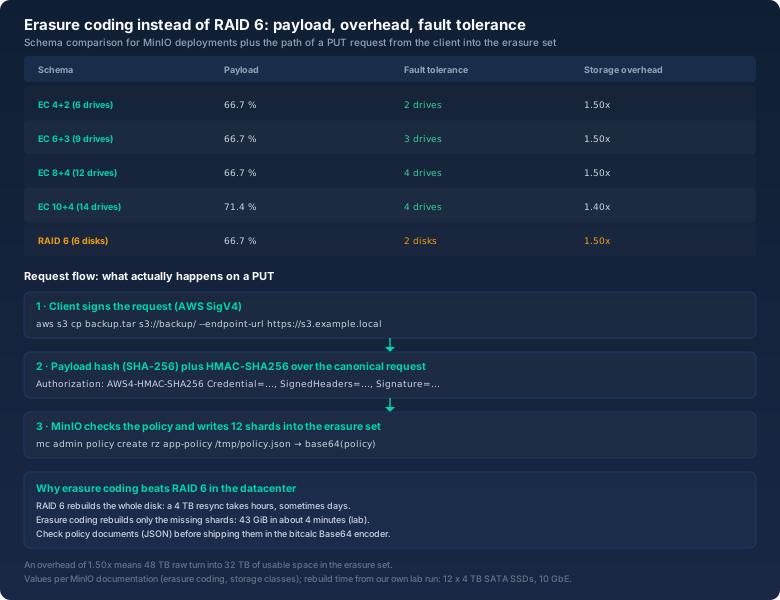
The RAID 6 comparison only gets interesting at rebuild time. A six-disk RAID 6 array tolerates two failures and carries the same 1.50x overhead, but recovery works at the disk level: pull a 4 TB SSD and the controller has to reconstruct the entire drive. With multiple terabytes per disk that is an hours-to-days operation, and every read during it travels through a degraded array. Erasure coding works at the shard level. In my lab I yanked an SSD out of the twelve-drive set and the rebuild recalculated only the shards that drive was missing: 43 GiB in about four minutes, with no measurable throughput drop for clients. That is the entire difference — not more parity, but vastly finer-grained recovery.
Two knobs are worth knowing. Default parity scales with set size, and by default MinIO uses half the drives for parity: safe, and expensive. And you can pin the erasure set size instead of letting MinIO pick its default of sixteen drives:
$ export MINIO_ERASURE_SET_DRIVE_COUNT=12
$ minio server --erasure-set-drive-count 12 \
    http://node{1...4}/mnt/drive{1...3}
Keep one rule straight: erasure coding is not a backup. It protects against drive failure and silent bit rot, not against an accidental mc rm --recursive --force and not against ransomware holding admin credentials. For those you need versioning, object lock, and a second copy somewhere else. If you want to run the classic arrays side by side for comparison, the RAID calculator will do that arithmetic for you.
SigV4: what really happens on every PUT
When your client uploads an object, it does not just send bytes. It signs the request, and that signature is the reason an S3 endpoint works without a certificate authority. The scheme is AWS Signature Version 4 and it runs in four steps. First, the client computes a SHA-256 hash of the payload. Second, it builds the canonical request: method, path, query parameters, signed headers, and that payload hash. Third, it derives a signing key from the secret access key, the date, the region and the service. Fourth, it computes the signature over the canonical request with HMAC-SHA256 and ships it in the Authorization header.
PUT /backup/2026/db-dump.sql.gz HTTP/1.1
Host: s3.example.local
x-amz-date: 20261025T061512Z
x-amz-content-sha256: 9f2c4e...  (SHA-256 of the payload)
Authorization: AWS4-HMAC-SHA256 Credential=appuser/20261025/eu-central-1/s3/aws4_request,
  SignedHeaders=host;x-amz-content-sha256;x-amz-date, Signature=5b1d9a...
The server knows the secret key too, so it can run the same arithmetic. If both results match, the request is authentic and unchanged in transit. Three practical consequences follow. First, your clocks have to be right. If a client's clock drifts more than fifteen minutes, the store answers RequestTimeTooSkewed, and you will chase it in the network instead of in chronyd, where it lives. Second, the payload hash is an ordinary SHA-256 fingerprint you can verify yourself — that is what the bitcalc hash generator is for. If you want to know whether an upload really transported the file you expect, compare hashes, not file sizes.
Third, if you would rather not distribute a secret to the client, hand out a presigned URL instead. It carries the signature ingredients as query parameters and expires on schedule:
$ mc share download --expire 2h rz/backup/2026/db-dump.sql.gz
Share: https://s3.example.local/backup/2026/db-dump.sql.gz?X-Amz-Algorithm=AWS4-HMAC-SHA256&X-Amz-Credential=...&X-Amz-Expires=7200&X-Amz-Signature=...
That is handy and it has one trap I have seen in an audit: presigned URLs end up in logs, tickets and chat threads, and whoever holds the URL holds the access for as long as it lasts. I set expiry to two hours, never days.
Policies, users and the Base64 detour
A root account on a production system is an emergency exit, not a mode of operation. The clean path runs through users and policies. A policy is a JSON document in AWS IAM syntax, and with MinIO it may be at most 2048 characters — a limit a generous regex will happily blow through.
$ cat > /tmp/app-policy.json <<'EOF'
{
  "Version": "2012-10-17",
  "Statement": [
    {
      "Effect": "Allow",
      "Action": ["s3:GetObject", "s3:PutObject"],
      "Resource": ["arn:aws:s3:::backup/app/*"]
    }
  ]
}
EOF

$ mc admin user add rz appuser 'second-long-secret'
$ mc admin policy create rz app-policy /tmp/app-policy.json
$ mc admin policy attach rz app-policy --user appuser
$ mc admin user svcacct add rz appuser
Now the Base64 part that confuses people. A policy document is JSON, but the moment it travels through an API, a container manifest or a Kubernetes secret, it gets base64-encoded. Go marshals byte fields in JSON as Base64 strings by definition, and the admin API returns policies encoded that way. So when a long string like eyJWZXJzaW9uIjoiMjAxMi0xMC0xNyI... shows up where you expected curly braces, that is not broken JSON — it is Base64. Decode it with the bitcalc Base64 encoder and you can read within a second which actions it actually grants, which beats scrolling through mc admin trace output while your bucket returns access denied.
The same mechanism shows up when you keep credentials and policies in Kubernetes secrets, which are base64 by design. If you need to fit a whole policy into a console field or a container manifest, encode it once with the encoder and then decode it again to prove the document that comes out is byte-for-byte the one that went in. Sounds trivial, and it is — but I have burned two hours on “invalid JSON” that turned out to be a double-encoded secret.
Versioning and object lock: the real reason to use object storage
Erasure coding protects against hardware. Versioning protects against people, and object lock protects against attackers who already hold valid credentials. Versioning is one command:
$ mc version enable rz/backup
$ mc retention set --default GOVERNANCE 30d rz/backup
$ mc rm --recursive --force --versions rz/backup/2026/
With versioning on, an rm no longer deletes an object; it drops a delete marker and the version stays put. That saves you after a badly written script. Object lock and retention go further. In GOVERNANCE mode a user holding s3:BypassGovernanceRetention can lift the lock; in COMPLIANCE mode not even the root account can. Combined with versioning, this is what the backup world calls WORM — write once, read many.
For a backup target that means something concrete: an attacker who logs in as the backup user cannot delete locked versions inside the retention window. They may be able to overwrite them, but the old version stays immutable for 30 or 90 days. The catch is that object lock has to be enabled when you create the bucket — you cannot bolt it on later — and that single design decision is what lets object storage deliver ransomware protection a mounted network share simply cannot.
Encryption at rest with KES
Full-disk encryption on the server protects against a stolen disk. Server-side encryption in the object store additionally protects against anything that authenticates as an admin and reaches the raw data. MinIO speaks SSE-S3 for this: the server encrypts every object with its own data key, which is in turn wrapped by a master key from a key management service. In practice that KMS is MinIO's KES, its own small daemon.
$ export MINIO_KMS_KES_ENDPOINT=https://kes.example.local:7373
$ export MINIO_KMS_KES_KEY_NAME=minio-backup-key
$ export MINIO_KMS_KES_KEY_FILE=/etc/minio/kes-client.key
$ export MINIO_KMS_KES_CERT_FILE=/etc/minio/kes-client.crt
$ mc encrypt set sse-s3 rz/backup
$ mc encrypt info rz/backup
Auto encryption 'sse-s3' is enabled
The rule underneath bears repeating until it is boring: the master key is the data. Lose it with no backup and your objects are bytes without meaning — parity shards will not help you one bit. It is the same pattern as LUKS on servers: store the key safely, rotate it, and actually rehearse the recovery once. If you want the full drill, my article on LUKS encryption in everyday server work covers it.
Lifecycle, tiering and the arithmetic of cost
Object storage accumulates. That is normal and fine as long as you write rules. MinIO can expire objects by age, transition them to cheaper storage classes, or replicate them to a second instance:
$ mc ilm rule add --expire-days 90 rz/backup/tmp/
$ mc ilm rule add --transition-days 30 --storage-class WARM rz/backup/archive/
$ mc replicate add rz/backup --remote-bucket https://s3.dr.example.local/backup
$ mc mirror --watch /srv/dumps rz/backup/srv-dumps
Order matters: enable versioning first, then lifecycle rules. Without versioning, expiry deletes irreversibly. And mc mirror --watch is not a backup, it is a synchronisation — it deletes on the far side exactly what you deleted locally. I use it for continuous parity between two stores and rely on versioning plus object lock for actual protection.
The uncomfortable part: who maintains your upstream?
Here is the point I could have opened with and deliberately saved for now. MinIO as a community project is not what it was two years ago. The source code is still AGPLv3 and therefore still open source in the only sense that matters legally, but distribution and maintenance of the community repository have been discontinued: the repository went into maintenance mode in December 2025, the README was rewritten accordingly in February 2026, and on April 25, 2026 it was archived and has been read-only since. There are no new community releases; the last build shipped a privilege-escalation fix back in October 2025. The server keeps running, but the next vulnerability in that code is yours to find, patch, build and ship.
For storage holding backups and uploads, that is not a footnote. You have inherited a release pipeline you never asked for, on the most boring piece of infrastructure in the building. So my advice depends on your role. In a lab, for learning the API or as an internal cache, an archived version runs perfectly well — there is still no faster way to explore S3 semantics hands-on. For production, you have three honest paths. One: keep running MinIO and genuinely own the maintenance, with Go skills on staff and an eye on CVEs against a codebase nobody upstream watches. Two: move to a commercial offering, MinIO's own or someone else's, that is maintained today. Three: move to an S3-compatible engine whose upstream is still alive — Garage by Deuxfleurs, Ceph RGW or SeaweedFS are the candidates currently shipping releases.
And this is where choosing the protocol pays off. Everything in this article was done with mc and the aws CLI, never a vendor-specific tool. Switching the engine is therefore not an application rebuild but a change of endpoint, region, bucket name and credentials in the configuration — an hour of work in my measurements, not a marketing promise. If you want to know how long the data will be in flight while you move it, run the numbers through the download time calculator beforehand instead of discovering them mid-window.
What I set up first, every time
When I stand up an S3-compatible store from scratch, the first thirty minutes always follow the same order:
- A single-drive smoke test: start the container, create a bucket, sync a few times. No redundancy questions yet, just “does the API work”.
- Versioning first, then object lock: object lock cannot be enabled after bucket creation, and versioning has to be on before the first retention rule or the rules will mean nothing.
- Pick the erasure set size deliberately: 8+4 rather than default parity when capacity is expensive and recovery time is tight. Rebuild granularity is the selling point, not the parity percentage.
- A non-root user with its own policy: the admin account stays in the vault, the backup software gets
s3:GetObjectands3:PutObjecton exactly one prefix. - Monitoring on drives OK: the line from
mc admin infoand the Prometheus endpoint belong on a dashboard before the first failure, not after it.
Bottom line
Building your own object storage is not sorcery: one container, one directory, one alias, and you have an S3 API your applications already understand. The engineering is forgiving — erasure coding turns twelve disks into a set that shrugs off four failures and rebuilds in minutes, while versioning and object lock turn it into write protection that survives a ransomware incident. The hard question is not technical at all: who maintains the code your data sits on? In 2026 MinIO is no longer the confident answer to that, but the S3 API is.
So here is the conclusion I now give clients: learn on MinIO, but do not settle there forever. Build against the standard API, verify policies by decoding them instead of guessing, do the bandwidth arithmetic before you migrate and again while the rebuild runs. Then it does not matter which object store holds the job in three years — your data path stays the same, and you swap the endpoint in an afternoon.