
In 2018 I got a call from a colleague whose laptop had been stolen from his company car overnight. The car sat in an underground garage, the window was smashed, the backpack gone. What still sticks with me: his first worry wasn't the device, it was the three client databases on the disk that no backup server knew about. The laptop had no encryption. The thief got a working machine with readable data, my colleague got a very unpleasant week. Today, every machine I manage has an encrypted disk. This article shows how that works in daily server life without the drama.
The second story ended more gently but taught me more. A server with an encrypted root partition needed a restart at three in the morning, and I stood in front of the KVM console while the client patiently waited for his database. Under time pressure you mistype a passphrase surprisingly often, and by the third attempt you're getting pale. Both stories belong to LUKS, because LUKS isn't a tool for paranoia, it's for normal operations. Once you understand the mechanics, encryption is about as exciting as a backup job.
The usual objection is: I have nothing to hide. That's rarely true for servers, because servers almost always hold other people's data, customer data, credentials, backups of other machines. And experience shows it's not a question of whether a disk ends up in the wrong hands, but when. Hosters change, warranty cases happen, and sooner or later a device disappears. Encryption is the only measure that still works in the moment you lose control over the hardware.
What's under LUKS: dm-crypt and a header full of metadata
LUKS stands for Linux Unified Key Setup and is, strictly speaking, just a file format for metadata. The actual encryption is done by dm-crypt, a kernel module that has been part of Linux since kernel 2.6 (2004). The name gives away the architecture: Device Mapper, a layer that sits between filesystem and disk, block by block. Every block passing through gets encrypted or decrypted. The filesystem above never notices.
LUKS2 has been the default since 2018 and replaces LUKS1. The important changes: the header can hold backups, key derivation uses Argon2id instead of PBKDF2 by default, and there's room for extra metadata like tokens, for example FIDO2 keys or systemd-cryptenroll. For daily work it's enough to know: LUKS2 is what current Debian, Ubuntu, Fedora, and openSUSE installers set up by default.
Looking at the layers helps avoid mistakes. Top to bottom: application, filesystem, dm-crypt, disk. An SSH service writes data into the filesystem, the filesystem hands blocks to dm-crypt, dm-crypt encrypts every block with a master key and writes it to disk. Reading runs the other way. The master key is a random value created at format time, stored in the LUKS header, encrypted with a key derived from your passphrase.
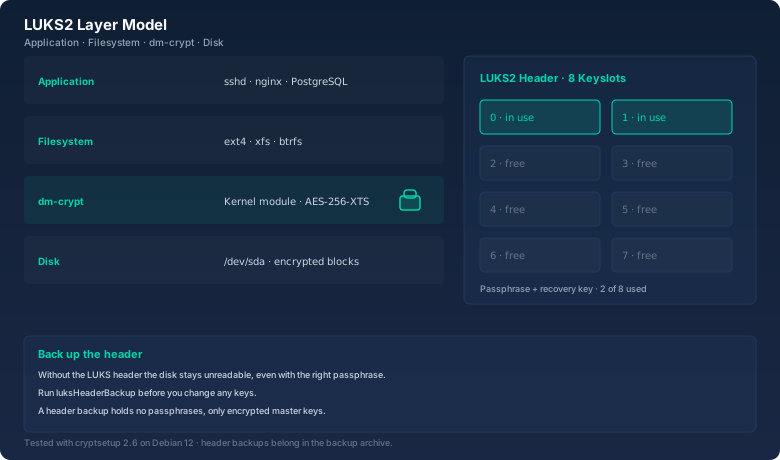
The key point of this chain: the passphrase doesn't protect the data directly, it protects the master key. That's exactly what makes passphrase rollover on a running system possible, without re-encrypting the disk.
First run: luksFormat with a warning label
Here's what a fresh setup looks like. I'll take an empty disk /dev/sdb, say the second SSD in a server or the spare drive in a NAS. The command is cryptsetup luksFormat, and it asks for a confirmation you can't overlook:
# cryptsetup luksFormat /dev/sdb1

WARNING!
========
This will overwrite data on /dev/sdb1 irrevocably.

Are you sure? (Type 'yes' in capital letters): YES
Enter passphrase for /dev/sdb1:
Verify passphrase:
The choice of passphrase decides the security. Eight characters with special characters sounds secure until you do the math: on a modern GPU that's seconds to minutes. Twenty random characters from the bitcalc Password Generator sit beyond anything practically guessable, and they're still easy to type once you've entered them a few times. For a server, the passphrase goes into the password manager, not on a sticky note.
After formatting, the disk is a LUKS container. luksDump makes that visible, printing the entire header:
# cryptsetup luksDump /dev/sdb1
LUKS header information
Version:        2
Epoch:          3
Metadata area:  16384 [bytes]
Keyslots:
  0: luks2
     Key:        512 bits
     Priority:   normal
     Cipher:     aes-xts-plain64
     Cipher key: 512 bits
     PBKDF:      argon2id
  1: luks2
     Key:        512 bits
     Priority:   normal
     Cipher:     aes-xts-plain64
     Cipher key: 512 bits
     PBKDF:      argon2id
Two things stand out immediately. First: aes-xts-plain64 with a 512-bit key is the default. XTS is a block mode that sidesteps the well-known weaknesses of ECB, and the 512 bits split into two 256-bit halves. Second: two keyslots already exist, even though I only entered one passphrase. The installer created a recovery key as the second key, a 32-digit random number stored in the hoster's console. Good practice, and I'll come back to it.
Keyslots: eight locks on one door
The LUKS header has room for eight keyslots. Every keyslot is its own lock with its own passphrase, and all of them protect the same master key. The model: a door with eight locks and only one room behind it. Whoever holds any of the eight keys opens the door. So there aren't eight different encryptions, there's one, with eight paths to the master key.
By the way: don't use the same passphrase everywhere. A key that fits everything opens everything. Knowing the passphrase of the backup server doesn't give you access to the main database if both use different keys. That's exactly what keyslots are for: different people, different keys on the same disk.
In my setup, two of eight are occupied: keyslot 0 with my passphrase, keyslot 1 with the recovery key. I generate the recovery key with the bitcalc Password Generator: 32 characters, upper and lower case, digits, special characters. It's the rescue when the passphrase is lost or an employee leaves without handing over the key. Six slots stay free for later purposes: a second passphrase for a colleague, a keyfile for automatic unlocking at boot, a FIDO2 token.
luksAddKey adds a new key. The command first asks for an existing key, then for the new one:
# cryptsetup luksAddKey /dev/sdb1
Enter any existing passphrase:
Enter new passphrase for key slot:
Verify passphrase:
The new key lands in the first free keyslot, slot 2 in this case. Important: luksAddKey doesn't touch any data on the disk, it only writes an entry into the header. That's why the whole thing takes seconds instead of hours, and why it's safe to run on a live server.
Passphrase rollover on a running server
The classic of daily admin life: an employee leaves the team, the passphrase has to go. Or the policy demands a quarterly change. With LUKS that's a two-command job, entirely on a running system. The disk stays mounted, no services stop, no reboot needed.
The first command is called luksChangeKey. It takes the current key of the given keyslot and replaces it with a new one:
# cryptsetup luksChangeKey /dev/sdb1
Enter LUKS passphrase to be changed:
Enter new passphrase:
Verify passphrase:
By default the change hits the first matching keyslot. If you want a specific one, append --key-slot 2. After any change I always check that the new key actually works. There's a test mode for that, which only checks the passphrase against the header without decrypting:
# cryptsetup luksOpen --test-passphrase /dev/sdb1
Enter passphrase for /dev/sdb1:
No output, exit code 0, done. That single line saves nerves, because a mistyped new key otherwise only shows up at the next reboot, and then you're facing a locked disk without a working key.
LUKS2 also knows keyslot priorities. Every slot defaults to normal, but individual slots can be marked with --priority high, say the recovery key, so systemd-cryptsetup prefers it at boot. If you manage several keyslots, it's worth checking the priorities once, otherwise chance decides which slot gets tried first when unlocking. For most setups the default is perfectly fine, though.
The second command is luksKillSlot, the radical option. It deletes a keyslot without you having to know its passphrase. You only need any other valid key:
# cryptsetup luksKillSlot /dev/sdb1 2
Enter passphrase for /dev/sdb1:
Slot 2 is history. I use this when I want to remove a key whose passphrase nobody knows anymore: the departing employee never revealed theirs, but I have mine. One kill, and the access is gone. The order is what matters: first add the new key, then delete the old one. Whoever kills the last working slot loses the disk for good.
One more warning about rollover: luksChangeKey only swaps the key that protects the master key. The master key itself stays the same, and so do all the data blocks on disk. If you suspect the master key is compromised, no key change will help, only a fresh luksFormat with a data transfer. That's the price of the convenient no-re-encryption rollover.
Header backups: insurance against forgetting
The LUKS header is the most sensitive file on the system, because without it the disk stays unreadable even with the correct passphrase. A single bad sector in the header area can be enough to lose access. That's why every setup that lives longer than a day gets a header backup:
# cryptsetup luksHeaderBackup /dev/sdb1 --header-backup-file \
    /root/backup/luks-header-$(date +%F).bin
The file is a few megabytes and travels into the archive with the regular backups. Important: the header backup contains the encrypted master keys, but no passphrases. So it's no security risk if it sits in an unencrypted backup archive. In an emergency, the header is restored like this:
# cryptsetup luksHeaderRestore /dev/sdb1 --header-backup-file \
    /root/backup/luks-header-2026-10-01.bin
The restore overwrites the current header, and afterwards all keyslots from the backup apply again, including passphrases that were deleted in between. That sounds like a feature, but it's also a trap: an old backup can resurrect a keyslot you deliberately killed. If you restore a backup, you should know which state it reflects. I verify the file's checksum with the bitcalc Hash Generator, SHA-256, before it goes into the archive.
What LUKS actually protects: an honest assessment
Now the part that sales slides like to skip. Disk encryption protects data at rest, and nothing else. Concretely: it protects against everything that happens to the disk itself.
The real scenarios: a server goes back to the hoster because the contract ends. A defective disk goes back to the manufacturer under warranty. A laptop gets stolen, like my colleague's. A backup drive ends up in the trash or on eBay. In every case the disk is in foreign hands, and in every case LUKS turns the data into worthless noise. Without passphrase and without header there's no way to the data, and a 32-character random passphrase from the Password Generator can't be guessed.
The honest flip side: LUKS doesn't protect against a compromised system. Anyone with root access to a running server reads the data while it's decrypted. The reason is simple: once the disk is unlocked, the master key sits in kernel memory and the data is available in plaintext. An attacker with root rights doesn't even have to look for the key, they just copy the data along. Encryption is not a firewall, then. It's protection for the moment the disk changes hands.
What does all this cost in performance? On modern x86 CPUs almost nothing, because AES-NI does the encryption in hardware. On my servers I measure an overhead of under five percent with LUKS, often none at all with large blocks. On ARM boards without AES-NI, say a Raspberry Pi 3, it looks different: dm-crypt eats twenty to thirty percent there, depending on filesystem and block size. That's acceptable for a homelab, but for a database-heavy box with a weak CPU you should plan for it.
The second boundary: everything that runs before unlocking is unprotected. The bootloader sits outside the encrypted area unless you work with Secure Boot and signed kernels. An attacker with physical access can also read the RAM, the classic cold-boot attack, or hang a keyboard device between server and console. These attacks are rare and elaborate, but if you take your threat model seriously, you should know they exist.
That leads to a rule of thumb I end every consultation with: LUKS solves exactly one problem, data at rest. Everything else is a job for updates, firewalls, SSH keys, and backups. Know that boundary and you'll use encryption where it works, and skip the rest of the drama.
Three rules for drama-free LUKS
After five years of running LUKS on servers, NAS boxes, and laptops, three rules have survived:
- Two keyslots, always: slot 0 for the daily passphrase, slot 1 for the recovery key. The recovery key lives with the hoster or in the password manager, never next to the server. Generated with the Password Generator, 32 characters long.
- Back up the header after every change: after luksFormat, luksAddKey, luksChangeKey, or luksKillSlot, run a fresh luksHeaderBackup. Five seconds of work, saves you from total loss.
- Test before you leave: after every key change, run luksOpen --test-passphrase. Exit code 0 means the key works and the server may reboot.
Bottom line
LUKS is a file format with a kernel module behind it, nothing more. Know the four layers and you also understand the limits: encryption protects data at rest, not running systems. The tools are manageable: luksFormat to create, luksAddKey and luksChangeKey for keys, luksKillSlot to remove, luksHeaderBackup as insurance. Passphrase rollover on a running server is routine if you keep the order: add the new key, test it, delete the old one.
My colleague with the stolen laptop got his data back back then because the thief didn't need the disk and the backpack turned up again on a parking lot. That was luck, not a concept. Since then my setups follow one rule: every disk that could leave the machine is encrypted before it gets installed. The passphrase lives in the password manager, the recovery key with the hoster. That costs five minutes per system and saves exactly one crisis per disk.