
I locked my own monitoring out this spring. Not because of a bug in the monitoring, but because of my own fail2ban. A check on my watchdog host knocked on port 22 of eight servers every 30 seconds to see whether SSH was answering at all. It never authenticated, just opened the connection and closed it again. sshd dutifully wrote a line into the journal for every one of those knocks, the sshd jail in fail2ban dutifully counted them, and after five hits within ten minutes the watchdog was gone. First on one server, then on all of them. My dashboard went red everywhere, and I sat in front of it for twenty minutes thinking about cables, DNS, and the router before it occurred to me to check who was actually being banned.
That is fail2ban in one anecdote. It did exactly what I had configured it to do. It counted patterns that looked like an attack, and it was right. It just had no idea who I was.
This is exactly where CrowdSec starts. Not with better regex, but with a different question: who is this IP, and what have other people seen it do? What follows is the comparison I wish I had read before switching, with the numbers from our own 2026 provider comparison and the pitfalls that never make it into an install guide.
Why I started questioning fail2ban after ten years
fail2ban has been on every server of mine since around 2014. It is small, it installs from Debian packages in about a minute, and over the years it has kept an enormous amount of brute force traffic out of my auth logs. That is why it only gets a passing mention in my piece on SSH hardening — there it is simply the last line of defence, not the interesting part of the story.
What changed my mind was not a single incident but a pattern in the numbers. I counted for months how many distinct IPs hit my sshd ports per week, and at some point it struck me that I keep seeing the same addresses and the same networks over and over. Not a slight overlap, but essentially the same handful of attacker infrastructure rotating from week to week. And my fail2ban learned every one of those repeats from scratch, every single time. A ban on one server, and the next server in the pool happily let the same IP in, because nobody there knew anything about it.
That is the point where a local tool reaches its limit. It recognises sins, but it learns nothing about the sinner.
Two ways of thinking: spotting patterns or spotting behaviour
The difference between the two tools is not an implementation detail, it is a difference in worldview. Once that clicks, you never have to argue about config files again.
fail2ban: one jail, one regex, all local
fail2ban reads log lines. Every jail comes with a filter defined in an INI file, made up of a failregex and an ignoreregex, plus values like maxretry, findtime, and bantime. If a line matches the failregex, a counter for the source IP goes up. Once the threshold is reached, fail2ban writes the IP into a local ban list and installs a rule in iptables or nftables, often in a chain of its own.
The construction is honest, transparent, and extremely easy to reason about. It also has one property you cannot configure away: a jail only sees what is in the logs it reads itself. On server A, nobody knows that server B banned the same IP three minutes ago. And a filter can only catch what looks like a pattern in a line, which means it cannot see that an IP is behaving completely out of character.
CrowdSec: scenarios, parsers, and split roles
CrowdSec reads the same logs but works in three separate stages. Parsers break a log line into named fields, scenarios describe in YAML which behaviour stands out, and the security engine decides from that whether an IP should be banned, throttled, or handed a captcha. The crucial part is that a scenario can describe behaviour rather than individual lines: not "five lines containing Failed password", but "the same source IP tried twelve different usernames across three services within two minutes".
Then there is the second source of knowledge that fail2ban cannot have in principle: the Central API. CrowdSec installations that volunteer for the community report their bans and receive signals in return about networks that have already drawn attention elsewhere. It is not an antivirus for IPs, it is an early warning system that fires before the first log line of your own.
If fail2ban is all you have worked with so far, my article on journald and structured logs is worth a look for the fundamentals, because CrowdSec lives off exactly that: clean fields instead of lines you have to bend into shape with regex.
The community effect: over 92 % of attacks are repeat offenders
The most interesting number from our 2026 provider comparison is this one: more than 92 % of the attacks arriving at a CrowdSec-protected server came from IP addresses the community already knew at that moment. Not 92 % of log lines from your own network, but 92 % of measured attacks against a protected server came from addresses that had already stood out somewhere else.
A number like that changes your defence logic. If nine out of ten attacks come from known offenders, the interesting question stops being "how do I detect this attack" and becomes "how short is my window between the first bad line and the ban". This is where the community list pays off: an IP that is already banned elsewhere does not have to do anything at all on my server to earn a ban.
None of that makes your own detection unimportant. The remaining eight percent or so are the genuinely dangerous ones, because they are new or purpose-built. The local scenarios keep running for exactly those, which is why CrowdSec is not a replacement for behavioural analysis but an addition around it. If you want to see the difference in numbers, the timestamp converter helps once you line up your own log timestamps against ban timestamps.
The botnet case: 7,000 machines, 50 minutes against 5
The clearest evidence of the gap comes from a botnet case in that same comparison: a botnet of roughly 7,000 machines went after a protected server. CrowdSec had banned more than 95 % of those machines in under five minutes. The reason was not a particularly clever rule but the combination of a fast first signal and community knowledge about the networks involved.
With fail2ban the same attack would have been technically manageable, just considerably slower. At several thousand log lines per minute, the filter would first have had to chew through that volume, and the same measurement gives a duration of roughly 50 minutes for this case before the network went largely quiet. Ten minutes of that are down to the default ban time alone: fail2ban ships with bantime set to 10 minutes. Anyone who comes back after ten minutes has not been slowed down much.
Fifty minutes against under five is a difference that no amount of tuning makes disappear. It is the difference between counting patterns and knowing who you are up against.
Architecture: detection and remediation split apart
The second reason CrowdSec has grown faster than fail2ban in my circles is an architectural choice that sounds trivial at first and simplifies a lot in daily operation. CrowdSec separates detection from enforcement. The agent, the security engine, watches logs and decides. The bouncer applies that decision where it hurts.
The bouncer applies the rules
Bouncers exist for nftables and iptables, for nginx, for Cloudflare, and for a good number of other targets. That means two things: the same agent can drive a firewall rule and a web application rule at once, and detection can run on one host while the ban takes effect on several. In my own pool the agent runs on the server that already collects central logs, and the two web servers pull their decisions from there.
If you plan this route, get comfortable with nftables, because the bouncer ultimately writes rules into the same tables everything else lands in. I wrote up the basics in nftables over iptables, because that is surprisingly often the point where a new rule set collides with existing chains.
cscli instead of a regex jungle
The nicest part day to day: everything is driven through cscli, a single command line tool that shows ban lists, sets decisions by hand, tests scenarios, and reports the state of the connection to the Central API. In practice that means I no longer grep through five INI files looking for a filter, I run one command and see why an IP is banned. In configuration terms it means YAML instead of regex-heavy INI, and that is not just a matter of taste: a YAML scenario describes behaviour you can read and review, while a failregex only describes which string should count.
What it actually costs to run
Before this reads like a one-sided recommendation: CrowdSec is not a drop-in replacement for fail2ban, and there are hard reasons to stay with fail2ban. You just want to know them up front instead of finding out afterwards.
RAM, outbound HTTPS, and air-gapped networks
Resource use is the first point. fail2ban runs comfortably on a small box from about 512 MB of RAM. In my experience CrowdSec starts at more like 1 GB, because parsers, scenarios, and its own data handling need more room. On a 1 GB VPS running a database, a web server, and a mail stack, that is not a detail, it is a decision about whether you need a bigger plan.
The second point weighs more. CrowdSec needs outbound HTTPS to api.crowdsec.net to fetch community signals and share its own bans. On any normal server that is unproblematic, but there are environments where it is not: networks with whitelist firewalls, industrial setups, customer networks with confidentiality requirements, test labs without internet. In an air-gapped network fail2ban remains the sensible choice, no matter how appealing CrowdSec looks. You can work with a local API and manually imported blocklists in those cases, but then you have switched off precisely the feature you would have switched for.
The pitfalls nobody writes about
The next three points have cost more uptime in my circles than any badly configured rule. They apply to both tools equally.
Whitelisting: the monitoring that locks itself out
The whitelist entry is the most important line in any such configuration, and it is the one most often forgotten. In my case it was the watchdog host, which banned itself through bare TCP checks on port 22. Classic candidates beyond that are your own monitoring, the backup runner that fetches its archives over SSH every night, the CI runners that push deployments from a fixed network, and the office IP you work from.
The mistake is almost never the number of entries, it is their shape. A whitelist entry for a single IP is a time bomb, because that address is not stable in most networks. If your office sits on a connection with a dynamic address, do not enter your current address but the whole address block of the provider, and for that you need clean subnet arithmetic. That is exactly what the subnet calculator on bitcalc is for: give it an address and a mask and you get the range including network and broadcast address, so you enter the network once instead of a new single IP every month. With both tools, whitelisting is incidentally the only piece of configuration you genuinely have to test before you need it. My test is unspectacular: after setting the whitelist I let the same check that locked me out before run again and watch whether anything new shows up in the ban list.
Bans are CIDR blocks, not single IPs
The second pitfall is a matter of understanding. Neither system today bans only a single address; both frequently ban a whole network the attack originates from. That is deliberate, because otherwise the attacker simply changes the last octet, and it is rarely a problem as long as the networks in question are not your own. That is where it gets uncomfortable: a ban covering a /24 or larger can swallow your office, your monitoring, or a customer site if the whitelist is computed incorrectly.
So before every whitelist entry I look at the width of the network I am allowing and check whether it sits in the same order of magnitude as the bans. The subnet calculator shows not just the range but also how many addresses a ban can hit, and that relativises the phrase "one ban" very quickly. Once you have worked that through, you write whitelists considerably more carefully.
Ban times are behavioural now
The third point is duration. Ban times used to be a constant: fail2ban defaults to 10 minutes, and you raised it per jail until it felt right. Today the ban duration in both systems is usually behavioural. A first offender gets a short block, a repeat offender a much longer one, and the block grows with every relapse. That is the right development, but it makes tracing things in production harder, because no single number in the config explains how long a particular IP actually stays out.
To avoid poking around in the fog here, when something looks suspicious I compare the log timestamps of the first odd line with the moment of the ban. That is exactly where the timestamp converter helps: it turns epoch values into readable time and back, so you can see how long ago the ban happened and whether a fresh relapse produced the extension you expected. Without that correlation you are discussing impressions instead of time ranges.
Decision matrix: the two side by side
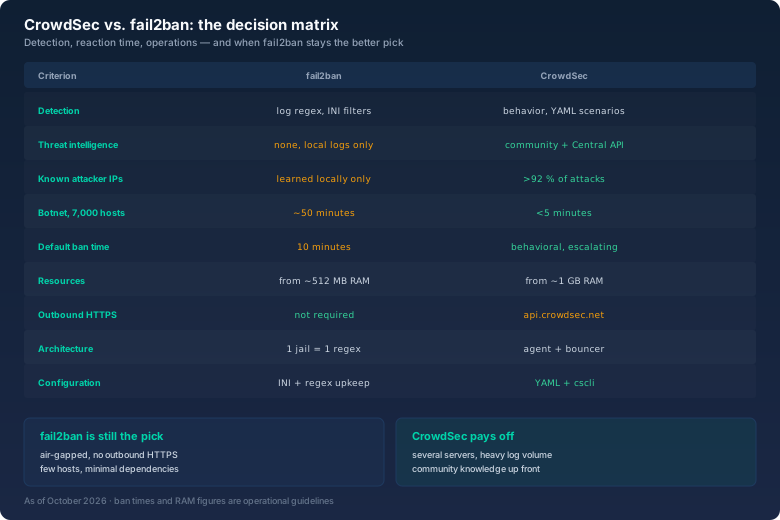
The matrix makes the pattern visible. CrowdSec wins wherever knowledge about the attacker matters: threat intelligence, known addresses, botnet reaction time, ban duration, and the split between agent and bouncer. fail2ban wins in the categories that are easy to overlook: no outbound traffic, less memory, and minimal dependencies.
Two rows deserve a closer look. The first is outbound HTTPS: for CrowdSec the path to the Central API is not an optional extra, it is the core of the thing. Where that path is blocked, CrowdSec loses its biggest advantage. The second is memory use: on small VPS instances fail2ban is not the worse choice, it is the realistic one.
What I use when
From the matrix and my own incidents comes a mapping I have been running for two years now.
On a single small server where everything is tight anyway, fail2ban stays. One jail for sshd, a sensible ban time, one whitelist entry for the monitoring, and the job is done. Running CrowdSec there would cost more effort than it gains.
In a network without outbound internet access, in a customer network with requirements, or in a test lab without internet, fail2ban also stays. There it is not a stopgap, it is the only option that works without contortions. You could install CrowdSec, but you would not reach the community list and therefore not use the heart of the tool.
Anywhere several servers work together and log volumes pile up, I take CrowdSec. On the web pool, on the mail gateway, and on anything facing the outside, the agent runs and the bouncers distribute decisions to where they are needed. The gain does not come from one better rule, it comes from a ban on one host applying on all of them at once, and from outside knowledge arriving before my first log line.
And running both? That is allowed and described by CrowdSec itself, though it only makes sense as a transition. If you want to keep fail2ban while easing your way in, you can run them side by side, but then you maintain two whitelists and make sure they do not clear each other's ban lists. I ran it that way for three months and then turned off the sshd jail in fail2ban, because it had become pure double work.
The verdict: two tools, two jobs
fail2ban is not an old tool you leave behind. It is a precise, dependency-free rule evaluator, and it is the right pick exactly when you want no outbound traffic, have little memory, or need one jail for one service. It kept brute force off my back for ten years.
CrowdSec solves a different problem. It extends detection with behaviour and your own view with other people's knowledge. The 92 % of known attacker IPs and the under-five-minute result in the botnet case do not come from better forensics, they come from the decision not to defend alone any more. If you run several servers, that decision buys you a lot of time you would otherwise spend working through logs.
Anyone who wants neither still has to deal with whitelisting. My monitoring taught me that this spring. And the lesson is not that fail2ban is bad, it is that an automatic banning system is only ever as good as its list of exceptions.