
2018, some random Tuesday. The client calls. "We have a ransomware incident." All VMs encrypted. The backups too. The last offline backup: three weeks old. Out of a year of email archives and financial data, all that remained was what sat on an external USB drive in the safe — which nobody knew was still readable.
Backup is the least loved job in IT. Nobody sees whether it's running. But everyone sees when it isn't.
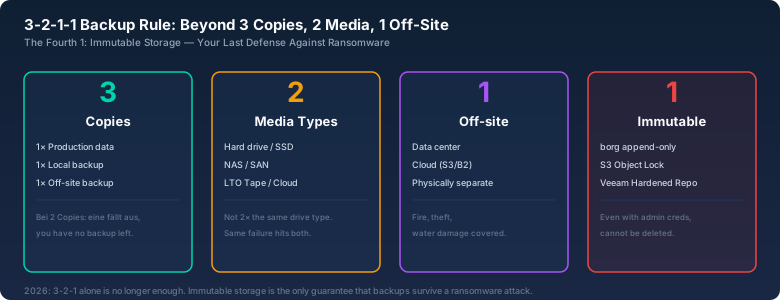
3-2-1-1: The Rule, and Why 3-2-1 Alone Isn't Enough in 2026
The classic 3-2-1 rule: three copies of your data, on two different media types, one copy off-site. That was state of the art in 2005. In 2026, it's not enough, because "off-site" now means "in the cloud" — and cloud backups have their own pitfalls.
I work with 3-2-1-1: three copies, two media types, one off-site, one immutable. Immutable means: the backup cannot be deleted or modified, not even by the admin account that wrote it. With Borg, you get this via borg serve --append-only. With Veeam, via a Linux Hardened Repository. With AWS S3, via Object Lock in compliance mode.
The reason is simple: if an attacker has your admin creds — and during a ransomware incident, they often do — they delete your backups first. Immutable storage prevents that. The attacker would have to wait until the retention period expires, and in my case that's at least 30 days.
BorgBackup: My Daily Companion
Borg is a deduplicating, compressing backup tool. It runs over SSH, requires no agent on the target, and repos are encrypted. I have been backing up all my Linux servers with it since 2019.
A typical setup looks like this:
# Initialization (once per repo)
borg init --encryption=repokey-blake2 borg@backup-server:/backup/server01

# Daily backup
borg create --stats --progress \
  --compression lz4 \
  borg@backup-server:/backup/server01::'{hostname}-{now:%Y-%m-%d_%H:%M}' \
  /etc /home /var/lib/docker/volumes /srv

# Prune old backups (keep 7 daily, 4 weekly, 6 monthly)
borg prune --keep-daily=7 --keep-weekly=4 --keep-monthly=6 \
  borg@backup-server:/backup/server01
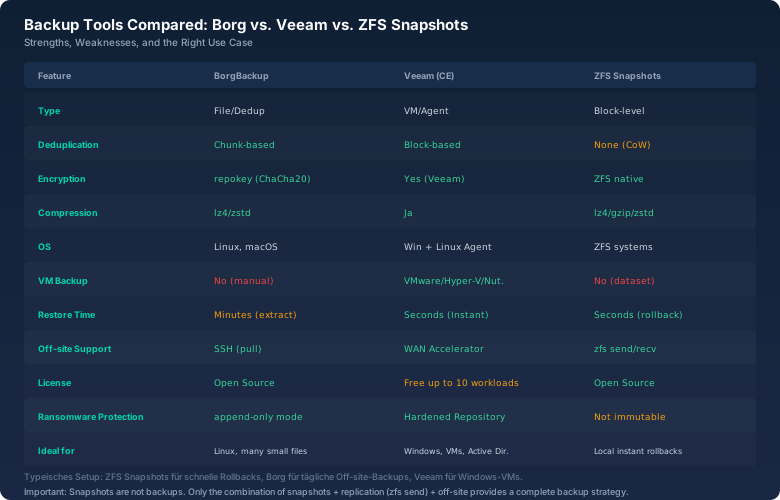
What Borg does brutally well: deduplication. Thirty daily backups of a server with 100 GB of data don't take 3 TB — they take about 115 GB. Borg finds identical chunks across file boundaries and stores them once. lz4 compression saves another 30-40% while costing barely any CPU.
My biggest Borg mistake: no borg check in the cron job. After 18 months, some chunks in the repo were corrupt — a bad RAM stick on the backup server. Borg noticed when reading and aborted. I could recover nothing. Since then, once a week:
borg check --verify-data borg@backup-server:/backup/server01This reads the entire repo once and checks every chunk against its hash. On a 500 GB repo, that takes about 4 hours. The alternative: spending time and money repairing a corrupt backup.
Veeam: When You Need More Than Just Files
For Windows servers and VMware/Hyper-V, there is no alternative to Veeam. The Veeam Agent for Linux is okay, but Borg is lighter. Veeam Community Edition is free for up to 10 workloads — enough for most small environments.
Veeam's killer feature is Instant Recovery. You boot a VM directly from the backup repository without fully restoring it first. The hypervisor reads from backup storage, and once the VM is running, Veeam migrates the data in the background (Storage vMotion/Quick Migration) to production storage. Downtime: under two minutes.
What Veeam does poorly: Linux file-level backups with the agent. The agent pulls a snapshot, mounts it, and copies file by file. No block-level dedup. For 5 million small files (mail server, Nextcloud), this takes multiples of Borg's time. For that use case, I still run Borg alongside.
ZFS Snapshots: Not a Backup, but the First Step
Snapshots aren't backups. But they're the first thing you should configure before you even think about backups. A ZFS snapshot freezes the state of a dataset at a point in time. No copying, no latency. It only consumes the space of blocks changed since the snapshot was taken.
My standard snapshot plan with sanoid:
# /etc/sanoid/sanoid.conf
[data/docker]
    use_template = production
    recursive = yes

[template_production]
    frequently = 0
    hourly = 24
    daily = 30
    monthly = 3
    yearly = 1
    autosnap = yes
    autoprune = yes
This gives me 24 hourly, 30 daily, 3 monthly, and 1 yearly snapshot — with 200 GB of Docker data, all snapshots together currently use 12 GB, because most container volumes barely change.
The advantage over Borg: restoring a single snapshot takes seconds. zfs rollback data/docker@2026-09-08_00:00 and the clock is turned back. Borg would first need to extract the entire backup.
The Download Time Calculator: How Long Does Your Off-site Backup Really Take?
This is the part most people skip. A full backup over WAN to the data center: 500 GB of data. Your internet connection: 100 Mbps symmetric. With the bitcalc Download Time Calculator, I get 11.9 hours — theoretically.
In practice, you measure with iperf3 between site A and B. At one client with a "100 Mbps" connection, only 65 Mbps arrived at the other end because the uplink provider's route was congested. Instead of 12 hours, the first full backup took 18. And that applies to every full backup, not just the first.
My solution: initial seeding. The first copy of the data goes onto an external drive and into the car to the data center. Import at the destination, then only incremental changes over WAN. Borg does this automatically: borg create to an external drive, carry the drive to the target server, mount the drive, and from then on borg create runs over SSH and only transfers the delta.
The Restore Test: The Only Thing That Counts
A backup you have never restored isn't a backup. It's a hope. At one client, I ran a complete disaster recovery test scenario in 2019: server off, new server on, only the Borg repos as the source. Result: 6 hours until all services were back up. Four of those hours for data recovery, two hours for what had no backup: /etc/fstab entries for NFS mounts, docker-compose files someone manually edited and never put in the backup directory.
My lessons learned from that test:
- Document the recovery. Not "somewhere in the wiki," but a 20-line shell script that rebuilds the server from scratch. The script itself lives in the backup.
- Test at least quarterly. None of that "once a year" nonsense. A quarter is the maximum duration you can afford if you discover backups have been broken for three months.
- Monitoring for backups. Borg and Veeam send emails on success and failure. But I also have a "canary" cron job: once a week, a test file is backed up, extracted from the backup, and compared against the original.
- Backups are not disaster recovery. A DR plan tells you what to restore in which order. DNS first — otherwise your servers can't find each other. Then DHCP, then Active Directory/SSO, then databases, then applications.
echo "canary-$(date -Iseconds)" > /tmp/canary.txtborg create backup-server::canary /tmp/canary.txtborg extract backup-server::canary --stdout /tmp/canary.txt | diff /tmp/canary.txt -if [ $? -ne 0 ]; then echo "BACKUP BROKEN" | mail -s "URGENT" admin@example.com; fiRansomware: Why Immutable Backups Are Mandatory
In 2024, a mid-sized company I know paid €450,000 to a ransomware group. Not because they had no backups. But because the attackers compromised the backup infrastructure three weeks before the actual attack and deleted the fresh backups every day. When the encryption started, the last intact backup was 23 days old.
Three layers of protection that prevent this:
1. Pull, not push. The backup server pulls data from the client, not the other way around. The client has no credentials for the backup server. Borg does this right by default: the client pushes, but with borg serve --append-only it can only write new data, not delete anything.
2. Air gap. At least one backup medium is physically or logically disconnected from the network. LTO tapes in a safe, external drives in rotation (one always in the cabinet, one on the server), or cloud storage with a write-only account.
3. Retention delay. Your primary backup tool has a deletion delay. Even if someone has your creds and runs borg prune, the data isn't actually deleted for X days. With Borg: borg compact --cleanup-commits only runs once a week, manually.
What I Would Never Do Differently Today
Before setting up backups, I ask three things:
1. What's the RPO (Recovery Point Objective)? How much data loss is acceptable? Accounting: 1 hour. Dev wiki: 24 hours. This determines whether hourly or daily snapshots are enough.
2. What's the RTO (Recovery Time Objective)? How fast does the system need to be back? Production database: 15 minutes. Internal monitoring: 8 hours. This determines whether you need snapshots, instant recovery, or full restore.
3. Who has access to the backup servers? If the domain admin is also the backup admin, you can skip the immutable part — the attacker has all the keys. Separate accounts, separate 2FA tokens.
Conclusion
Backup isn't a tool. Backup is a process. Borg, Veeam, and ZFS are the tools. What matters: you test restores regularly, you have an off-site backup, and one backup is immutable. Everything else is noise.
And: RAID is not a backup. We all knew that already. Yet in every second incident I see, RAID is the only "backup solution." Two simultaneous drive failures are rare, but they happen. Exactly when you can least afford them.