
RAID is not a backup. Every sysadmin knows this line, and it's true. People still pick the wrong RAID level anyway — not because they're stupid, but because the decision has an uncomfortable number of moving parts. Capacity, performance, fault tolerance, rebuild time, controller cost. And then someone from procurement shows up saying "the 18 TB drives are on sale."
This isn't a theory piece. It's about what bites you in the real world: what a RAID 5 rebuild at 18 TB means for your URE risk, why RAID 6 is non-negotiable for large arrays, and when RAID 10 is worth the premium. With real numbers from our RAID calculator and IOPS calculator.
The contenders: what the common RAID levels actually do
Before we get into the weeds, a quick lay of the land. Not every RAID level makes sense for every job, and some combinations are just expensive ways to lose data.
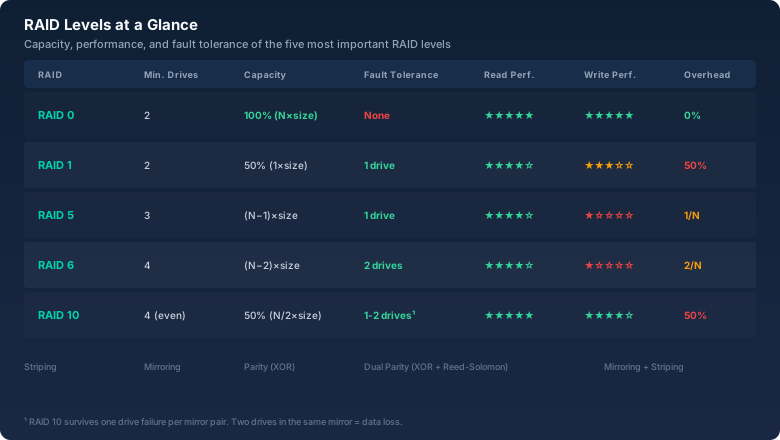
RAID 0 — striping with no safety net
Data gets split into blocks and written across all drives in alternating stripes. You get the full capacity of every drive and the highest write throughput the controller can push. But: lose one drive, lose everything. Every file on every disk. There's no redundancy, no parity, nothing.
When this is okay: temporary data, render caches, swap space — anything where losing it doesn't hurt. Databases, VMs, file servers? Absolutely not.
RAID 1 — mirroring
Two drives, identical content. One dies, the other keeps running. Capacity is half of what you installed. Reads can be optimized by the controller (pull from both), writes go out twice — so no speed gain there.
RAID 1 is the simplest form of redundancy and perfectly fine for boot drives or small critical volumes. The downside: 50% overhead. Two 2 TB drives give you 2 TB usable. Doesn't scale.
RAID 5 — striping with distributed parity
The classic "good enough" middle ground. Data and parity are spread across all drives. Lose one drive, the missing data gets rebuilt from the remaining drives plus parity. Capacity = (N−1) × drive size. Minimum three drives.
This is where it gets interesting. RAID 5 was the default for file servers, small databases, anything that needed to be "solid and affordable" for about two decades. Then drives got big.
RAID 6 — double parity
Like RAID 5, but with two independent parity blocks (P via XOR, Q via Reed-Solomon). Capacity = (N−2) × drive size. Minimum four drives. Survives two simultaneous drive failures.
RAID 6 is the answer to the problem RAID 5 developed once drives crossed the 2 TB mark. More on that in a moment.
RAID 10 — mirroring plus striping
A combination of RAID 1 and RAID 0: drives are mirrored first, then the mirrors are striped. Capacity = 50% of raw. Minimum four drives. Excellent read and write performance, very fast rebuilds. But expensive.
The URE problem: why RAID 5 is a gamble with large drives
URE stands for Unrecoverable Read Error. It's a read error the drive can't fix on its own. Hard drives carry a specified URE rate — typically 1 in 10¹⁴ bits for consumer drives, 1 in 10¹⁵ for enterprise models.
10¹⁴ bits is about 12.5 terabytes. Translation: statistically, a consumer drive hits one unrecoverable read error every 12.5 TB of data read.
Now picture a RAID 5 with four 8 TB drives. Usable capacity: 24 TB. When a drive fails, the controller has to read every bit of data from the three remaining drives to rebuild — that's 24 TB. With a URE rate of 1:10¹⁴, the probability of hitting a read error during rebuild is over 85%. When that happens, the rebuild is dead. Data is gone.
RAID 6 solves this: even if a URE hits during rebuild, the second parity block has you covered. The rebuild keeps going. That's why RAID 6 is now the minimum standard for arrays with large drives (>2 TB) or many drives (>4). Every current storage guide — Dell, HPE, Synology — recommends RAID 6 or RAID 10 for production arrays.
Rebuild times: the factor nobody talks about until 2 AM
A rebuild isn't some magic process that finishes in three minutes. The controller reads every remaining drive in full and writes the reconstructed data to the replacement. With large, slow drives, this can take days.
A RAID 5 of five 18 TB NAS drives (7200 rpm) needs somewhere between 30 and 50 hours depending on controller and load. During that entire window the array is running without redundancy. If a second drive fails in those two days — and the probability isn't zero, because all drives came from the same batch and have the same age — you're done.
RAID 10 rebuilds are much faster because only the mirror of the failed drive needs to be copied, not the whole array. An 18 TB mirror rebuild takes 8 to 14 hours instead of 30+. RAID 6 takes about as long as RAID 5 but keeps one redundancy layer alive during the rebuild.
IOPS in practice: what RAID does to performance
RAID performance gets discussed in MB/s most of the time. But for databases, virtualization, and anything with lots of small random I/O, IOPS are what actually matters.
The ground rules:
- Reads: RAID 0, 5, and 6 can read from all drives in parallel. IOPS scale roughly with N. RAID 10 reads from all drives too.
- Writes on RAID 5/6: Every write needs a read-modify-write cycle: read old data, read old parity, compute new parity, write new data plus parity. That's four I/O operations per logical write — the infamous RAID 5 write penalty. Write throughput on RAID 5 is about a quarter of read throughput.
- Writes on RAID 10: Each write goes to two drives (the mirror). Write penalty = 2. Much better than RAID 5/6.
A real example using our IOPS calculator: five SAS drives at 180 IOPS each. In RAID 5 you get roughly 900 read IOPS but only 225 write IOPS. In RAID 10 you get 900 read IOPS and 450 write IOPS — twice as fast on writes, same usable capacity, but twice the drive count.
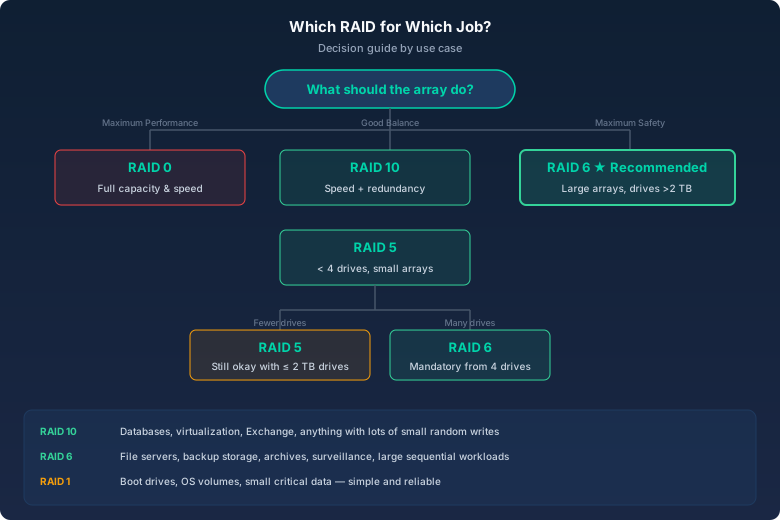
Decision matrix: which RAID for which job?
| Use case | Recommendation | Why |
|---|---|---|
| Database (OLTP) | RAID 10 | Write IOPS are critical, RAID 5 penalty kills latency |
| Virtualization (hypervisor) | RAID 10 | Lots of small I/O, multiple VMs competing simultaneously |
| File server (documents) | RAID 6 | High capacity, mostly sequential load, solid fault tolerance |
| Backup storage | RAID 6 | Maximum capacity, infrequent access, rebuild time doesn't matter |
| Video editing / rendering | RAID 0 or 10 | RAID 0 for pure speed (temporary), RAID 10 for safety |
| Surveillance cameras | RAID 6 | Sequential write load, capacity matters more than IOPS |
| Boot / OS drives | RAID 1 | Simple, reliable, low overhead for small drives |
The bitcalc RAID calculator: no spreadsheet, no guesswork
I built the RAID calculator exactly for these decisions. You plug in RAID level, drive count, and drive size, and it gives you usable capacity, overhead percentage, how many drives can fail, and the efficiency formula. No spreadsheet, no calculator app, no "wait, how did the N−2 thing work again?"
Paired with the IOPS calculator you get every number you need for a solid decision. The IOPS calculator shows read and write IOPS for your RAID level — write penalty included. You'll see immediately whether your RAID 5 array can handle the database load or if you need RAID 10.
What 25 years of sysadmin work taught me
A few things that don't show up in spec sheets:
- Drives from the same batch die together. You buy six drives, and after three years one fails — the other five are on borrowed time. Plan your rebuilds so they finish before the next one goes.
- Hot spare is not a luxury. A built-in spare that starts the rebuild automatically saves you the 3 AM phone call and the drive to the data center. For large arrays, it's the best money you'll spend.
- The RAID controller is a single point of failure. A dead controller can make an entire array unreadable. If the data matters: controller redundancy or a second identical system for emergencies.
- Backups aren't RAID, but RAID without backup is asking for it. Deleted files, ransomware, accidental overwrites — RAID protects against exactly none of these. Make backups. Test the backups. Then make more backups.
Bottom line
RAID 5 was the right call in 2005. With 2 TB drives and four slots in a server, it was fine. Today, with 18 TB drives and URE rates still sitting at 1:10¹⁴ for consumer models, RAID 5 is a calculated risk. For data you don't care about, okay. For everything else: RAID 6 or RAID 10.
The good news: the premium for "more safety" is usually one extra drive. A RAID 6 of five 8 TB drives gives you 24 TB usable. A RAID 5 of four 8 TB drives also gives you 24 TB — but without the second parity. That's not a massive investment for the difference between "array survives the rebuild" and "restore from backup."