
It was 23:40 on a Tuesday and a customer's database had stopped writing. No crash, no alert from monitoring, just a Postgres log full of "No space left on device". The cause was not the database but the partitioning: /var/lib/postgresql lived on its own logical volume, created two years earlier with exactly 200 GB. Growth had not been part of the plan; that night 12 GB were missing.
The classic route would have meant filing a maintenance window, stopping the service, backing up the volume, repartitioning, restoring — four to six hours. The actual route took a minute of work: there was still a free drive bay in the enclosure, so pvcreate, vgextend, lvextend -r -L +100G, done. The database kept running, the customer noticed nothing, and I was back in bed at 23:50. That moment is the entire reason LVM exists. It is also why it has survived in every one of my servers even though ZFS and Btrfs can do more.
The second half of this story is less pleasant, and it explains why this article is also about traps. A colleague had the same idea, but with XFS and in the opposite direction: he wanted to shrink an oversized volume and ran lvreduce assuming the filesystem would follow. It did not. XFS cannot shrink. He lost access to 400 GB — the volume was logically smaller than the data inside it. The restore took two days because he first had to find the right snapshot chain. LVM rewards those who know the order, and punishes those who guess.
Three layers, three tools
LVM inserts a layer between disk and filesystem: the device mapper. Three components form the stack:
- Physical volume (PV): a disk or partition that LVM may use. Created with
pvcreate. LVM writes a metadata header, overwriting existing filesystem signatures. - Volume group (VG): a pool made of one or more PVs. Created with
vgcreate. The VG is the layer that grows and shrinks. - Logical volume (LV): the slice that carries a filesystem. Created with
lvcreate. The LV is what you put into/etc/fstab.
The arithmetic behind it is unspectacular, but it explains every limit: a VG can only hand out as much volume as its PVs provide. Once the VG is full, only another disk helps — an LV can only promise size within that pool. Which is why the real trick is not growth but the pool itself. Build a VG from three disks instead of one and you can survive a five-year expansion without rebuilding anything.
The smallest unit is the extent, 4 MiB by default. lvcreate -L 500G rounds to a multiple of 4 MiB, and -l (lowercase L) counts extents instead of gigabytes. In practice this is the most common manual-arithmetic mistake: 500 GB is 128,000 extents, not 500 of anything.
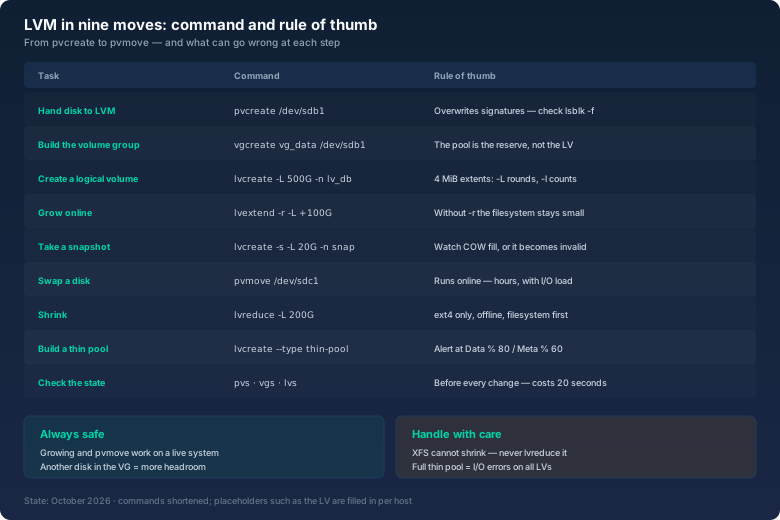
Before every change, look at the current state. Three commands give you everything you need, if you read their columns:
# pvs
  PV         VG      Fmt  Attr PSize   PFree
  /dev/sdb1  vg_data lvm2 a--   <3.64t  <1.64t
  /dev/sdc1  vg_data lvm2 a--   <1.82t   1.82t
# vgs
  VG      #PV #LV #SN Attr   VSize  VFree
  vg_data   2   3   0 wz--n-  5.46t  3.46t
# lvs -o +data_percent,metadata_percent
  LV      VG      Attr       LSize   Data%  Meta%
  lv_root vg_data -wi-ao---- 100.00g
  lv_var  vg_data -wi-ao---- 200.00g
  lv_db   vg_data -wi-ao---- 200.00g
  pool    vg_data twi-aotz-- 1.00t   41.20  12.60
PFree in the PV output and VFree in the VG output are the budget a new LV or a growth step is paid from. The last two percentages only concern thin pools, and they are the single most important early indicator in the whole setup. If they are not in your monitoring, you will notice a filling pool when applications start throwing I/O errors.
The classic: growing a live system
Insert the disk, create a partition (parted or sfdisk, type 8e for LVM), then three commands. Important: pvcreate overwrites filesystem signatures on the target disk. On a reused disk that is intended; on the wrong disk it is the most expensive typo of the year. So I always check first with lsblk -f and wipefs -n what is on the device.
# pvcreate /dev/sdd1
  Physical volume "/dev/sdd1" successfully created.
# vgextend vg_data /dev/sdd1
  Volume group "vg_data" successfully extended
# lvextend -r -L +100G /dev/vg_data/lv_db
  Size of logical volume vg_data/lv_db changed from 200.00 GiB to 300.00 GiB.
  Logical volume vg_data/lv_db successfully resized.
  resize2fs 1.47.0: /dev/mapper/vg_data-lv_db on 78643200 (4k) blocks
  The filesystem on /dev/mapper/vg_data-lv_db is now 78643200 blocks long.
The -r is the part you forget exactly once: it makes LVM grow the filesystem along with the volume. Without -r the LV is larger but the filesystem inside is unchanged — the space exists and is unusable. If you prefer to see the steps separately, do it the classic way: lvextend -L +100G /dev/vg_data/lv_db, then resize2fs for ext4 or xfs_growfs /mnt/db for XFS. The latter takes the mount point, not the device — a detail that goes wrong in scripts all the time.
Two numbers from my own work: on a machine with 40 GB free in the VG, growing by 100 GB took under two seconds, because only metadata was written. The following resize2fs only deals with the blocks that were just added. That is why growth is safe on a production database server, while shrinking never is a live operation.
Snapshots: short windows, not backups
An LVM snapshot is a copy on paper. Creating one produces a new LV that points at the same data as the original. Only when a block in the original changes is the old block copied into the snapshot — copy on write. The snapshot therefore does not need the size of the original, but the size of the changes that accumulate during its lifetime.
# lvcreate -s -L 20G -n snap_db /dev/vg_data/lv_db
  Logical volume "snap_db" created.
This is where the most common misjudgement sits. "20 percent of the original" is not a rule, it is a prejudice. The relevant question is: how much does the application write during the period the snapshot is supposed to live? For a consistent backup run of 40 minutes at 8 MB/s of write load that is roughly 19 GB — so 20 GB is correctly sized and 40 GB would be waste. For a snapshot that serves as a rollback point for a week-long upgrade, the same arithmetic looks completely different, and then the snapshot probably does not belong on the same volume at all.
If the allocated space fills up, something unpleasant happens: LVM marks the snapshot invalid and removes it. The snapshot is not "half broken", it is gone. In lvs output that shows as Status: INVALID, without warning, unless someone watches the COW fill level. That is why lvs -o name,origin,data_percent belongs in every backup script — not in application monitoring, but in the script that uses the snapshot.
What snapshots can do: take a consistent backup without stopping the application; run a test against yesterday's data; start a package upgrade with a rollback path. What they cannot do: survive a failed disk. The snapshot lives on the same VG, meaning the same physical disks. A disk failure takes the original and the snapshot with it. Which is why the sentence from my backup article still holds: a snapshot is a time window, not a backup.
Thin pools: elegant, with an expiry date
Thin provisioning inverts the logic: a thin pool is created once with physical space, and the LVs made from it may collectively promise more than the pool holds. A 1 TB pool can carry five LVs of 400 GB each, as long as less than 1 TB is actually written.
# lvcreate --type thin-pool -L 1T -n pool vg_data
# lvcreate -V 400G --thinpool pool -n lv_www
# lvcreate -V 400G --thinpool pool -n lv_mail
The upside is convenience: volumes get generous sizes without disks being reserved. The price is a crisis source of its own kind. When the pool fills, it is not the applications with the largest consumption that suffer — it is all of them. The thin data area sits beneath every LV in the pool, so all LVs hit write errors at the same moment instead of getting a clean "disk full" message. A capacity question turns into an application outage.
So thin pools get one rule I have not broken since an incident: the alert threshold for Data% is 80 and for Meta% is 60, and both are wired to an alarm. Meta% gets forgotten regularly, because nobody expects metadata to fill up — it is small (typically 1 to 4 GB) and grows with many small snapshots and thin volumes. A VG with 3,000 snapshots can suffocate on metadata while data space is plentiful. And: lvextend only helps a thin pool if the VG still has free extents, so never plan the last free slot in the pool.
Shrinking: ext4 yes, XFS no
This is the trap from the introduction, and it has nothing to do with courage, only with filesystem physics. XFS grows online and cannot shrink — not with LVM, not with xfs_repair, not with third-party tools. If you want tighter limits on XFS, you back up, recreate, restore. Period.
ext4 can shrink, but only offline and in this order: shrink the filesystem first, then the LV. Do it the other way round and the data sits outside its own container, which means it is lost.
# umount /mnt/db
# e2fsck -f /dev/mapper/vg_data-lv_db
# resize2fs /dev/mapper/vg_data-lv_db 200G
# lvreduce -L 200G /dev/mapper/vg_data-lv_db
# mount /mnt/db
If you want to avoid the exact block arithmetic, give resize2fs a target slightly below the LV size and then let lvextend -r pull the LV up to the real filesystem size. Unspectacular, but it saves the counting.
Swapping disks without a maintenance window
Replacing a physical volume while the VG stays online is the most elegant part of LVM. pvmove relocates the extents onto the remaining (or newly added) PVs — online, with applications running.
# pvmove /dev/sdc1
  /dev/sdc1: Moved: 8.4% ... 100.0%
# vgreduce vg_data /dev/sdc1
# pvremove /dev/sdc1
Reality: on a 2 TB disk with roughly 120 MB/s of copy throughput that is a bit under four hours. During that time there is I/O load on the VG, and monitoring should watch response times rather than throughput. Two conditions must hold beforehand: target PVs with enough free extents in the same VG, and no snapshots with filled COW areas that pvmove has to drag along. On servers with three hours of maintenance per year, this is still my favourite tool: install the replacement, run pvmove, drink coffee, pull the old disk afterwards.
When LVM is the wrong answer
I like LVM, but it is no substitute for a filesystem with checksums. LVM distributes blocks; it knows nothing about data integrity, nothing about per-block checksums, nothing about self-healing. Anyone who needs redundancy and fears bit rot is better served by ZFS — snapshots there are immutable, checksums ubiquitous and pools understand redundancy. Btrfs offers part of that at filesystem level, with a different maturity level.
The division of labour I work with: LVM for layout and flexibility, a classic filesystem for the data, and a checksum layer only where redundancy really matters. If encryption is added on top, LUKS sits below the filesystem and above the disk — the order of LVM and LUKS decides whether you can snapshot the encrypted side or not, and the LUKS article covers that.
And then there is the size arithmetic that reliably misleads everyone: drive vendors ship terabytes, the filesystem expects tebibytes. A "10 TB disk" holds 9.1 TiB, and after LVM metadata and extent rounding roughly 9.0 TiB remain depending on pool configuration. Anyone planning capacity should convert that once, properly — that is what the capacity converter is for, showing decimal and binary side by side.
Five rules from five years of LVM in production
- Plan the pool before the volume: a VG built from several PVs is insurance you cannot buy later. One disk more in the pool beats one LV at the limit.
- Grow online, shrink offline only: ext4 shrinks inside a maintenance window, XFS never. Tighter limits on a live XFS system mean backup and restore.
- Snapshots as windows, never as replacements: size them for expected changes, check the COW fill level inside the script, remove them after every backup.
- Monitor thin pools: alert at
Data%80 andMeta%60. A full pool is an outage of all LVs, not a capacity message. - Measure before changing anything:
pvs,vgs,lvsandlsblk -ftake twenty seconds. Nearly every LVM accident starts with a command aimed at the wrong device.
Bottom line
LVM is not spectacle, it is a layout tool: three layers, one extent grid and a handful of commands you learn once. Its value shows up not during setup but two years later, when a volume has to grow without a maintenance window and nobody may stop the service. The price is responsibility: treat snapshots as backups, run thin pools without alarms or shrink XFS, and you will collect exactly the outages the system was supposed to prevent.
That database server is still running, by the way — on a VG with three disks and 400 GB of headroom. The volume has grown twice since, both times on a Tuesday evening, and nobody but me ever noticed. That is what admin work should look like.