
Ten years ago, a TLS certificate was a line item in your annual budget. Two hundred euros for a wildcard cert from Sectigo or DigiCert — and then you'd miss the expiry date on December 23rd because the reminder calendar was hanging in the office and you were already on Christmas break. I drove to the data center on Christmas Eve twice because the monitoring on an HP-UX box hadn't pinged an expired qa.example.com. Today, with Let's Encrypt, a certificate costs me zero euros and exactly the time it takes to set up automation. Get it right once and it runs. When it doesn't run, it's usually one of the ten things I'm about to list.
This article is for admins who are done renewing certificates by hand. I'll show you three paths — certbot (the standard), dehydrated (the lightweight), and Traefik (the reverse proxy that does all the work for you). Plus the ten most common renewal failures that have already cost me hours, and a monitoring setup that warns you before your boss does.
Why automate at all — and why wildcards now?
Let's Encrypt certificates last 90 days. That's not a bug, it's intentional — short lifetimes force automation. Anyone renewing 90-day certs manually has lost control of their life. I tried it for one quarter when Let's Encrypt was new in 2016. After the third missed renewal, a cron job became mandatory.
The classic approach is the HTTP-01 challenge: certbot drops a file into your .well-known/acme-challenge/ directory, Let's Encrypt fetches it over port 80, and that proves you own the server. Works perfectly as long as your web server is reachable from the outside on port 80. Fails spectacularly when you have internal hosts, load balancers, or services without a public port 80.
Then there's the DNS-01 challenge. Instead of a file, you create a TXT record in your DNS zone. Let's Encrypt queries _acme-challenge.yourdomain.com, finds the TXT record, and issues the certificate. The key advantage: DNS-01 enables wildcard certificates. One certificate for *.yourdomain.com that works on any number of subdomains — no per-sub validation required. For Kubernetes clusters, staging environments with dynamic subdomains, or internal services that never see the public internet, this is the only sensible option.
The catch: you need a DNS provider with an API — and an API token stored in your hook script. More on that in a moment.
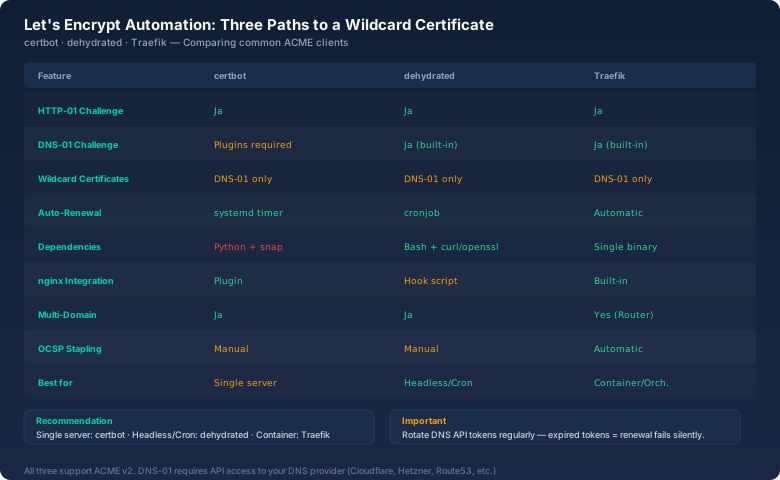
Path 1: certbot — the heavyweight with quirks
certbot is the EFF reference implementation and available on most servers via apt install certbot. For standard setups with HTTP-01 on nginx or Apache, there's little reason to use anything else. A single certbot --nginx -d example.com and it runs. The cron job at /etc/cron.d/certbot or the systemd timer certbot.timer handles the rest.
Things get interesting with DNS-01 and a plugin. For Cloudflare, it looks like this:
# Cloudflare API token in /etc/letsencrypt/cloudflare.ini
# dns_cloudflare_api_token = YOUR_TOKEN_HERE

certbot certonly \
  --dns-cloudflare \
  --dns-cloudflare-credentials /etc/letsencrypt/cloudflare.ini \
  -d "*.yourdomain.com" -d yourdomain.com \
  --non-interactive --agree-tos \
  -m admin@yourdomain.com
This issues a wildcard plus the apex certificate. The credentials file should be chmod 600, and the token should have the minimum necessary permissions — Zone:Zone:Read and Zone:DNS:Edit on Cloudflare is enough.
certbot's downside: it's a Python monolith with dependencies, which is annoying on slim containers and embedded systems. It also defaults to storing certs in /etc/letsencrypt/live/ while managing the actual files in /etc/letsencrypt/archive/ via symlinks — a well-thought-out system until you start rsyncing directories. I've had to reissue certificates more than once because I accidentally copied the symlink instead of the file behind it.
Path 2: dehydrated — when you just need the cert
dehydrated is a Bash script. No Python, no runtime, no dependencies beyond curl, openssl, and sed — all of which exist on any reasonably current Linux box. That's exactly why I run it on my Raspberry Pi cluster: 70 lines of hook script for the Hetzner DNS API, and it renews four wildcard certs for four internal subdomains without me ever having to think about it again.
The configuration is minimal. In /etc/dehydrated/config:
CA="https://acme-v02.api.letsencrypt.org/directory"
CHALLENGETYPE="dns-01"
HOOK="/etc/dehydrated/hook.sh"
CERTDIR="/etc/dehydrated/certs"
CONTACT_EMAIL="admin@yourdomain.com"
In /etc/dehydrated/domains.txt you list your domains:
yourdomain.com *.yourdomain.com
other-domain.com *.other-domain.com
The hook is the heart of it. dehydrated calls it with deploy_challenge and clean_challenge. Inside the hook, you set the TXT record via an API call and delete it after validation. For a homelab admin securing five internal services, the setup takes 30 minutes — and then runs for years without maintenance. Last month I rebuilt a machine from 2022 and the dehydrated setup from back then was still running flawlessly. That's the kind of software I like.
The downside: dehydrated has no built-in web server integration. You have to wire up the certificates into your nginx or Apache config yourself and trigger a reload. The hook script has to handle that. If you want true fire-and-forget, Traefik is the better choice.
Path 3: Traefik — zero-config TLS as a side effect
Traefik is a reverse proxy that runs as a sidecar in Docker and Kubernetes environments. What matters for our context: Traefik automatically fetches Let's Encrypt certificates the moment you register a new service with a Host label. No cron job, no hook script, no manual reload. You start Traefik once with a certificate resolver, and every subsequent deployment gets TLS for free.
Minimal Traefik setup with Docker and Cloudflare DNS-01:
# docker-compose.yml (excerpt)
services:
  traefik:
    image: traefik:v3.2
    command:
      - "--certificatesresolvers.le.acme.dnschallenge=true"
      - "--certificatesresolvers.le.acme.dnschallenge.provider=cloudflare"
      - "--certificatesresolvers.le.acme.email=admin@yourdomain.com"
      - "--certificatesresolvers.le.acme.storage=/letsencrypt/acme.json"
    environment:
      - CF_API_EMAIL=admin@yourdomain.com
      - CF_DNS_API_TOKEN=${CF_DNS_API_TOKEN}
    ports:
      - "80:80"
      - "443:443"
    volumes:
      - ./letsencrypt:/letsencrypt
Each new container just needs labels:
labels:
  - "traefik.http.routers.myservice.rule=Host(`app.yourdomain.com`)"
  - "traefik.http.routers.myservice.tls.certresolver=le"
Done. Traefik validates the domain via DNS-01, issues the certificate, stores it in acme.json, and renews it 30 days before expiry automatically. This is the gold standard when you're orchestrating containers. The only catch: Traefik is a whole piece of software you have to run, and the acme.json format isn't compatible with other tools. If you want to use the certificate outside of Traefik, you need to extract it from the JSON with a script.
The 10 renewal failures that actually happened to me
I've debugged more certificate renewals over the last eight years than I care to remember. Here are the ten failures that will hit you eventually — sorted by the amount of time I spent troubleshooting each one.
1. Firewall blocks port 80 (HTTP-01)
The classic. You've configured HTTP-01, but your firewall — or your hoster's — is blocking inbound connections on port 80. certbot times out. The fix is either opening port 80 or switching to DNS-01. I recently spent 45 minutes on a Hetzner Cloud box before remembering I'd disabled the IPv6 port-80 firewall rule three months earlier. Let's Encrypt prefers IPv6 when an AAAA record exists — a detail none of the three tools document prominently enough.
2. Expired or incorrectly scoped DNS API token
DNS API tokens expire, get rotated, or come from a test environment you deleted long ago. The error message is usually a cryptic 403 Forbidden or authentication failed. I've made a habit of storing tokens in a central .env file and running a quarterly script to verify they're still valid. In larger teams, tokens often end up on the laptop of an admin who leaves the company — and then all wildcard certs fail at once.
3. Rate limits: 50 certificates per domain per week
Let's Encrypt has a hard limit: 50 issued certificates per registered domain per week (as of September 2026). If you have a CI/CD system that requests a new certificate on every deployment — for instance, because you're not persisting acme.json — you're locked out after 50 deploys. Until the following Monday at 00:00 UTC. This happened to me with a staging Kubernetes cluster that requested a new Traefik cert on every terraform apply. Since then, staging always runs against the Let's Encrypt Staging Environment.
4. DNS propagation too slow
The DNS-01 challenge requires your TXT record to be resolvable worldwide before Let's Encrypt queries it. With some providers, propagation takes 60 seconds or longer, especially if you have multiple nameservers in different regions. dehydrated doesn't include a sleep by default — you need to add it in your hook. Thirty seconds of sleep plus an explicit lookup against ns1.yourprovider.com before continuing will save you the 3 a.m. debugging session.
5. CAA records blocking Let's Encrypt
A CAA DNS record tells the world which Certificate Authority is allowed to issue for your domain. If it says 0 issue "digicert.com", Let's Encrypt will reject your request. I inherited this on a domain previously managed by a PCI-DSS-compliant service provider. dig CAA yourdomain.com shows you whether you have a problem. Change it to 0 issue "letsencrypt.org" or delete the record entirely.
6. Symlinks or wrong paths after certbot renewal
certbot renews the certificate and updates the symlinks. If your web server doesn't resolve the symlinks — for example, because you started the container with a bind mount to the symlink target instead of the directory — it serves the old certificate. openssl s_client -connect yourdomain.com:443 -servername yourdomain.com | openssl x509 -noout -dates shows the actual validity dates. If they don't match the filesystem, you've probably got a symlink problem.
7. Let's Encrypt CA server unreachable
Let's Encrypt runs on acme-v02.api.letsencrypt.org. If your server can't reach it — outbound HTTPS blocked, broken DNS, proxy without internet access — renewal fails. For me it was a Squid proxy that passed HTTP but silently dropped HTTPS traffic. curl -v https://acme-v02.api.letsencrypt.org/directory from the server's perspective tests reachability.
8. Wrong file permissions after renewal
certbot and dehydrated write new certificate files with the permissions of the executing user. If your web server runs as www-data and the certificate is root:root 600, it can't read it. Build a chown and chmod 640 into your hook after every renewal. Yes, this happened to me too — nginx died at 4:30 a.m. with Permission denied on privkey.pem after a renewal. Since then, every hook has an explicit chown www-data:www-data /path/to/certs/*.
9. OCSP stapling and stale intermediate certificates
After a renewal, the web server needs to reload the chain of server certificate and intermediate CA certificates. If your nginx or Apache doesn't update the intermediate, OCSP stapling can fail — the server delivers a valid certificate, but clients' OCSP validation fails. The error is subtle because browsers still accept the certificate (they fetch the OCSP response themselves), but monitoring tools and API clients break. certbot renew --force-renewal followed by nginx -t && systemctl reload nginx fixes it.
10. Wrong system time
ACME protocol validation depends on correct system time. If your clock is off by more than a few minutes — for instance, because NTP hasn't synced after a reboot — Let's Encrypt rejects the request. This loves to happen in VMs restored from snapshots. Check timedatectl status before the first renewal.
Monitoring: before your boss calls you
Certificate monitoring is one of those things every admin has on their list and keeps putting off. I run three layers that warn me for free:
Layer 1 — systemd timer: systemctl list-timers certbot shows you when the last renewal ran and when the next one is due. This is the minimum you can always check.
Layer 2 — shell script: A cron job that runs openssl s_client -connect domain:443 -servername domain </dev/null 2>/dev/null | openssl x509 -noout -enddate and sends an email when fewer than 14 days remain. I run this on a Raspberry Pi in my living room that checks 30 domains twice a day. Not a single outage in three years.
Layer 3 — external monitoring: Services like UptimeRobot or Cert Spotter monitor Certificate Transparency logs and alert you when a certificate is about to expire. This is the safety-net approach: even if both your internal cron job and the systemd timer fail, you get an external notification.
One thing I recommend from experience: test the renewal process manually once a month. Don't just check certificate validity — run a certbot renew --dry-run or dehydrated -c --force. A dry-run that worked three months ago is no guarantee it works today. API tokens expire, firewall rules change, DNS providers update their APIs. A monthly manual check has saved me from nasty surprises three times already.
Which tool for which use case?
The decision depends less on features than on your setup:
- Classic VPS with nginx: certbot. It's in your package repos, the docs are extensive, and the nginx plugin writes your config automatically. The Python ecosystem overhead doesn't matter on a VPS with 2 GB of RAM.
- Embedded, Raspberry Pi, minimal containers: dehydrated. No Python, no dependencies. I run it on a Pi Zero W with 512 MB of RAM — certbot would bring that thing to its knees.
- Docker Compose stack or Kubernetes: Traefik. Once you have more than three containers, manual certificate handling is wasted time. Traefik makes it a commodity.
For managing more than a handful of domains, a mix works best: Traefik for your container landscape, dehydrated for special cases like mail servers or external load balancers that don't have a container ecosystem.
Bottom line
Let's Encrypt democratized TLS. What was a cost factor and organizational nightmare ten years ago is now a given — provided you've set up the automation properly. The three paths I've shown here cover everything from single-server setups to multi-container clusters. The biggest enemy isn't the technology, it's neglect: a renewal setup that works today can silently break in three months. My lesson from eight years of certificate automation: test manually once a month, document your API tokens, and distribute your monitoring across two independent layers. Then you'll sleep soundly, even on Christmas Eve.