
The incident that got me into GPG started innocently. A colleague called because a freshly provisioned web server was suddenly listening on SSH port 22, even though the rollout list said 2222. The reason was easy to find: someone had edited the sshd_config on the way from staging to production instead of copying it. There was no proof, because the file carried no signature. Since then my setups follow one rule: every config file that reaches more than one server gets signed. And when you need to encrypt a backup for a colleague, you don't need a certificate authority, you need a tool that's already installed on almost every Linux box.
GPG suffers from an image problem. Most people associate it with email encryption, which hardly anyone actually uses, and with hoarding keys you never need. In daily server life, though, GPG is a wonderfully pragmatic tool. You sign files so others can verify they really come from you and are unchanged. You encrypt backups for colleagues without passing a shared password back and forth. And along the way you run a small, manageable PKI that belongs to you. This article shows how that works without the drama.
What GPG really is: a small public-key toolbox
GPG stands for GNU Privacy Guard, the free implementation of the OpenPGP standard. On Ubuntu, Debian, or Fedora it's often already there; on a fresh system a quick apt install gnupg is all it takes. Under the hood it's the same idea as TLS: a key pair with a private and a public key. What sets GPG apart from a certificate authority is the management. There's no central issuer. You trust keys directly because you know the people behind them. For a team of five admins, that's perfect.
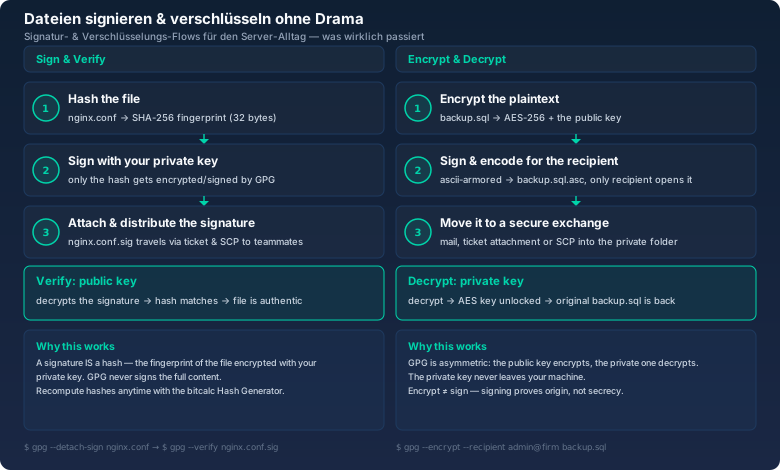
Two basic operations are all you really need day to day. Signing proves origin and integrity: you created the file, and nobody has touched it since. Encrypting ensures only the recipient can read it. The distinction matters because it's often confused: signing doesn't hide content, and encrypting doesn't make it more authentic. I've sent configs encrypted that were still wrong afterwards, only secretly wrong.
Why a signature is fundamentally a hash
Here's the part that explains everything once it clicks: a digital signature doesn't encrypt the whole file. That would be far too slow and would produce enormous signatures. Instead, GPG first computes a cryptographic hash, a fixed fingerprint of the file, and signs only that. For a 50-megabyte file that's a string of 32 bytes. The cost is independent of file size, and that's exactly what makes signing so fast.
So when you verify a signature, what happens at the core is this: GPG recomputes the hash of the file in front of you, decrypts the hash from the signature using the public key, and compares the two. If they match, the file is authentic and unchanged. It's the same fingerprint you can recompute yourself with the bitcalc Hash Generator. Once you understand that a signature is just a signed hash, you understand half of GPG.
Signing config files: where to start
You create your first key pair with gpg --generate-key. The tool asks for your name, your email address, and a passphrase. The passphrase protects your private key, so treat it like a password: twenty random characters from the bitcalc Password Generator are a solid start. What you get is visible in the key listing:
$ gpg --list-keys
/home/admin/.gnupg/pubring.kbx
--------------------------------
pub   rsa3072 2026-10-01 [SC] [expires: 2028-10-01]
      4F6A 1C29 8D03 4A72 B7C1  9E2F 3A8B D1C4 77E0 5F21
uid           [ ultimate ] Roberto Admin <roberto@firma.de>
sub   rsa3072 2026-10-01 [E] [expires: 2028-10-01]
The long line under the key ID is the fingerprint, the full identifier of your key. The short ID at the end, 77E0 5F21 here, is only an abbreviation and should never be used for security decisions, because it's prone to collisions. When in doubt, always compare the entire fingerprint. On a server, I now sign, for example, the sshd_config:
$ gpg --detach-sign --armor sshd_config
$ ls -la sshd_config*
-rw-r--r-- 1 admin admin 1523 Oct 19 08:10 sshd_config
-rw-r--r-- 1 admin admin  844 Oct 19 08:10 sshd_config.asc
--detach-sign produces a separate signature file, and --armor writes it as text instead of binary so it travels easily through tickets or version control. The result is a small file of a few hundred bytes. It holds only the signed hash, not the config. The sshd_config itself stays readable as plaintext, which is exactly what you want for configs, because they're meant to arrive on the target systems.
Once the target system has the file, it verifies it. For that, the signer's public key has to be imported there:
$ gpg --import roberto-pub.asc
$ gpg --verify sshd_config.asc sshd_config
gpg: Signature made Thu 19 Oct 2026 08:10:24 CEST
gpg:                using RSA key 4F6A 1C29 8D03 4A72 B7C1 9E2F 3A8B D1C4 77E0 5F21
gpg: Good signature from "Roberto Admin <roberto@firma.de>"
The phrase Good signature is all the magic there is. It means the file sitting on the server has exactly the hash Roberto signed on October 19. That lets a rollout script instantly tell whether the correct, approved version arrived, rather than some intermediate version someone changed along the way.
The warning nobody should skip
GPG flags it when a key isn't tied to a trusted origin. The first time you import a foreign key, you'll see WARNING: This key is not certified with a trusted signature. That's not panic, it's an honest statement: you received the key, but you haven't yet verified it really belongs to the person it claims to be from.
The fix isn't technical, it's an organizational ritual. I always compare fingerprints over a second channel. If a colleague sends a key over Slack, I call and have them read the first sixteen characters of the fingerprint. For a key shared inside the team, a chat at the desk is enough. Once you've cross-checked a new key's fingerprint with the Hash Generator, you can confirm it cleanly with gpg --edit-key and sign. After that, your checks follow a clean chain of trust.
Encrypting backups for colleagues
The second daily classic: you want to get a backup, a database dump, or a file with credentials to a colleague, but not through a shared folder protected by a password that now lives in three chat histories. This is where GPG really shines, because you encrypt for the recipient's public key, not for a shared secret.
$ gpg --encrypt --recipient anna@firma.de --armor backup.sql
$ ls -la backup.sql*
-rw-r--r-- 1 admin admin 88.4M Oct 19 09:02 backup.sql
-rw-r--r-- 1 admin admin 59.2M Oct 19 09:02 backup.sql.asc
What GPG does internally is elegant: it generates a fresh, random session key for each file and encrypts the data with it symmetrically. Then it encrypts that session key with Anna's public key. So the heavy cryptography runs on AES-256, while RSA only protects a tiny key. That's efficient, and it has a pleasant side effect: you can encrypt the same file for several recipients at once, say --recipient anna@firma.de --recipient backup-admin@firma.de, without processing it multiple times.
On her machine, Anna decrypts with her private key. GPG asks for her passphrase, then the plaintext appears:
$ gpg --decrypt backup.sql.asc > backup.sql
gpg: encrypted with 3072-bit RSA key, ID 9A04 E71B
gpg: decryption failed: No secret key
That last error is exactly where many people stumble. I encrypted the file for Anna's key, but my own machine only holds my private key. Of course I can't open it. That's not a bug, it's the intended behavior: only the holder of the matching private key gets to the data. If you want to encrypt a file for yourself and a colleague, add both as recipients, otherwise you'll be the one locked out.
Managing keys before it hurts
After a few months of GPG, more than one key pair quickly lands on an admin system. Then a few rules pay off from day one. The first concerns validity: give every key an expiration date. By default many tools create keys that never expire, and forgotten keys are a risk, because their private half might be sitting on some old disk. With gpg --edit-key you can set a validity period and extend it later if the key is still alive.
The second rule is about the loss scenario. When an admin leaves the company, deleting does nothing, because their key could have been copied. The clean answer is revocation: you generate a revocation certificate immediately after creating the key and store it somewhere safe:
$ gpg --output revoke-4F6A.asc --gen-revoke 4F6A1C298D034A72B7C19E2F3A8BD1C477E05F21
$ # print the revocation certificate and lock it in the safe
That lets you declare a signature publicly invalid without needing access to the private key. Whoever holds the certificate can invalidate the key in an emergency. In practice, put it on physical backup and in the password manager, but never only on the same machine that holds the private key, because then it's useless in a loss.
The third rule is the most important and the most often ignored: back up the private key. A lost private key means you can no longer decrypt anything encrypted for you, and you can no longer sign. There is no recovery service for that. The export writes the key into a protected file:
$ gpg --export-secret-keys --armor 4F6A1C298D034A72B7C19E2F3A8BD1C477E05F21 > roberto-secret.asc
$ # store this file encrypted in the safe, never in the plaintext backup folder
That file is the key to the kingdom, because it contains the entire private key. It belongs encrypted in the safe or in the password manager, not in a backup archive that anyone can read anyway. I manage the passphrase that protects the key like a root passphrase: in the password manager, never on a sticky note by the monitor.
Three rules for relaxed GPG
After a few years of running GPG on servers, three rules have survived, and I hand them to every setup:
- Fingerprints, not key IDs: always compare the full fingerprint over a second channel. Short key IDs are convenience, not a security feature.
- Back up the secret key before you need it: export right after creation, encrypted into the safe. Lost means irretrievably lost.
- Think of signing and encrypting as separate: mixing both in one command (--sign --encrypt) is convenient but confusing when you debug. Test the two paths separately once.
Bottom line
GPG isn't a tool for paranoia, it's for daily questions nobody else answers cleanly: is this file really from you? Does only the recipient read the backup? Both are answered with two commands, once you accept that a signature is, at its core, just a signed hash. That's exactly why the Hash Generator pairs so well with it: if you can recompute a file's fingerprint, you understand what GPG does behind the scenes.
My colleague with the edited sshd_config learned his lesson, and so did I. Since then we sign every config that leaves a system, and we encrypt backups for exactly the people who are allowed to read them. It costs one second per file and, at the start, one ten-minute session per key pair. In return, everyone on the team now knows that the file on the server is exactly the one that was approved. That's a good feeling, and it needs no certificate authority, just a key that belongs to you.