
For a long time I believed there was one right answer when it comes to filesystems. One that is simply better than the others, and anyone who runs something different just hasn't bothered to read up. Then December 2022 arrived, and one server in my own small fleet started teaching me otherwise.
The machine was a plain backup host, set up with ext4, because ext4 is simply the default filesystem of Debian everywhere. The partition ran stable for months, until one evening I filled the drive completely while restoring a hefty database dump. Not a little full, properly full, down to the last block. I cleaned up, the partition was free again, but the system stayed oddly sluggish. fsck found nothing, SMART reported everything fine, yet the box stuttered for days until I rebuilt the filesystem from scratch. Since then, when I plan any storage setup, I no longer ask which filesystem has the most features, but which one fits the job that disk is actually going to do.
This article is my attempt to answer the filesystem question for servers without tribalism. The three candidates, ext4, XFS, and Btrfs, are all serious workhorses. They have different strengths, different weaknesses, and above all different crash stories. Once you understand that, you choose by workload, not by preference.
The frame: what are we actually talking about?
All three filesystems are core components of the Linux kernel, and that's already the most important common ground. No proprietary driver, no separate module to load, nothing exotic. You format a partition with mkfs and you're off. The difference lies in history and design goals.
ext4 is the successor to ext3 and thus the direct heir of a lineage reaching back to the early 1990s. It has been the default filesystem of Debian, Ubuntu, and most other distributions for over a decade. Its biggest advantage is not technical brilliance but sheer maturity: there is hardly a scenario that hasn't been played through a thousand times. XFS was originally built by SGI for large files and high throughput on workstations and servers before it entered the Linux kernel in 2001. Btrfs is the youngest of the three and follows a different goal: it is not a plain journaling filesystem, it tries to bundle features for which the others need LVM, mdadm, and an extra tool.
A sentence I've explained to clients for years sums it up: ext4 is the dependable all-rounder, XFS is the specialist for large data, Btrfs is the Swiss Army knife that can do more but needs more attention. None is categorically the best.
The real criterion: the workload
When I plan a storage setup today, I ask myself exactly three questions. First: how many files are there, and how large are they on average? Second: what happens if the server crashes mid-write or the drive gives up? Third: which features do I genuinely need, snapshots, checksums, compression, or is robust journaling enough?
The difference between many small and few large files is the biggest lever. A web server with thousands of small PHP, log, and cache files has a different profile than an archive server holding 40 GB ISO images and backup tapes. The former needs efficient metadata handling for tens of thousands of entries, the latter must write and read large blocks sequentially with as little overhead as possible. Confuse these two profiles and you pick the wrong filesystem.
ext4: the dependable all-rounder
ext4 is my default answer for anything I'm not sure about. It's the filesystem that runs most often on servers, has the best tooling, and whose behavior after a crash is the most predictable. The 2008 revision brought three important changes: extents instead of the old block-mapping structure, which improved handling of large files, delayed allocation, and journaling that has become the standard.
Two properties are especially valuable for server operations. First, robustness after a crash: ext4 journals metadata by default, which means the filesystem structure stays consistent after a hard reboot, even if individual data blocks may be lost. Second, the tooling: e2fsck is by far the most mature repair utility of the three, and in twenty years of ext4 use I've rarely seen a case e2fsck couldn't solve.
The limits are just as clear. A filesystem can be grown online but not shrunk, that only works offline. There are no native snapshots, for that you need LVM, which in my setups often sits underneath anyway. And it verifies no data checksums, so silent bit rot goes undetected. For databases, web servers, and the classic LAMP stack, none of that is a problem.
One detail many underestimate: the IOPS. If you write many small files, you quickly hit a ceiling on I/O operations per second, not on throughput. That's exactly what the bitcalc IOPS calculator is for, working out how many operations a planned workload needs and whether the disk can deliver them. I use it regularly when planning ext4 partitions for web servers.
XFS: the specialist for large data
XFS was developed by SGI for high-performance servers and still carries that DNA. Its design targets high throughput with large files and parallel writes. For that it uses an allocation strategy that is not optimal for many files and small blocks. The result: XFS shines on archives, backups, video files, and large VM images, but on a directory tree with hundreds of thousands of small files it is noticeably weaker than ext4.
What sets XFS apart technically is scaling. The maximums are dizzying: file sizes up to 8 EiB and filesystems of similar magnitude, numbers that real servers will practically never reach. More important in practice is the delayed allocation and efficient handling of very large, contiguous regions. When sequentially writing a 100 GB backup, XFS is clearly ahead.
I know the flip side in crash scenarios from experience: xfs_repair works, but it runs entirely in RAM, and on very large filesystems a repair run can take hours and eat a lot of memory. On my archive server I therefore make sure the XFS filesystem is cleanly unmounted before the server shuts down. Hitting a power loss on a written XFS is the classic path to a long repair.
For practice that means: XFS is my choice for everything that thinks in few, large files, meaning backup targets, media archives, and storage pools for virtual machines. If you write large files and let many of them be read at once, you get the best throughput here.
Btrfs: the all-rounder with a manual
Btrfs is the most ambitious of the three and the one with the most heated debates. It brings features that never even appear on the radar of ext4 and XFS: copy-on-write with snapshots, checksums for data and metadata, compression, subvolumes, and its own RAID implementation. None of the other two can do that natively out of one hand.
Snapshots are the killer feature. A snapshot is an almost free point-in-time copy of a subvolume, letting you roll back in seconds after an accidental rm -rf or a botched update. On top come checksums: Btrfs detects silent data corruption, bit rot on the disk, and can even self-heal in a RAID-1 or RAID-10 setup. Exactly these properties make Btrfs so attractive for home directories and file servers.
But Btrfs is not a tool for beginners. It needs care: snapshots eventually fill the drive if you don't clean them up regularly, and its own RAID implementation, especially RAID 5 and RAID 6, had a bad reputation for a long time due to data-loss bugs. In my setups I therefore use Btrfs where its strengths really matter and keep it away from places where its copy-on-write gets in the way.
A classic misunderstanding: copy-on-write is not a blessing everywhere. When a database keeps overwriting its own data blocks, CoW leads to fragmentation and noticeably more write overhead, because every change creates a new block. That's why I explicitly disable CoW for database files and VM images on Btrfs with chattr +C. Without that detail, my Btrfs experiment would have failed early.
What a real crash taught me
Back to my backup host from the beginning. The lesson of December 2022 was not that ext4 is bad, but that I had chosen the wrong filesystem for the job. A backup target that mainly ingests large, sequentially written files is exactly the profile XFS was built for. The ext4 partition had no fundamental problem with the load, but when I filled it and freed it again, it showed how severe fragmentation can be on a full ext4.
Since then the backup host runs XFS, and the machine has given no more trouble. The database dump that once filled the drive now lands on an XFS filesystem, and the full-disk state is just a case for the monitoring alert, not for a sluggish system afterwards.
The second story is about Btrfs and is more cheerful. On one of my development servers, a file server ran on Btrfs. A colleague accidentally deleted an entire home folder with two years of data while cleaning up. Because I have a snapshot of the subvolume taken every six hours, the folder was back after a single cp from the snapshot, including every file. That day the filesystem rescued an error that no backup plan would have covered, because it wasn't foreseeable.
Feature matrix: the three side by side
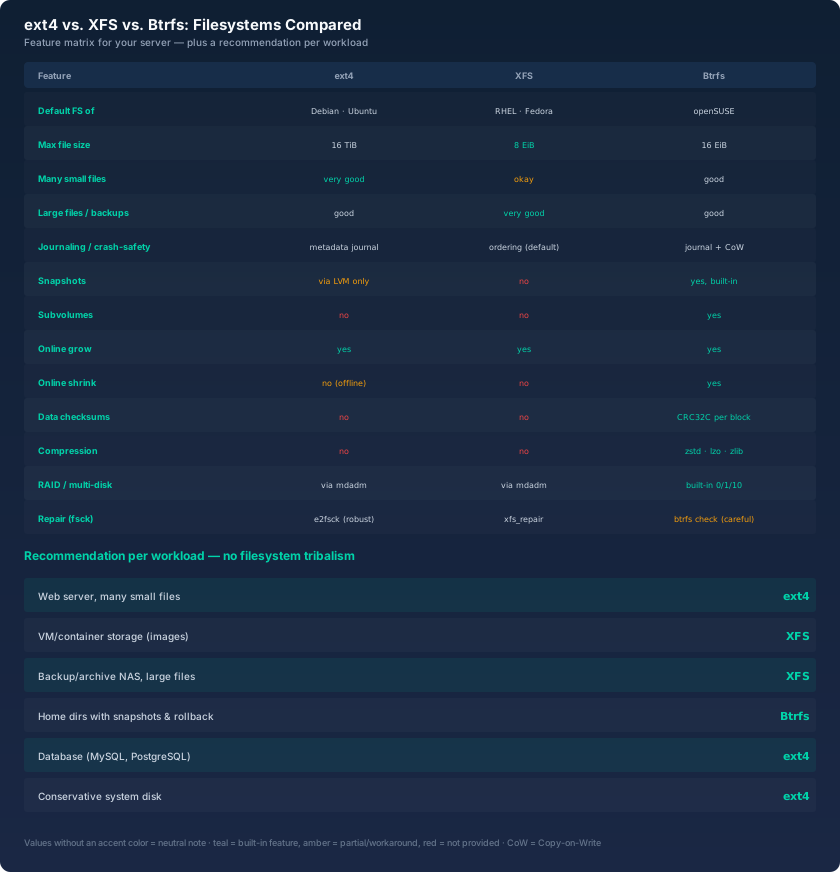
The table shows the essentials at a glance. The pattern stands out: XFS is strong where ext4 is only good, namely with large files and throughput. Btrfs shines at snapshots and checksums, where the other two simply offer nothing. And ext4 holds up well everywhere without reaching the absolute top score anywhere. Exactly that profile makes it the default.
Two rows deserve special attention. The first is online shrink: ext4 can't do it while running, XFS can't either, Btrfs can. Sounds like a detail, but it matters for flexible storage usage. The second is data checksums: only Btrfs detects silent data corruption. If you run long-lived archives without RAID and worry about bit rot, you'll find a real difference here.
The recommendation per use case
From the matrix and my crash experiences comes a fairly clear mapping that I've applied in practice for years.
For a web server with many small files I take ext4. The metadata handling is efficient for tens of thousands of small files, the tooling is robust, and the few missing features aren't needed by a classic LAMP stack. The same goes for database servers: MySQL and PostgreSQL constantly rewrite small blocks, and there ext4 with its predictable behavior is the safe choice. On a database server I'd only take XFS in exceptional cases and never Btrfs without declaring no CoW.
For backup targets, media archives, and storage for virtual machines I take XFS. Large files are written sequentially there, and XFS delivers the best throughput and scaling for exactly that. VM images and large ISO archives are the textbook case. The price, a more complex repair after a hard crash, is rarely due on cleanly managed servers.
For home directories and file servers with many users I take Btrfs. Snapshots are pure gold when someone accidentally deletes something or an update goes wrong, and the checksums protect against silent data corruption. Btrfs is my tool here because precisely the features that make it unique are the ones this job needs. Provided I clean up the snapshots regularly and watch drive utilization.
The honest warning: filesystems are no substitute for backups
A sentence I can't repeat often enough: no filesystem, not even Btrfs with its checksums and snapshots, replaces a backup. Snapshots live on the same disk as the data. If the disk dies, the RAID falls apart, or the server is stolen, all the snapshots are gone too.
Checksums detect silent errors, but they repair nothing without a second copy. A RAID-1 with Btrfs can heal because it has the good copy, but without a redundant copy a detected problem stays just a reported problem. And if your backups sit on the same machine as the originals, you don't really have backups at all. The 3-2-1 rule applies regardless of filesystem.
For practice that means: choose the filesystem by workload, but plan backups as if the filesystem were only a detail. A good setup runs the right combination of filesystem, RAID, and backup system together, and none of them replaces the others.
Filesystem choice is a decision, not a creed
What I've taken away from almost two decades of server operations fits into three rules. First: decide by workload, not gut feeling. Second: be willing to revise a decision when reality demands it, my backup host is the best example. Third: test the crash behavior before you need it in an emergency, a planned hard reboot followed by fsck tells you more than any spec.
ext4 is my default because it's rarely wrong. XFS is my tool for large data because it's fastest there. Btrfs is my tool for directories because it brings snapshots and checksums. None of them is the best filesystem, they're each just the right one for a particular task. Once you understand that, the filesystem tribal war is over for you.
And before you plan storage, first work out what I/O load will really land on the disk. The bitcalc IOPS calculator helps turn application numbers and drive values into a realistic requirement before you even pick the filesystem.