You can tell a good admin not by what they know, but by what they no longer do manually. These 20 tools either replace a dusty standard tool, fill a gap, or are just so good you'll wonder why they aren't preinstalled.
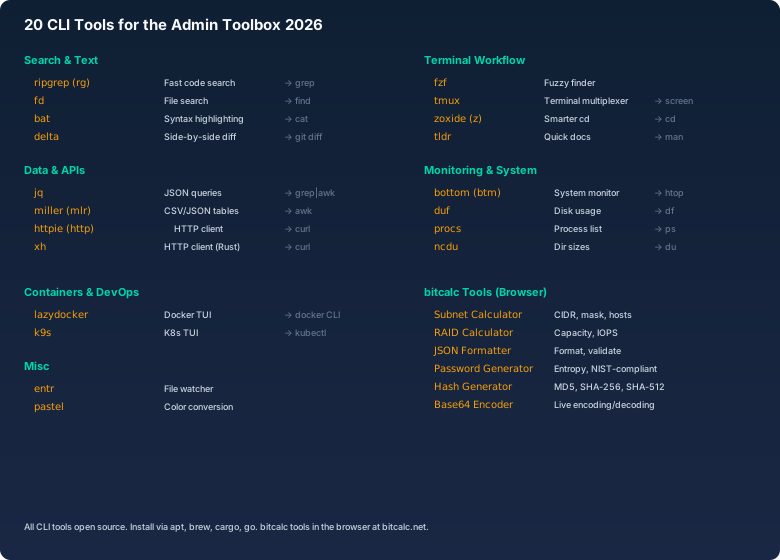
Search & Text
1. ripgrep (rg)
Replaces: grep. rg 'pattern' --type py. When you search a whole project without dragging node_modules and .git along, rg is the first choice — and with --type you filter by file type instead of building another --exclude tangle.
2. fd
Replaces: find. The classic "where was that file again?" tool: fd searches by simple patterns, respects .gitignore automatically and colors the results — no need to remember -name, -type and ! -path.
3. bat
Replaces: cat. Syntax highlighting. Looking at config files suddenly becomes pleasant: bat colors YAML, JSON and friends and shows the line number you're about to look up in your editor — and for long files you simply pipe it through less.
4. delta
Replaces: git diff. git diff | delta. Git diffs on the console finally become readable: changed lines highlighted, with syntax highlighting and no GUI diff tool required. Set it once as your git pager and you'll forget it was ever different.
Data & APIs
5. jq
Replaces: grep | awk on JSON. Whether AWS CLI, Kubernetes or a REST API: jq is the standard answer to "how do I get just that one field out of this JSON output" — filter, sort, transform, all without a Python script.
6. miller (mlr)
CSV/JSON. mlr --csv filter '$status=="error"' server.log. CSV isn't dead — and mlr filters, sorts and aggregates tabular data without you writing a throwaway script. The same syntax works for JSON too, which makes it a Swiss army knife for data exports.
7. httpie (http)
Replaces: curl. http POST api.example/users name=Klaus. API testing in the terminal with readable output: headers, body and status code at a glance, colorized. The key=value syntax replaces curl's constant -H and -d fiddling.
8. xh
httpie in Rust. Same interface as httpie, but compiled in Rust: output comes back so fast you notice the difference immediately — and when you fire off many requests in a row, it genuinely saves time in your daily terminal work.
Terminal Workflow
9. fzf
Fuzzy finder. Ctrl+R, vim $(fzf). Interactive search everywhere: shell history with Ctrl+R, files, processes, even git branches. Combined with your terminal, fzf is probably the biggest time-saver on this list — once you're in, you never want to go back.
10. tmux
Sessions survive disconnects. Your SSH connection drops, your build keeps running: tmux sessions survive network failures and can be reattached from anywhere. Add split panes and scrollback and remote work finally becomes practical.
11. zoxide (z)
Smarter cd. z bitcalc. After a few weeks zoxide knows your working directories and jumps there with a fraction of the path — cd /srv/Projekte/bitcalc becomes z bitcalc. Its frequency- and recency-based learning surprisingly often hits the directory you actually meant.
12. tldr
Practical examples. tldr tar. You know the command but not the flags? tldr shows you the three to five most important examples with real syntax, instead of making you scroll through a man page. For rarely used tools it's the fastest way back into a workflow.
Monitoring & System
13. bottom (btm)
Graphical CPU/GPU monitor. btm. Per-core CPU load, memory, temperatures, network and running processes at a glance — the dashboard you leave open in the terminal while working on a performance problem. More compact and modern than htop, with sensible defaults.
14. duf
Disk usage. duf. Instead of adding up df output in your head: duf shows all mounts colorized with usage, free space and filesystem type — tidy, sortable and understandable at a glance, even for less experienced colleagues.
15. procs
Process tree. procs --tree. ps works but is bare: procs shows processes with colored columns, built-in search and a tree view — no need to memorize column names and flags first. A real win when hunting a specific process on a busy host.
16. ncdu
Interactive dir browser. ncdu /var/log. When the disk is full again: ncdu interactively analyzes the biggest directories and shows you instantly where the space is going. You navigate the tree and delete right from the TUI — no more endless du -sh chains.
Containers & DevOps
17. lazydocker
Docker TUI. Container logs, starts and restarts by keyboard instead of long docker command chains: docker ps, docker logs, docker restart — all in one clean terminal interface. When debugging several containers side by side, it saves a lot of context switching.
18. k9s
K8s TUI. Kubernetes inspection without a kubectl memory: pods, logs, describe and exec in a clean terminal UI. You see the state of all workloads at a glance and navigate with shortcuts instead of long command lines — indispensable if you work in clusters regularly.
Misc
19. entr
File watcher. ls *.py | entr -c pytest. Tests on save: entr watches files and runs the command on every change — perfect for TDD workflows, automatic rebuilds or re-validating configs while you edit.
20. pastel
Color conversion. pastel format hex 1E3A5F. Convert, lighten, mix and check contrast of colors — when you need to translate brand colors between hex, RGB and HSL or quickly check which color fits your theme. A small tool, but exactly the kind of gap this list is about.
apt install ripgrep fd-find bat jq miller httpie fzf tmux tldr ncdu entr