
Subnetting has a bad reputation. Every Cisco class has people converting their first IP to binary and thinking "there has to be an easier way." There is. You just need to understand the principle once. After that, it's practice and a good calculator.
This isn't a textbook chapter. It's about the mindset that makes subnetting easy in practice: why the subnet mask isn't magic, how to read CIDR notation in seconds, and how to split a network into sensible subnets — with the bitcalc Subnet Calculator as your verification tool.
The one thing you need to understand
An IPv4 address is 32 bits long. That's it. Everything else — decimal notation, subnet masks, CIDR — is just notation for those same 32 bits.
Picture those 32 bits as a strip. The left part is the network ID, the right part is the host ID. The subnet mask tells you where the cut is. That's the whole story.
192.168.1.42 with mask 255.255.255.0 means: the first 24 bits (192.168.1) are the network, the last 8 bits (42) are the host. That's why you write /24 — 24 network bits. CIDR notation is so much easier to read than 255.255.255.0 that I don't understand why some GUIs still use the old format.
Why the host formula is "2^n − 2" and not "2^n"
Every subnet reserves two addresses: the network address (all host bits zero) and the broadcast address (all host bits one). The network address identifies the subnet, the broadcast reaches every host in it.
For 192.168.1.0/24, 192.168.1.0 is the network address and 192.168.1.255 is the broadcast. The 254 addresses in between (1–254) are usable for hosts.
Sounds obvious. I've still seen network diagrams where someone assigned 192.168.1.0 as a host address. Happens more than you'd think, especially when people hand out addresses in large /16 networks and ignore subnet boundaries.
The only subnetting principle you need to remember
When you split a network into smaller subnets, one rule covers it: every bit you move from the host part into the network part doubles the number of subnets and halves the number of hosts per subnet.
Example: 192.168.1.0/24 has 254 hosts in one subnet. Want two subnets? Add one bit to the network part: /25. Now you have 2 subnets with 126 hosts each. Four subnets: /26, four subnets with 62 hosts each. Eight subnets: /27, 30 hosts each.
That's the entire magic trick. No binary wizardry. Just shifting bits.
Real example: the boss wants four departments
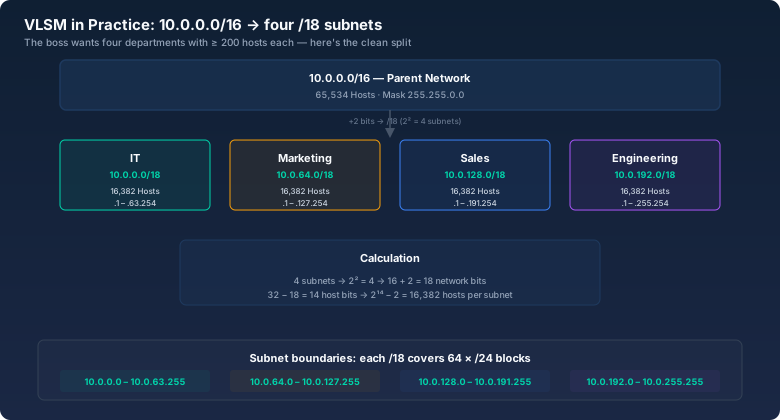
Classic scenario: you have the 10.0.0.0/16 network and need to split it across four departments — IT, Marketing, Sales, and Engineering. Each department needs at least 200 hosts.
Step by step:
- Four subnets means 2 additional network bits (2² = 4). /16 becomes /18.
- Host bits: 32−18 = 14 bits. 2¹⁴−2 = 16,382 hosts per subnet. Plenty.
- Subnets:
- IT: 10.0.0.0/18 (hosts: 10.0.0.1 – 10.0.63.254, broadcast: 10.0.63.255)
- Marketing: 10.0.64.0/18 (10.0.64.1 – 10.0.127.254)
- Sales: 10.0.128.0/18 (10.0.128.1 – 10.0.191.254)
- Engineering: 10.0.192.0/18 (10.0.192.1 – 10.0.255.254)
Clean separation, each department has its own broadcast domain, and with 16,382 hosts per subnet they won't outgrow it anytime soon.
VLSM: when subnets don't all need to be the same size
Variable Length Subnet Masking. Sounds complicated, but it's just applying the same principle with different prefix lengths in the same network.
Say IT only needs 10 hosts but Engineering needs 500. With fixed subnetting (/18 for everyone) you're wasting 16,382 addresses on IT. With VLSM, give IT a /28 (14 hosts) and Engineering a /23 (510 hosts).
The rule: allocate larger subnets (smaller prefix) first, then fill the gaps with smaller ones. The Subnet Calculator shows you whether your configuration works cleanly with every entry.
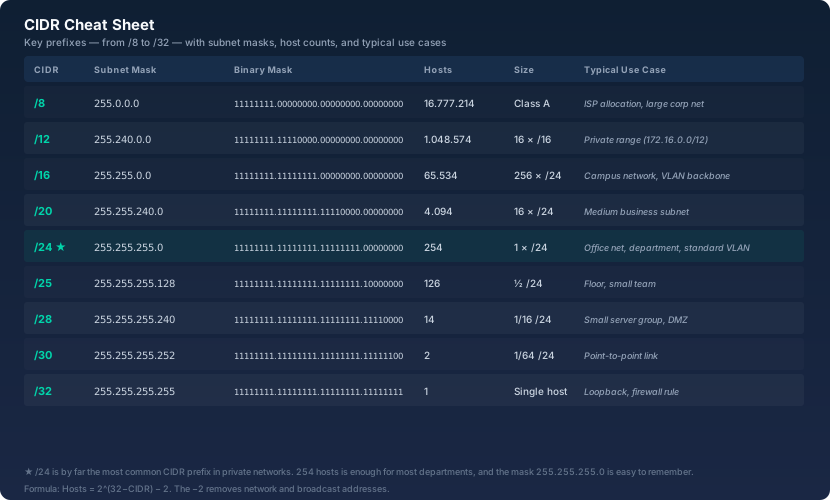
The five CIDR prefixes worth memorizing
Some prefixes show up so often you should just know them. Not because you can't look them up, but because you don't want to stall every time someone brings up a network diagram.
| CIDR | Subnet Mask | Hosts | Typical Use |
|---|---|---|---|
| /24 | 255.255.255.0 | 254 | Office network, small department, home LAN |
| /16 | 255.255.0.0 | 65,534 | Campus, large site |
| /30 | 255.255.255.252 | 2 | Point-to-point link between two routers |
| /8 | 255.0.0.0 | 16,777,214 | ISP allocation, huge enterprise network |
| /32 | 255.255.255.255 | 1 | Single host, loopback address |
What goes wrong in the real world
A few things I've run into in actual networks:
- The admin who slapped /16 everywhere. "Doesn't matter, we have plenty of addresses." Three years later: broadcast storms in a flat /16 with 8,000 devices. The switch gave up, half the office was down. Subnets are also broadcast boundaries — that's their actual job.
- The firewall rule with the wrong subnet. 10.0.4.0/22 instead of 10.0.4.0/24. Suddenly half the neighboring department was in the DMZ. Document your subnet boundaries properly — ideally in IPAM, or at least in a spreadsheet that lives somewhere other than Klaus's laptop.
- The DHCP server handing out addresses across subnet boundaries. IP helper misconfigured, clients got addresses from the wrong scope. Result: devices had an IP but no gateway. "The network is broken" — no, the subnet plan was.
The bitcalc Subnet Calculator: your verification tool
I built the Subnet Calculator to give you everything in one entry: network address, broadcast, first and last usable host IP, subnet mask in both notations, host count. You can enter any IP from the subnet, not just the network address. The calculator finds the subnet regardless.
For VLSM planning, just run multiple passes — each one shows whether your subnets overlap or waste space.