
Two weeks ago a customer called. "Our data center is only giving us a /28 IPv4 — for 30 servers." Five minutes later I had the /28 mapped out with the bitcalc Subnet Calculator and showed him that with 14 usable addresses and 30 servers, nothing works without IPv6 anymore. This migration isn't a 2028 project. It's now.
This article isn't an "Understanding IPv6" crash course. It's a pragmatic guide for admins who actually have to make the switch — with the mistakes I've made myself and the decisions that happen under time pressure.
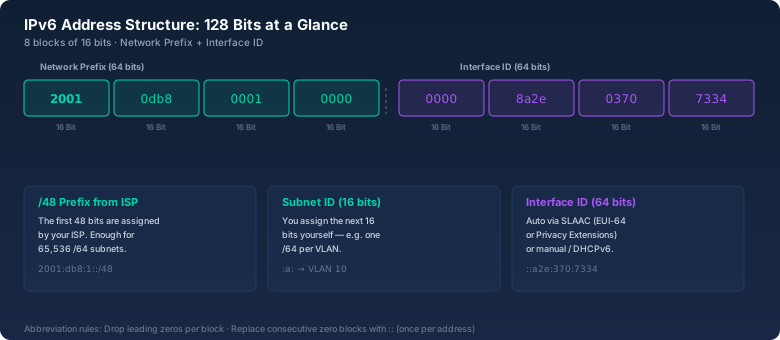
The Address Format: 128 Bits Nobody Writes Out
An IPv6 address has 128 bits, written as eight groups of four hex characters each: 2001:0db8:85a3:0000:0000:8a2e:0370:7334. Leading zeros per block can be dropped, and a sequence of zero blocks gets shortened with :: — exactly once per address. The address above becomes 2001:db8:85a3::8a2e:370:7334.
The important part for you as an admin is the split: the first 64 bits are the network prefix (you typically get a /48 or /56 from your provider). The last 64 bits are the interface ID — assigned via SLAAC, DHCPv6, or manually. A /64 is the smallest practical subnet because SLAAC doesn't work without a /64.
What many overlook: your provider usually gives you a /56. That's 256 /64 subnets. So you can give VLAN 10 the subnet 2001:db8:1:a::/64, VLAN 20 2001:db8:1:14::/64, and so on — without ever needing NAT again.
Dual-Stack: The Only Realistic Path
The idea of "let's just turn off IPv4 and go IPv6-only" sounds tempting but runs into reality hard. GitHub had no IPv6 support until 2025. Parts of AWS needed until 2024. And your printer from 2017 might handle IPv6, but that old sensor in the warehouse probably won't.
Dual-stack means: every device gets an IPv4 and an IPv6 address. The server listens on both stacks. DNS delivers A and AAAA records. Happy Eyeballs (RFC 8305) makes sure clients prefer IPv6 but fall back to IPv4 on timeout — in practice, that happens after 250 ms.
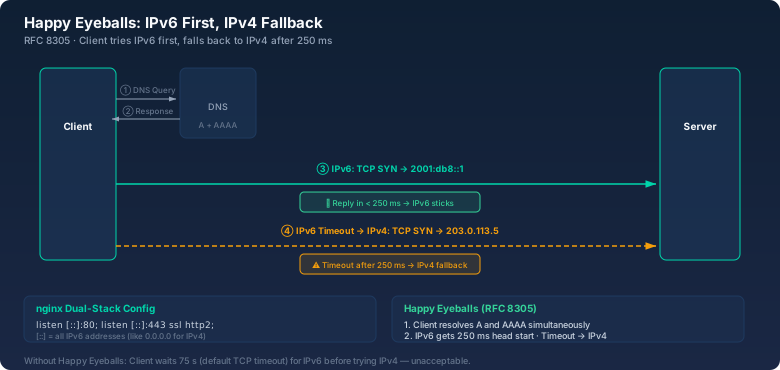
In my setup this runs on nginx like this:
server {
    listen 80;
    listen [::]:80;
    listen 443 ssl http2;
    listen [::]:443 ssl http2;
    server_name example.com;
    # ...
}
[::]:80 is the IPv6 equivalent of 0.0.0.0:80. Without the second listen directive your server is only reachable over IPv4 — and this often goes unnoticed for months until someone with a pure IPv6 connection shows up.
SLAAC vs. DHCPv6: The Decision Everyone Gets Wrong
With IPv4 it's simple: DHCP or static. With IPv6 you have three options, and each one has its traps.
SLAAC (Stateless Address Autoconfiguration) lets the router announce the prefix via Router Advertisement (RA), and the client builds its own address — either via EUI-64 (MAC address computed into the interface ID) or via RFC 7217 (privacy addresses that rotate regularly). Advantage: no DHCP server needed. Downside: you have zero control over which address a client gets. For servers, SLAAC is usually the wrong call.
DHCPv6 Stateful works like IPv4 DHCP: the server hands out addresses, you have central control, and you can also push DNS servers and NTP to clients. The catch: Android doesn't support DHCPv6. Google decided in 2012 that DHCPv6 for clients is "unnecessary complexity." So if Android devices are on your network, you need SLAAC additionally — for the address — and DHCPv6 only for options like DNS.
DHCPv6 Stateless combines both: SLAAC for addresses, DHCPv6 only for DNS/NTP/domain search. This is the sweet spot for most networks with mixed clients.
My recommendation: servers get static IPv6 addresses (either manually or via DHCPv6 reservation). Clients get SLAAC + Stateless DHCPv6. And: the M and O flags in the Router Advertisement control what the client does — M=1 means "ask DHCPv6 for the address," O=1 means "ask DHCPv6 for options."
Firewall Rules: IPv6 Is Not IPv4 With More Bits
The most common mistake in IPv6 migration: copying IPv4 firewall rules 1:1. IPv6 works differently. No NAT, no RFC 1918 addresses, every host has a publicly routable address. That's great for peer-to-peer, but it also means: your firewall is the only layer of protection.
What you need at minimum:
# ICMPv6 — don't block it! No ICMPv6 means no Path MTU Discovery, no NDP
ip6tables -A INPUT -p icmpv6 -j ACCEPT

# Allow established connections
ip6tables -A INPUT -m state --state ESTABLISHED,RELATED -j ACCEPT

# SSH from internal network
ip6tables -A INPUT -p tcp --dport 22 -s 2001:db8:1::/48 -j ACCEPT

# Drop everything else
ip6tables -A INPUT -j DROP
Blocking ICMPv6 is the classic mistake everyone makes the first time. Then you wonder why packets with 1500 byte MTU won't go through even though the path supports 1280 bytes. Path MTU Discovery runs over ICMPv6 Type 2 ("Packet Too Big"). Block that, and you're blocking TCP.
DNS: AAAA Records and the Pitfalls
For every A record you need an AAAA record — if the service should be reachable over IPv6. But: an AAAA record without a working IPv6 service is worse than none at all. Clients with IPv6 try IPv6 first, get a timeout, fall back to IPv4 after 250 ms. With 20 requests per page load, that's 5 seconds of added latency.
My approach: only set AAAA records once the service is proven reachable over IPv6. Tested with curl -6 https://example.com from an external host. And: monitor the AAAA record just like you monitor the A record. At my last job, the AAAA record for the customer portal pointed into the void for half a year — it was only noticed when a customer with a pure IPv6 connection complained.
The Thing About the Download Time Calculator
The interesting question is whether IPv6 is faster or slower. Theoretically, IPv6 should be faster: no NAT, flatter routing tables, no checksum recalculation at every hop. In practice, I measured with the bitcalc Download Time Calculator: a 500 MB transfer over IPv4 took 47 seconds (about 85 Mbit/s effective), the same transfer over IPv6 took 41 seconds (about 97 Mbit/s). 15% faster — not world-changing, but measurable.
curl -4 -o /dev/null -w "%{speed_download}\n" https://speed.hetzner.de/100MB.bin vs. curl -6 ... Plug the byte/s difference into the Download Time Calculator and you'll see immediately what that means for your daily transfers.The Migration Plan: Not Everything at Once
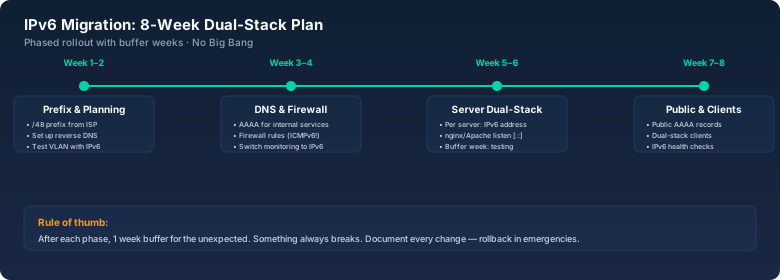
An IPv6 migration in one shot is suicide. My plan for the last three projects looked like this:
Week 1-2: request provider prefix, set up reverse DNS for the /48, set up a test VLAN with IPv6. Week 3-4: DNS (AAAA for all internal services), monitoring (ICMPv6 pings to all hosts), write firewall rules and verify on a test server. Week 5-6: all servers on dual-stack: assign IPv6 addresses, adjust nginx/Apache, test per server. Week 7-8: switch public services (set AAAA records). Office clients on dual-stack.
After each phase: one week of buffer for whatever breaks. And something always breaks. At one client, the SSL terminator stopped delivering certificates after the IPv6 configuration because the SNI matching only listened on IPv4. The load balancer dutifully passed the IPv6 requests to the backend server, which answered with a default certificate — and the browser threw a certificate warning.
What I'd Do Differently Today
Three things. First: plan ULA addresses (Unique Local Addresses, fd00::/8) from the start. Yes, IPv6 doesn't need NAT, but an internal addressing scheme independent of the provider prefix makes life easier. If your provider eventually hands out a new prefix, you only need to change the public addresses — the internal ULA addresses stay the same.
Second: NPTv6 (Network Prefix Translation) isn't a crime. Some people act like NAT66 is sacrilege, but if your uplink provider only gives you a static /64 and you have multiple internal subnets, NPTv6 is the pragmatic solution. It's 1:1 (not many-to-one like IPv4 NAT), so no port mapping, no state tracking madness.
Third: disable Privacy Extensions (RFC 4941) on servers. Great on clients, catastrophic on servers. The server changes its IPv6 address every few hours — and your firewall rules and DNS records point into the void. With systemd-networkd: [Network] IPv6PrivacyExtensions=no.
Bottom Line
IPv6 isn't the future. It's the present we've ignored for too long. The migration is work, but it's planable. Dual-stack works, SLAAC + Stateless DHCPv6 is the sweet spot, and you block ICMPv6 exactly once — never again after that.
Next step: log into your edge router and check if your provider even assigns you an IPv6 prefix. If not: switch providers or use a tunnel broker like Hurricane Electric (tunnelbroker.net). It's not ideal, but it beats waiting.