
The call came on a Friday at 16:20: a freshly installed ESXi host could not see the SAN LUNs, and the storage team had already left for the weekend. The host had two HBAs, both LEDs green, the switches showed the ports as online, the array showed healthy controllers. The fault sat one level higher: the zones had been created, but the zone set had never been activated. cfgshow showed the configuration, cfgactvshow showed nothing — and a fabric without an active zone set does not enforce any zones.
What stayed with me from that evening was not the fault but the order of diagnosis. All five people involved had been right on their own layer. Fibre Channel is not black magic, but it is a chain of five links, and the chain breaks at the weakest link — not at the loudest one. If you know the order (HBA, optics, fabric, zoning, LUN mapping) and check each link individually, this class of outage takes twenty minutes instead of a weekend.
This article is for admins building or inheriting a SAN. It explains the terms on the paperwork, shows the commands that verify each layer, and names the mistakes that reliably cost the most time — including the question of when Fibre Channel is the right answer and when iSCSI or NVMe over Fabrics is the cheaper one.
What Fibre Channel is — and what it is not
Fibre Channel is a dedicated network protocol for block storage that runs over optical fibre (or short copper runs). It is not TCP/IP with a different connector: FC is built for one job — carrying SCSI commands losslessly, in order and with guaranteed bandwidth. That is why there is no routing in the IP sense, no fragmentation and no in-flight rerouting, but a fabric in which every device is reachable by a unique identifier.
The crucial difference to Ethernet-based approaches: FC is flow-controlled with buffer-to-buffer credits and cannot drop packets under load. If you bought bandwidth, you get it — with iSCSI you share the same Ethernet path with everything else. That point, not raw speed, is what keeps Fibre Channel alive in virtualisation and database environments.
The flip side is cost and skill distribution: HBAs, switches, optics and per-port licences cost many times what a 10 GbE switch costs, and the person who knows FC is usually one person on the team. Anyone building storage for a homelab or a small customer is almost always better off with iSCSI over two separate switches. Anyone hanging two ESXi hosts on an enterprise array with a support contract is better off with FC.
The four layers a SAN is built from
A SAN path consists of four components that are created in this order and checked in this order: HBA, optics and cabling, fabric, LUN mapping. The fifth component sits above it — multipath — and it is the reason a proper SAN has two of everything.
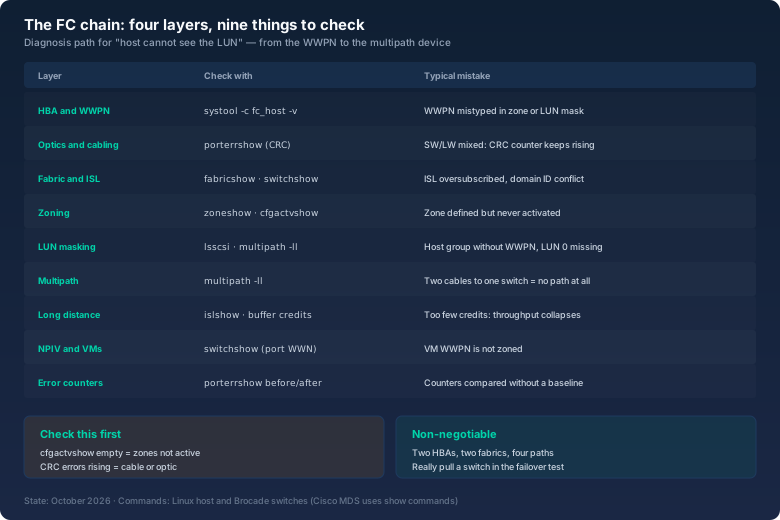
The HBA is the card in the host. Each of its ports carries a globally unique identifier, the WWPN (world wide port name), a 64-bit value that you enter in the switch and in the array. You can read it in production without any tool:
# systool -c fc_host -v | grep -E 'Class Device|port_name|port_state|speed'
  Class Device = "host8"
    port_name   = "0x10000000c9a1b2c3"
    port_state  = "Online"
    speed       = "32 Gbit"
# cat /sys/class/fc_host/host8/port_name
0x10000000c9a1b2c3
The WWPN is the key to everything else: it appears in the zones, in the LUN mask on the array and in the multipath table. A single mistyped hex pair in a zone is the number one cause of "host cannot see the LUN", and you will not spot it at the LEDs, only by comparing strings. That is why I write all WWPNs into an inventory file before configuring the first switch — not into a ticket, not into a wiki, but into a file that is open while the work happens.
Optics and cabling: the quiet failure source
Fibre Channel runs on multimode (OM3/OM4, short distances) or singlemode (OS2, long haul). What matters is that optic, patch cable and switch port match: a singlemode optic on a multimode cable does not merely perform worse — it does not work, or it throws errors. The class is printed on the SFP: SW for short wave (multimode), LW for long wave (singlemode).
The resulting failures are invisible because the link still reports "online". They only show up in the switch port error counters, and that is exactly where you look when a host loses paths intermittently:
# porterrshow
  frames  enc out  disc  link  loss  loss   frjt  fbsy  crc  crc  crc
             err     c3   fail  sync   sig                g_eof
  1.2g     0   0     0     0     0      0      0      0    0    0    0
  1.4g   18m   0     0     4     0      4      0      0  142    0  142
Port 1.4 shows four link failures and 142 CRC errors. CRC errors mean the frames arrive but their checksum does not match. The cause is almost always cable, connector, optic or a dirty ferrule — not the host, not the array, not the software. I swap in this order: patch cable, optic, port side, and after every swap I check whether the counter stops moving. Important: the counters are cumulative. Without noting the starting value, you cannot tell whether it improved. So: porterrshow before the swap, note it down, check again after.
Fabric, port types and what zoning really does
As soon as a switch is involved the network is called a fabric. The switch assigns itself a domain ID internally and turns the attached ports into a switching layer. The port type names that fly around in logs are quickly explained:
- N_Port — the port on the end device, i.e. on the HBA or array controller.
- F_Port — the port on the switch where an N_Port is attached.
- E_Port — the link between two switches (inter-switch link, ISL). This is what turns individual switches into one fabric.
- G_Port — a port that does not yet know what it will become. The state changes to F or E automatically at login.
- NPIV — N_Port ID virtualisation: one physical port logs in several virtual WWPNs. This is how every VM with a raw device mapping gets its own WWPN, so zoning can act at VM level.
Zoning is the fabric's access control: it defines which ports may see each other at all. Without zones there is the default zone, in which every device sees every other — convenient during build-out, dangerous in production, because a misconfigured host can then see foreign LUNs and, in the worst case, write to them. The difference between the two variants matters:
- Soft zoning — the name server hides the devices that are not allowed from the query. Traffic is not blocked in hardware; a host that knows the target WWPN could in theory address it directly.
- Hard zoning — the switch ASIC filters frames. Modern switches enforce this automatically for WWPN zones. Combined with name-based zones, hard zoning is what you want.
What I configure in practice: name-based zones (WWPN), one zone per initiator-target pair (single initiator, single target — SIST), aliases built from hostname and array port, and as few zones as possible. The rule "one big zone for everything" saves twenty minutes during build-out and costs hours on every incident, because then all hosts share one RSCN storm when a single device flaps. An RSCN is the fabric message "the membership list changed"; in a big zone everybody reacts to it.
And the punchline from the opening: a zone set is not activated automatically after editing. Two commands you need to know:
# cfgshow | head -6            # defined configuration
# cfgactvshow                  # -> empty: nothing is active
# cfgadd san_prod zone_esx01_arrA0
# cfgactv san_prod             # <- this step enforces the zones
# cfgactvshow                  # -> Zone Set: san_prod (active)
LUN masking: the second hurdle after zoning
A correct zone is half the job. The other half lives on the array: a LUN has to be assigned to an initiator or a host group, normally by WWPN. Only then may the host see the device. That is why the order during build-out is not arbitrary: first the WWPNs of all HBA ports must be known, then they are created in the array as a host with two HBA ports, then the LUN is assigned to that host group, and only then does a rescan bring the device up in the operating system.
When it fails here, the symptom is typical: the port is online, the zone is active, but no LUN appears in the OS. You can verify that from the host side:
# systool -c fc_remote_ports -v | grep -E 'port_name|roles'
# lsscsi -w | grep -i 'fc\|san'
# multipath -ll | head -20
Two classics belong here: some arrays only present the first LUN on LUN 0, and a host that is not mapped to LUN 0 sees nothing — so the first mapping belongs on LUN 0. And: an array-side mapping needs no reboot, a rescan is enough. The right rescan is not restarting the stack but a targeted scan of the SCSI hosts.
Multipath: two of everything, and genuinely two
Redundancy in a SAN does not mean "two cables to the same switch". It means two HBAs, two fabrics (A and B), two array controllers — and therefore four paths per LUN. Only then does the service survive the loss of an HBA, a switch or a storage controller. The host must not see four disks, however; it has to bundle the paths into one device via multipath.
In the schematic it looks like this — three ESXi hosts, two separate fabrics, one FC-attached array:
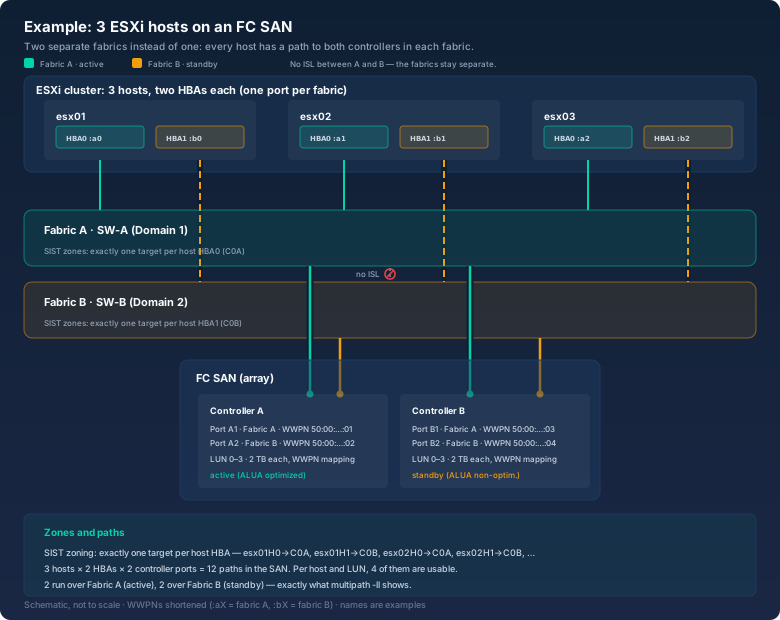
Count the lines in the drawing: two leave every host (one per fabric), and each fabric reaches both controllers — that makes four paths per host and LUN, twelve in the whole SAN. The detail that separates this design from a cheap SAN sits between the two fabrics: the red symbol. There is deliberately no link between A and B. That is the only way a fault in one fabric — a flapping port, an RSCN storm, a configuration mistake — cannot spill over into the second.
# multipath -ll
mpatha (3600009700001968015535330303035) dm-3 WDC,IntelliFlash
size=2.0T features='1 queue_if_no_path' hwhandler='1 alua' wp=rw
|-+- policy='service-time 0' prio=50 status=active
| |- 8:0:0:1 sdb 8:16  active ready running
| `- 9:0:0:1 sdc 8:32  active ready running
`-+- policy='service-time 0' prio=10 status=enabled
  |- 10:0:0:1 sdd 8:48  active ready running
  `- 11:0:0:1 sde 8:64  active ready running
Four paths, two active across fabric A, two standby across fabric B. That is what a healthy SAN looks like. The test I run at every handover: pull one of the two fabric switches out of service for ten minutes and watch whether applications and monitoring stay calm. Anyone who avoids that test because it is "prod" does not have redundancy, they have hope.
One detail that reliably costs time: after an array update or a switch reboot, a controller failover can flip all paths of one fabric at once. In monitoring that looks like an outage — it is an ALUA state change. If you read the paths as four equal ones instead of two groups, you will look in the wrong place. That is why my runbooks do not say "check paths" but "check paths per fabric, note active/standby state".
Long distance, buffer credits and oversubscription
Two topics that separate the lab from the data centre. First: FC is flow-controlled, and the flow control works with buffer credits — the number of frames that may be in flight at once. One credit equals one frame, and a frame equals roughly two kilobytes of payload. On short runs the port's credits are large enough that nobody thinks about them. On long runs between data centres they become the limit: the vendor rule of thumb is that additional credits are needed per kilometre of distance, and the higher the port speed the more of them. Anyone planning a long-distance ISL needs that calculation before the purchase, not after.
Second: oversubscription. A 48-port switch with four ISLs to a rack switch means a subscription ratio of 11:1. For virtualisation with bursty behaviour that is very often fine — storage load rarely hits all ports at once. For a six-node database in synchronous mode, or for storage vMotion across several VMs at the same time, it is not fine. The honest answer: the ratio alone says nothing; what matters is the peak parallelism of your application. If you do not know it, measure it before you buy.
When Fibre Channel is the wrong answer
Worth saying, because it saves time and money: a SAN with two switches, two HBAs and support contracts costs five times as much upfront as an iSCSI setup with two 10 GbE switches. For environments where block storage runs over two dedicated Ethernet switches and nobody needs extreme IOPS profiles, iSCSI with multipath, jumbo frames and dedicated VLANs is technically equivalent — as long as you apply the same discipline (two of everything, separated networks).
Fibre Channel stays the better choice when latency and jitter must be deterministic (databases with hard response-time commitments), when the fabric comes with the enterprise array anyway, or when NVMe over Fibre Channel is in play: FC-NVMe carries NVMe commands directly over the existing fabric and skips the SCSI translation path. Anyone building fresh in 2026 and wanting maximum throughput at minimum CPU cost finds a real advantage there — with the same zoning and multipath discipline as above.
Historically grown but still in service: FCoE, Fibre Channel over Ethernet. It never took the market, because it combines the complexity of both worlds — FC configuration plus an Ethernet fabric with DCB and priority flow control. Anyone inheriting it should know that it works, but that its community of specialists is small.
My build in short form
- Inventory first: WWPN of every HBA port, switch port assignment, array controller ports, LUN numbers — as a file, before the first command runs.
- Zones: SIST and named. One zone per initiator-target pair, aliases with hostname and port, and always verify "activate zone set" as its own step (
cfgactvshow). - Watch the error counters:
porterrshowbefore and after every cable swap, with CRC counters as the main indicator for optic and connector problems. - Two of everything, then test: two HBAs, two fabrics, four paths — and pull one switch once per handover to prove it.
- Calculate long distance upfront: buffer credits and subscription ratio belong in planning, not in the post-mortem.
Bottom line
Fibre Channel is a chain of five links: HBA, optics, fabric, zoning, LUN mapping — with multipath as insurance on top. Every outage I have seen in twelve years of SAN operations traced back to exactly one of those links, and the longest troubleshooting sessions came not from missing knowledge but from missing order. Start with the WWPN, read the error counters before swapping anything, and do not call zones finished until cfgactvshow shows them: then this whole class of incident no longer costs you a night.
That ESXi host saw its LUNs at 17:05, an hour before the weekend — after a cfgactv the storage team acknowledged on Monday with "that is what we said". That is admin life too.